
How to Manage Vosko Billings and Credits
Welcome to the Credits and Billing guide. This guide explains how to track your usage and details our flexible subscription plans to help you manage your workspace efficiently.
How to Check Your Credit Balance
Credits are the universal currency powering all AI-driven video translation and dubbing features on our platform. You can track your remaining credits and usage history at any time directly from your workspace.
How to View Available Credit Balance
Log in to your Vosko account, navigate to the projects dashboard, and click Credits in the upper right corner.
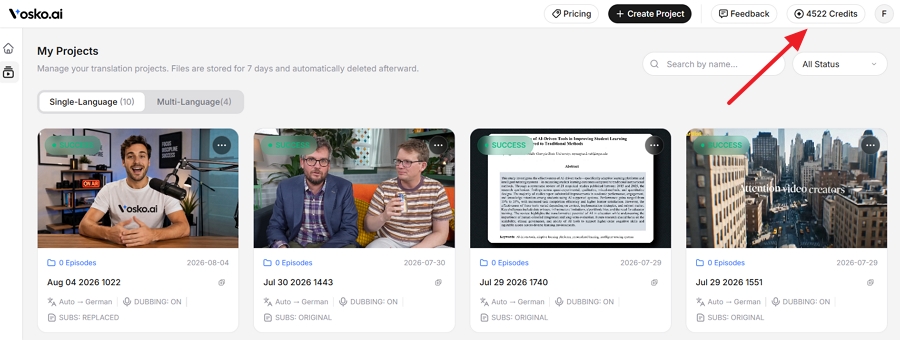
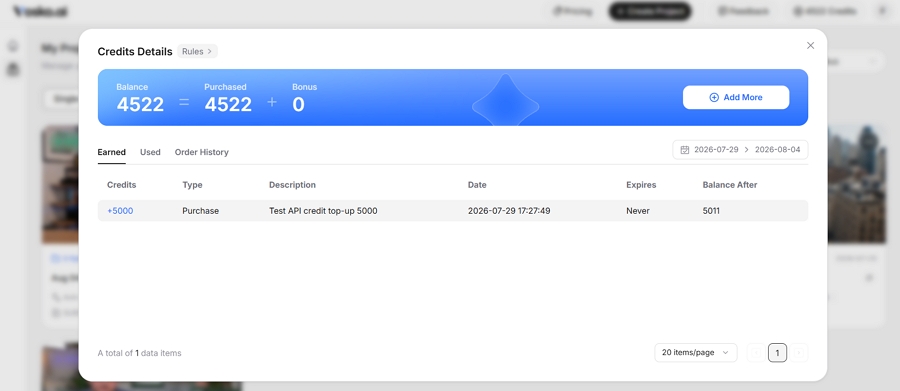
This will open the Credits Details window, displaying your total available balance alongside a summary of credits earned and purchased.
How to Understand Credit Rules
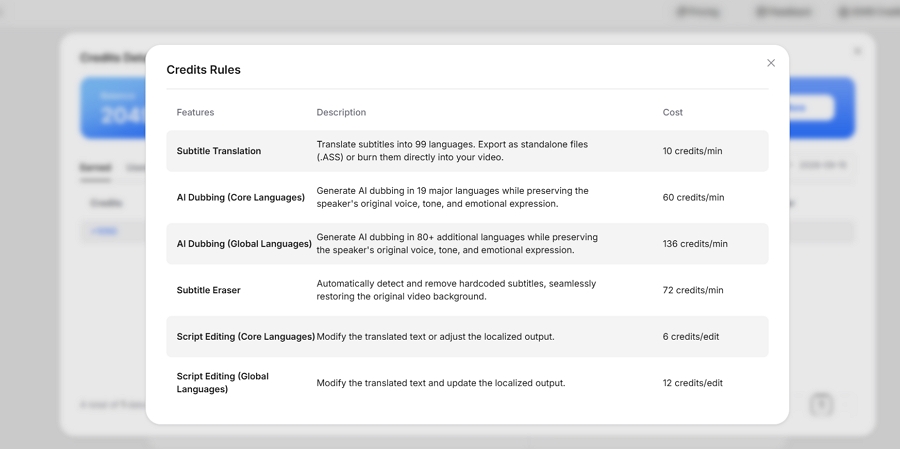
Inside the credits interface, click the Rules button to see exactly how credits are calculated based on the precise workload of your processing tasks:
- Subtitle Translation (10 credits/min): Translate subtitles into 99 languages. Export as standalone files (.ASS) or burn them directly into your video.
- AI Dubbing - Core Languages (60 credits/min): Generate AI dubbing in 19 major languages while preserving the speaker's original voice, tone, and emotional expression.
- AI Dubbing - Global Languages (136 credits/min): Generate AI dubbing in 80+ additional languages while preserving the speaker's original voice, tone, and emotional expression.
- Subtitle Eraser (72 credits/min): Automatically detect and remove hardcoded subtitles, seamlessly restoring the original video background.
- Script Editing - Core Languages (6 credits/edit): Modify the translated text or adjust the localized output.
- Script Editing - Global Languages (12 credits/edit): Modify the translated text and update the localized output.
The Core Languages include the following 19 options: English, German, French, Italian, Spanish, Portuguese, Polish, Dutch, Turkish, Swedish, Russian, Chinese, Japanese, Indonesian, Malay, Vietnamese, Filipino, Korean, and Thai.
How to Track Usage Credits
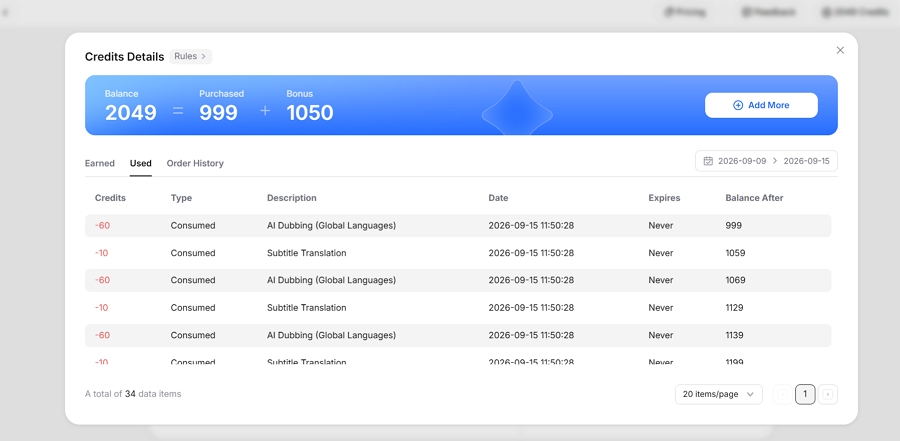
To see a detailed breakdown of your consumed credits, click the Used tab within the Credits Details window. Here you can review the specific processing history and exact credit deductions for each of your past projects.
Vosko Subscriptions & Top-Ups
We offer flexible monthly and annual subscription plans designed to fit your production volume. Annual plans are billed upfront for the year, providing the best long-term value (Save 20%).
Monthly Plans (Billed Monthly)
- Free Trial ($0): Includes 200 Credits (No credit card required). Allows for AI dubbing (2 mins) or Subtitle translation (20 mins).
- Starter Plan ($10.50/mo): Includes 1,050 Credits. Allows for AI dubbing (15 mins) or Subtitle translation (105 mins). Translate 8 languages simultaneously.
- Creator Plan ($31.50/mo): Includes 3,150 Credits. Allows for AI dubbing (45 mins) or Subtitle translation (315 mins). Maximum video length: 200 minutes.
- Pro Plan ($94.50/mo): Includes 10,500 Credits. Allows for AI dubbing (150 mins) or Subtitle translation (1,050 mins). Maximum video length: 200 minutes.
- Studio Plan ($154.50/mo): Includes 21,000 Credits. Allows for AI dubbing (300 mins) or Subtitle translation (2,100 mins). Maximum video length: 200 minutes.
Annual Plans (Billed Annually)
- Creator Plan Annual ($25.00/mo, billed at $300.00/yr): Includes 37,800 Credits upfront. Allows for AI dubbing (540 mins) or Subtitle translation (3,780 mins). Maximum video length: 200 minutes.
- Pro Plan Annual ($75.00/mo, billed at $900.00/yr): Includes 126,000 Credits upfront. Allows for AI dubbing (1,800 mins) or Subtitle translation (12,600 mins). Maximum video length: 200 minutes.
- Studio Plan Annual ($125.00/mo, billed at $1,500.00/yr): Includes 252,000 Credits upfront. Allows for AI dubbing (3,600 mins) or Subtitle translation (25,200 mins). Maximum video length: 200 minutes.
Pay-As-You-Need
If you run out of credits before your next billing cycle, or if you prefer a flexible alternative to subscriptions, you can easily top up your account. Navigate to your dashboard and click Add More to select a one-time credit package (Credits never expire):
- 2,100 Credits: $21.00
- 7,000 Credits (Popular): $70.00
- 14,000 Credits: $140.00
Billing & Credits FAQs
Q: Can I switch from paying annually to paying monthly?
No, annual plans cannot be downgraded or switched to monthly billing mid-cycle. To make the switch, you must cancel your current annual subscription's auto-renewal. Once your annual billing cycle concludes, you can then resubscribe using a monthly plan.
Q: Can I upgrade my subscription plan mid-month?
Yes. If your production volume increases, you can upgrade your plan at any time (for example, from Starter to Creator). The system will automatically prorate the cost difference and instantly add the new tier's credit allowance to your balance.
Q: How do I cancel my subscription?
Currently, you can cancel your subscription by following our step-by-step cancellation tutorial. (We are rolling out an update soon that will allow you to cancel directly from the Billing tab in your Account Settings). Please note that after canceling, you will retain full access to your current subscription credits and platform features until the end of your active billing cycle.
Q: Which payment methods do you accept?
We securely accept all major credit and debit cards (Visa, MasterCard, American Express, Discover) via our enterprise-grade payment gateway.
Q: Where can I find my invoices?
A downloadable PDF invoice is automatically generated for every successful transaction. You can access and download all your historical invoices at any time by going to your dashboard, clicking Credits in the top right corner, and navigating to the Order History tab.
Q: If a translation or dubbing task fails, do I lose my credits?
No. If a task fails due to a system error, format incompatibility, or processing timeout (Status Code: -1 or -2), our system automatically detects the failure and refunds the exact credit amount back to your balance immediately.