If you need to translate your YouTube video audio immediately, here are the three industry-standard workflows based on different creator needs:
Expanding a YouTube channel into global markets used to require hiring voice actors, renting recording studios, and spending thousands of dollars per video. Today, creators and media teams can translate YouTube video audio into dozens of languages seamlessly using automated workflows.
Before diving into specific workflows, understanding why localize your video is essential. Capturing foreign audiences dramatically increases total watch time, opens new ad revenue streams, and boosts overall channel valuation.
However, choosing the right method depends entirely on your budget, quality standards, and technical requirements. While YouTube offers a native automated feature, its robotic output often drives professional creators toward dedicated AI translation software or local offline processing pipelines.
To help you choose the best localization pipeline for your specific project, here is an at-a-glance comparison of the three primary translation methods.
| Feature | Traditional Manual Translation | YouTube Auto Dubbing | Vosko AI Video Translator |
|---|---|---|---|
| Cost | Extremely Expensive (Human labor costs) | Completely Free | Credit-based (200 Free Trial) |
| Turnaround Time | Highly Time-Consuming (Days or Weeks) | Automated (Minutes) | Fast (Minutes) |
| Voice Quality | Lacks original timbre (Requires hired voice talent) | Generic synthetic text-to-speech | 1:1 Voice cloning and emotion preservation |
| Speaker Handling | Manual tracking and multiple voice actors required | Flattens all speakers into one voice | Automatically separates multiple speakers |
| Editing Control | Complete manual control via SRT and DAW files | Closed black box with zero editing | Interactive timeline editor for scripts and timing |
| Privacy and Network | 100% offline and localized data privacy | Requires cloud processing via Google | Secure cloud processing workspace |
| Best Use Case | Security-strict enterprise teams | Casual vloggers needing basic reach | Brand creators and professional agencies |
Before the advent of advanced AI dubbing platforms, localization agencies and professional creators relied on entirely manual translation pipelines. While this traditional workflow guarantees a high degree of human oversight, creators must understand its severe drawbacks.
It is highly time-consuming, prohibitively expensive, and fundamentally fails to preserve the original creator's authentic voice timbre. Here is a breakdown of the traditional industry workflow and why it remains a massive bottleneck for global scaling.
Transcribe ➔ Human Translation & Proofreading ➔ Hire Voice Actor ➔ Voiceover ➔ Sync Timeline ➔ Export Audio
Step 1. Transcribe the Original Video
The pipeline begins by converting the original spoken audio into a text transcript. Editors typically achieve this through manual dictation, exporting YouTube auto-captions, or using third-party transcription software.
Regardless of the method, this step requires rigorous human proofreading. Editors must manually verify proper nouns, brand names, geographic locations, and technical terminology. For a standard one-hour video, this proofreading phase alone consumes one to three hours of dedicated labor.
Step 2. Translate the Transcript
Once the baseline transcript is accurate, the text is translated into target languages. Media teams often hire professional localization agencies or freelance translators, or they utilize machine translation followed by heavy human post-editing.
Professional translators must carefully navigate cultural differences, adapt industry jargon, and maintain the original brand tone. To ensure consistency across multiple videos, creators must build and maintain a dedicated localization glossary for all specialized vocabulary.
Step 3. Adapt the Script for Speech
This is the most critical yet frequently overlooked phase of manual localization known as script adaptation or localization editing. Direct word-for-word translations often sound incredibly unnatural when spoken aloud. Translators must heavily refine the translated text into colloquial, conversational speech to ensure it sounds natural for a voice actor to read.
Step 4. Record New Voiceovers
With the localized script finalized, the project moves to the audio recording phase. Creators generally choose between two options. The first is hiring professional native voice actors.
While this delivers natural emotion, it is exceptionally expensive and slow, often costing between $50 and several thousand dollars per language depending on the actor's prestige and video length.
The second option relies on internal team recording utilizing overseas employees. While this reduces overhead costs, it frequently results in inconsistent audio quality and a severe lack of professional vocal delivery.
Step 5. Synchronize Audio Timing
Audio recording is never the final step because sentence lengths vary drastically across different languages. A concise English phrase often requires significantly more time to speak in Spanish or German.
To achieve perfect lip-sync and pacing, video editors must manually crop audio waveforms, adjust conversational pauses, extend video frames, or compress speech rates to force audio-visual synchronization.
Step 6. Edit the Video
Video editors must then import the synchronized voiceovers back into their editing software. They must replace the original audio track, rebalance background music levels, fix volume inconsistencies, and render the final video.
Historically, this meant rendering and managing completely separate video files for the English, Spanish, French, and German versions of the exact same content.
Step 7. Create Localized Subtitles
Alongside the audio tracks, editors must generate compliant subtitle files in formats like SRT, VTT, or ASS. This requires a final manual review to verify precise timestamp accuracy, optimal line breaks, and culturally appropriate punctuation.
Step 8. Upload to YouTube
In the early days of YouTube localization, creators uploaded these localized files to entirely separate language channels or published duplicate translated videos on their main channel. This outdated approach led to massive content repetition, incredibly complex channel management, and severely diluted algorithmic SEO authority.
The manual localization pipeline creates an unsustainable financial burden for most creators. Consider the typical baseline costs for a standard 20-minute YouTube video.
| Task | Estimated Cost Range |
|---|---|
| Transcription | $10 to $50 |
| Translation | $30 to $150 |
| Voiceover Recording | $50 to $500+ |
| Video Editing and Sync | $20 to $200 |
| QA Review | $10 to $50 |
For a single target language, the cost easily ranges from $120 to over $900. If a creator attempts to scale their content into 10 global languages, they face staggering production costs of $1,200 to $9,000+ per video upload. Because this entire manual process must be repeated for every new release, it is entirely unscalable for modern digital content strategies.
To eliminate the massive financial costs and production delays of traditional manual workflows, YouTube introduced an in-house automatic dubbing feature powered by Google's Aloud AI incubator project, which debuted in 2023.
Designed as a completely free tool built directly into the YouTube Studio ecosystem, it attempts to democratize global reach by automating the entire translation pipeline within a single video upload.
YouTube automatic dubbing is currently rolling out and is not yet available to all creators. To qualify, your channel must meet specific criteria:
The native tool operates silently in the background of YouTube Studio. For a deeper breakdown of its accuracy and audio limitations, check out our full YouTube Auto Dubbing review. Key features include:
Uploaded Video ➔ ASR Transcription ➔ Neural Machine Translation ➔ Synthetic TTS Audio ➔ Selectable Audio Track
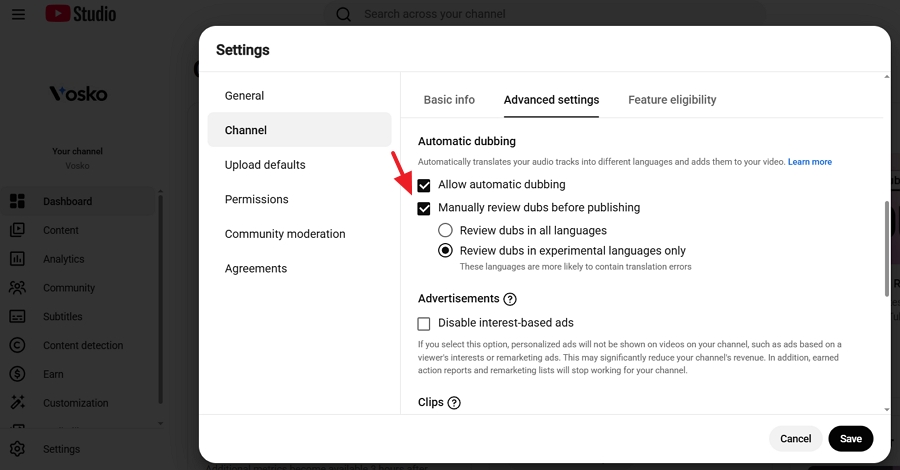
1. Log in to YouTube Studio.
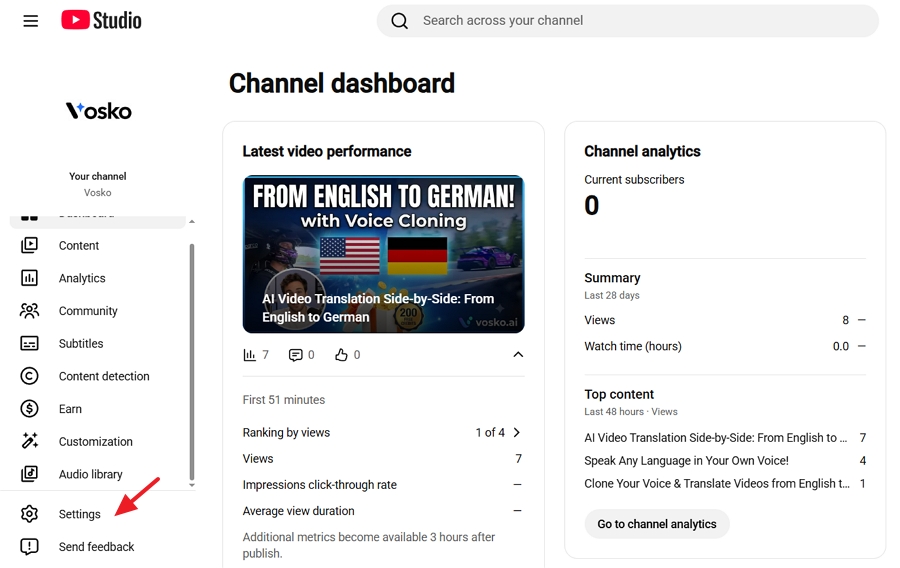
2. Click Settings in the left navigation menu.
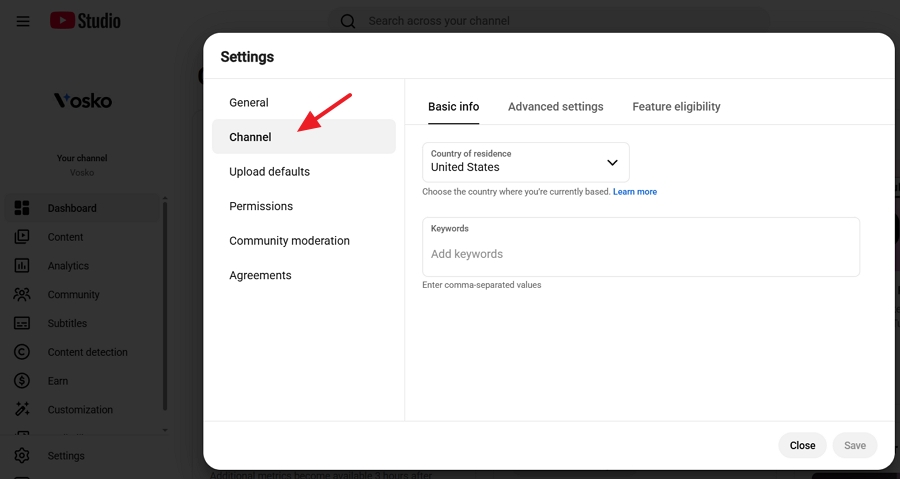
3. Select Channel, then click the Advanced settings tab.
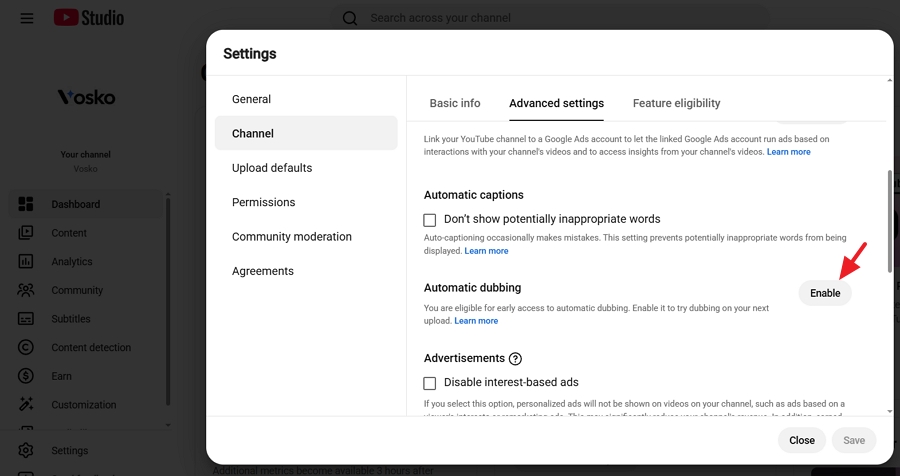
4. Scroll down to the Automatic Dubbing section and click Enable if you haven't enabled YouTube automatic dubbing yet.
5. Check Allow automatic dubbing and click Save.
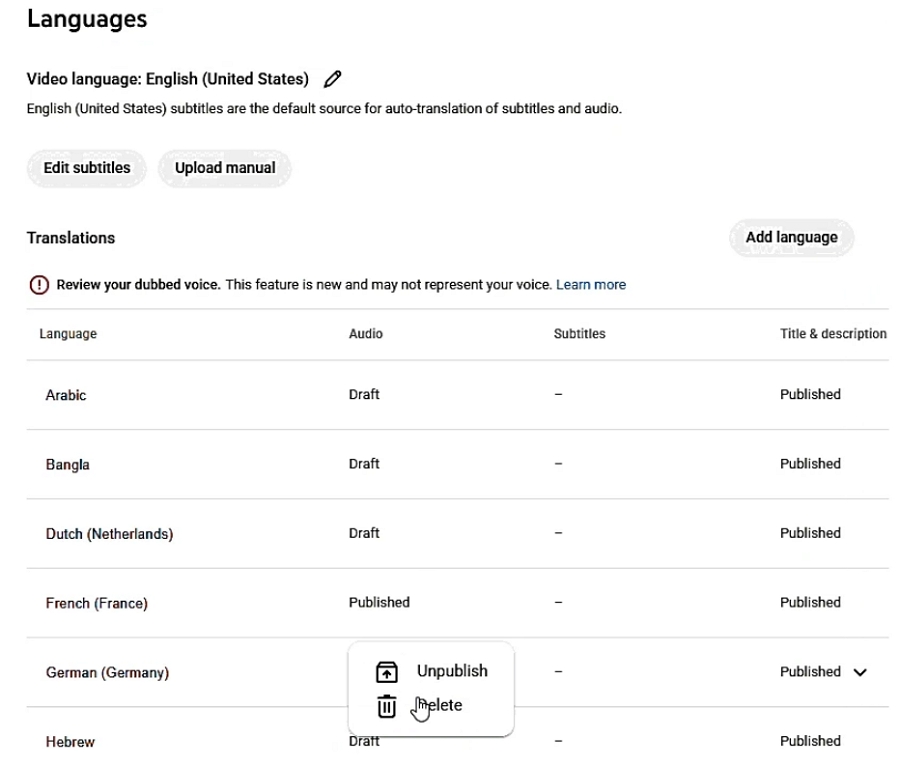
YouTube allows creators to review, hide, or permanently remove automatically generated audio tracks before or after a video goes live:
1. Open YouTube Studio and navigate to Language.
2. Click the video you want to manage.
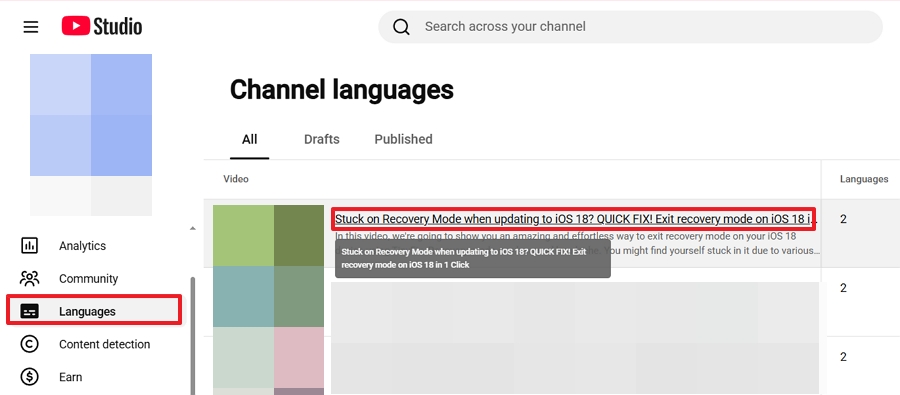
3. Locate the Audio column to see the auto-generated languages alongside your original track.
4. Hover over the target language to select either Unpublish to hide the dubbed audio track or Delete to permanently erase it.
Note: If you find these automated machine voices annoying as a viewer or want to stop them on your own channel, read our complete guide on how to turn off YouTube automatic dubbing.
While YouTube's native free tool offers basic accessibility, it has severe limitations for brand-conscious creators. Industry tests reveal that over 60% of viewers abandon localized videos when the voice sounds artificial.
YouTube's native system flattens multi-speaker dialogues into a single robotic voice, misses industry-specific jargon, and strips away the creator's emotional pitch. Vosko AI Video Translator solves these issues by providing studio-grade localization with full creative control and 1:1 voice preservation.
Import Video ➔ Voice Cloning and Speaker Diarization ➔ Interactive Timeline Editor ➔ High Quality Audio Export ➔ Upload to YouTube Studio
1. Create a free account at Vosko to instantly claim 200 free credits for testing.
2. Upload your source media file. Vosko allows you to translate a single YouTube video into up to eight target languages simultaneously. Select your desired output languages and toggle Voice Cloning and Multi-Speaker Diarization on.
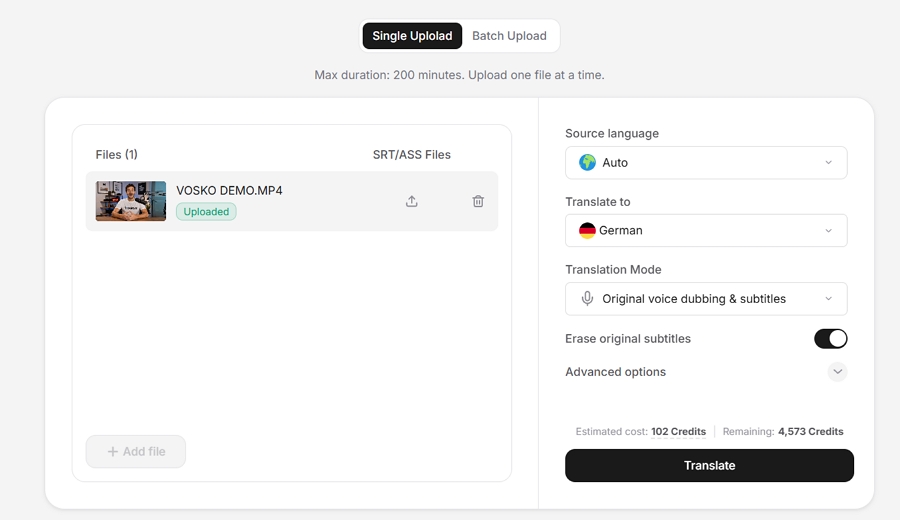
3. Let the AI engine do the heavy lifting. Within minutes, your video will be ready to preview, allowing you to experience the authentic voice cloning and verify perfect subtitle synchronization in real time.
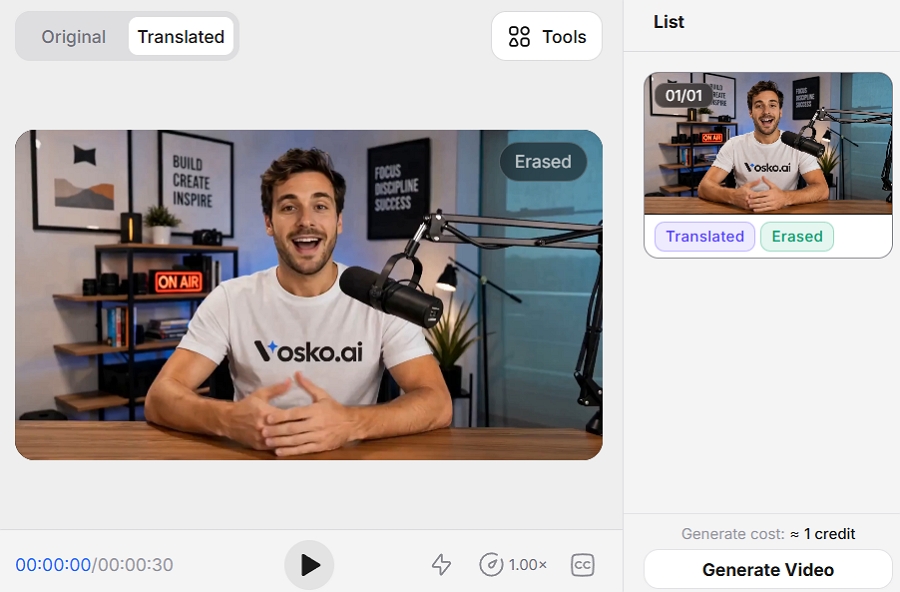
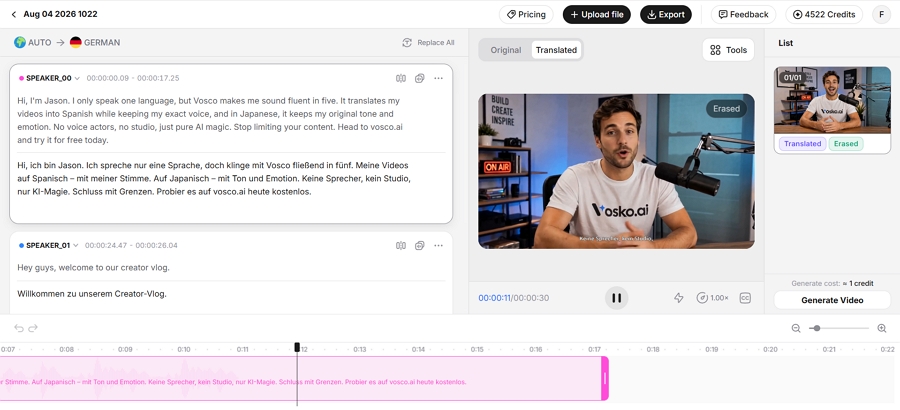
4. Open the dedicated editor workspace to review the transcript, correct specialized industry terms, adjust phrase timing, and fine-tune speaker assignments.
5. Download your high-quality multi-language audio tracks and upload them directly to your YouTube Studio language settings.
Vosko utilizes a transparent credit-based system:
Successfully localizing a YouTube channel requires more than simply generating a foreign language audio track. To maximize algorithmic reach and viewer retention across global markets, creators must implement comprehensive localization strategies.
In the past, creators built separate regional channels to target different countries. Today, utilizing official YouTube multi-language audio tracks on a single main channel is the superior strategy.
Consolidating your content ensures that views, watch time, and engagement across all languages accumulate under a single video URL. This massive unified engagement metric pushes the video significantly higher in YouTube's global recommendation algorithm compared to fractured regional channels.
Translating the audio track is only half the battle. If a viewer in Germany cannot read your video title, they will not click it. You must manually translate your video titles, descriptions, and thumbnail text into your target languages.
YouTube allows you to upload localized metadata directly in the Subtitles tab. When a foreign viewer encounters your video, YouTube will dynamically display the title and description in their native language, drastically increasing your Click-Through Rate.
When uploading custom dubbed tracks back to YouTube Studio using tools like Vosko or offline workflows, ensure your audio files match YouTube loudness standards. Target an integrated loudness of -14 LUFS (Loudness Units Full Scale) and keep true peak levels below -1.0 dBTP.
Failing to normalize your audio will result in YouTube aggressively compressing your custom track, which can severely degrade the voice quality for mobile listeners.
Direct word-for-word translation often fails in video localization. Humor, idioms, and pop culture references rarely translate across borders. When using editor workspaces like Vosko or manual offline workflows, always prioritize contextual adaptation over literal translation.
Modify analogies to fit the target demographic and ensure technical industry terms align with local search habits to maintain viewer trust and retention.
How translated audio tracks affect the YouTube algorithm?
Utilizing Multi-Language Audio tracks directly boosts algorithmic reach. Instead of splitting views across multiple regional channels, a single video aggregates global watch time and engagement. This consolidated data signals high viewer satisfaction to the YouTube algorithm, pushing the content significantly higher in international recommendation feeds.
How accurate is AI video translation compared to human dubbing?
Traditional machine translation frequently struggles with cultural nuances and specialized industry jargon. However, advanced platforms bridge this gap using context-aware dictionaries and interactive editor workspaces.
While professional human voice actors excel at dynamic emotional delivery, modern AI solutions achieve near-human parity through authentic voice cloning and speaker diarization, offering broadcast-quality accuracy at a fraction of manual production costs.
How viewers access translated audio tracks on YouTube?
When creators upload multi-language audio tracks, YouTube automatically plays the audio track that matches the viewer's default device language setting. Viewers can also manually switch languages at any time by tapping the video settings gear icon on desktop or mobile and selecting the Audio Track menu.
How can I translate the audio of a YouTube video without CC?
You can use an AI translation platform like Vosko or an offline tool like OpenAI Whisper. Both tools process the raw acoustic audio signal directly using Automated Speech Recognition, meaning they do not require existing text subtitles to generate accurate translations.
Is AI dubbing with lip sync available for YouTube videos?
YouTube Automatic AI dubbing platforms now offers generative lip syncing which modifies the video facial movements to match the mouth shapes of the target language. Creators can process their source video through it with lip sync enabled and generate the modified video file.
Translating your YouTube video audio is no longer an optional luxury; it is a critical growth lever for reaching a global audience. The optimal workflow depends entirely on your budget and the level of quality your brand demands.
For creators just starting out with zero budget, the native YouTube Automatic Dubbing tool provides a functional, albeit robotic, entry point into accessibility. For enterprise teams with strict data security requirements and massive budgets, building a Traditional Manual Workflow offers ultimate control, though it remains highly time-consuming and fails to keep your original voice identity.
However, for the vast majority of professional creators and media brands looking to scale globally without sacrificing quality, Vosko AI Video Translator remains the premier solution.
By offering authentic voice cloning, multi-speaker separation, and a dedicated timeline editor, it bridges the gap between automated speed and professional broadcast quality. Assess your channel goals, leverage the right AI tools, and start speaking directly to the world today.