While YouTube's native auto-dubbing offers a risk-free way to test international waters, elevating your global presence with full voice preservation typically requires a professional AI localization platform.
YouTube's built-in feature promises effortless global distribution by automatically generating multi-language audio tracks directly in YouTube Studio. However, real-world testing reveals significant performance gaps—most notably, the complete loss of the creator's natural vocal timbre.
Before relying on this free system, this guide breaks down how YouTube auto dubbing works, its technical specifications, our test results, and when to upgrade to a dedicated localization tool.
For creators constantly asking, "Can you dub a YouTube video in another language directly on the platform?", this native tool is the answer. Originally developed under Google's internal AI incubator program "Aloud" before its broader integration in mid-2023, YouTube's auto-dubbing workflow automates the full translation pipeline within a single video upload.
When a creator uploads a video, YouTube's backend executes a multi-step process. First, an automated speech recognition (ASR) model transcribes the original spoken audio into text.
Next, a neural machine translation engine translates the transcript into target languages. Finally, a text-to-speech (TTS) synthesizer renders synthetic audio streams, which YouTube seamlessly embeds alongside the original video as selectable YouTube multi-language audio tracks.
Automatic dubbing is managed directly inside your channel configuration. To enable the feature for future uploads, follow these steps:
1. Sign in to YouTube Studio.
2. From the left navigation menu, click Settings.
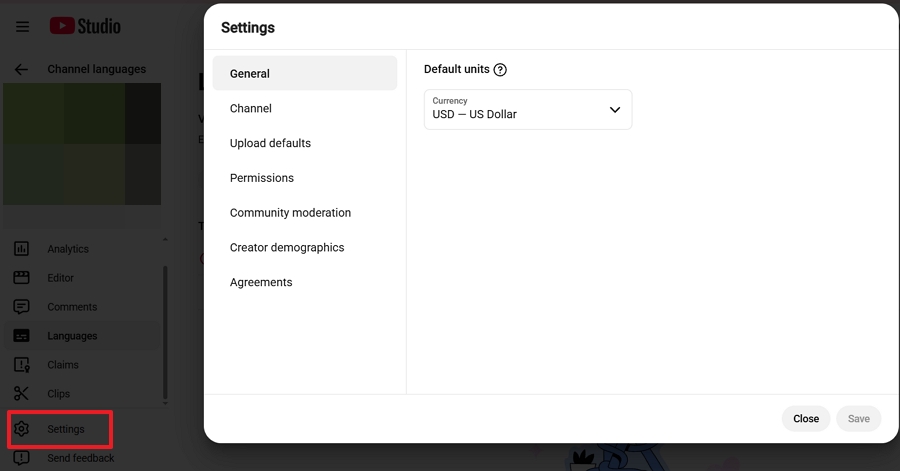
3. Select Channel.
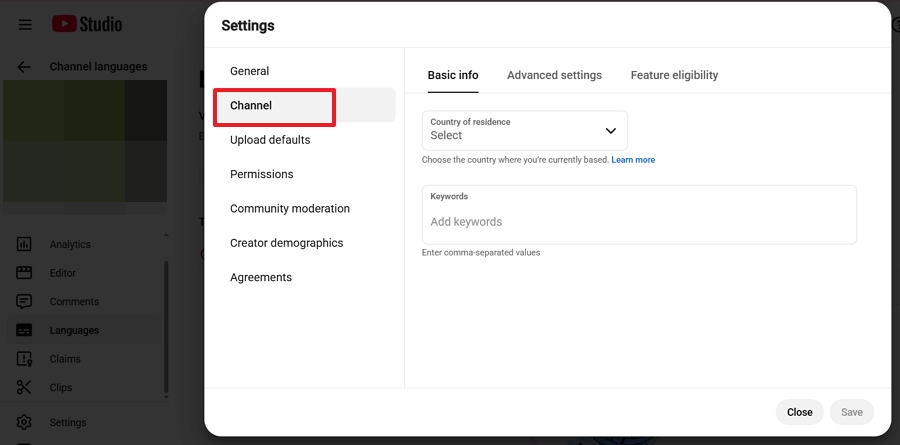
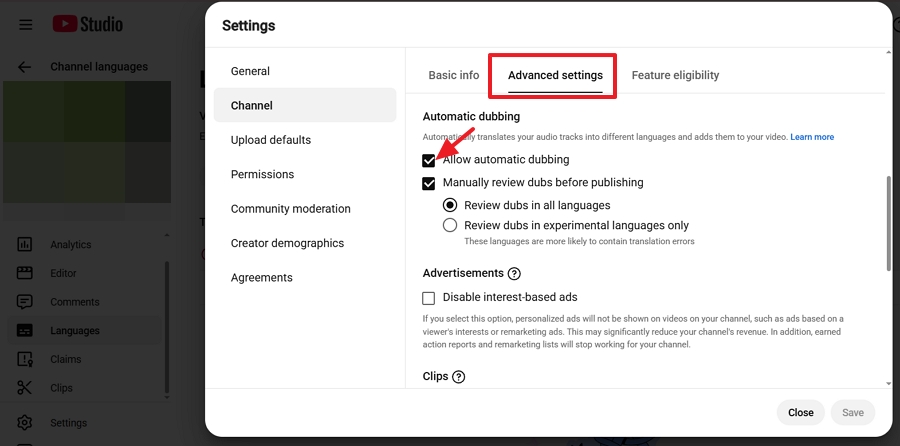
4. Then open the Advanced settings tab. Scroll to the auto-dubbing controls and check the box labeled Allow automatic dubbing.
5. Check Manually review dubs before publishing if you prefer to inspect auto-generated audio tracks before they go live to the public.
6. Click Save to confirm your preferences.
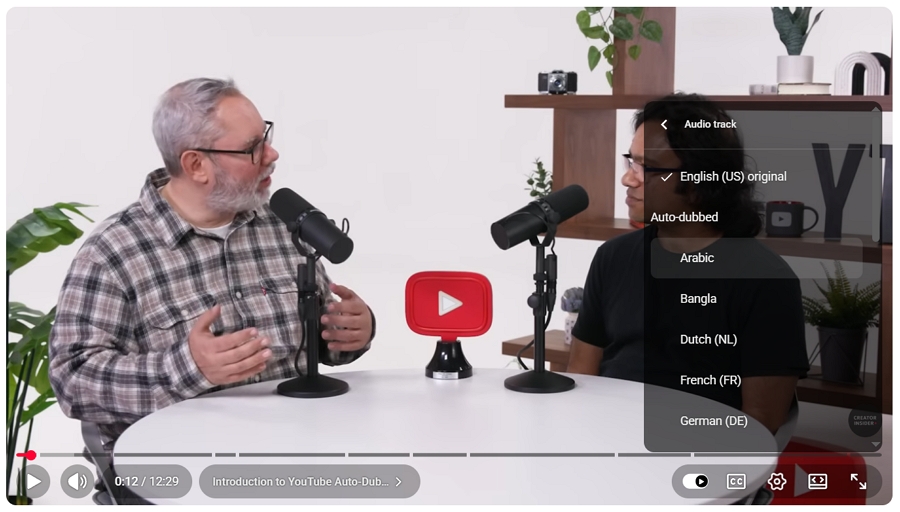
Once activated, viewers can switch audio track directly within the video player by the following steps.
1. Click the Settings (gear icon) on the YouTube player. Select Audio Track.
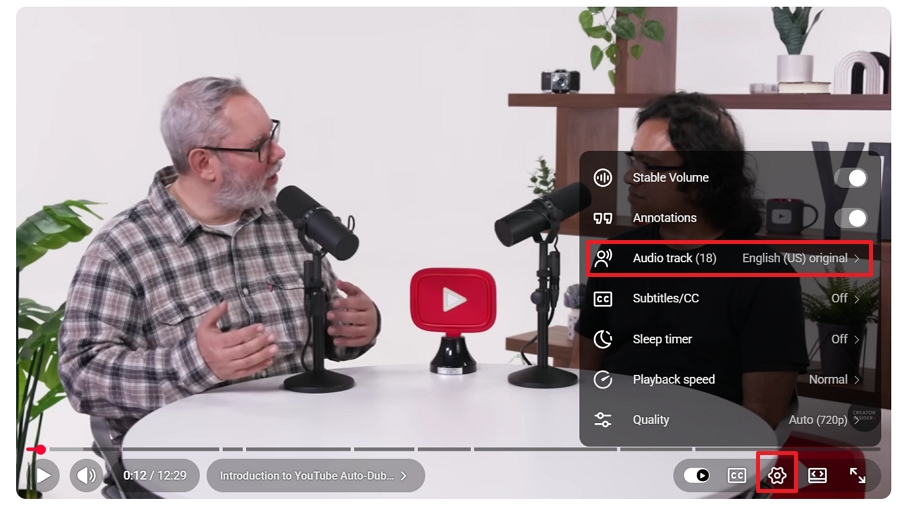
2. Pick from the available auto-generated languages.
Not every video uploaded to YouTube is eligible for automated processing. YouTube enforces several technical boundaries that dictate when and how the system generates dubbed audio.
| Parameter | Limitation / Rule |
|---|---|
| Maximum Duration | 120 minutes per video file |
| Audio Content | Requires clear, sustained spoken dialogue (bypasses music/ambient) |
| Source Language | Must be an automatically detectable, supported source language |
| Speech Pacing | Extremely rapid speech is disqualified to prevent audio glitches |
| Rights Status | Active Content ID claims or copyright flags invalidate dubbing |
| Platform Binding | Exclusive to YouTube player; audio files cannot be exported |
Note: Automatic dubbing applies strictly to new videos published after activating the feature. It does not retroactively scan or dub older videos sitting in your channel library.
While YouTube has expressed long-term plans to support retroactive processing for high-performing legacy content, older videos currently require manual multi-language audio uploads via custom .mp3, .m4a, .flac or .wav files.
Language conversion is heavily weighted toward English-source videos. If your native video is in German, French, or another language, automated output is restricted to English only.
| Source Languages | Target Languages |
|---|---|
| Arabic, Bengali, Chinese, Chinese (Traditional), Dutch, Farsi, French, German, Hebrew, Hindi, Indonesian, Italian, Japanese, Korean, Malayalam, Polish, Portuguese, Punjabi, Romanian, Russian, Spanish, Swahili, Tamil, Telugu, Thai, Turkish, Ukrainian, Urdu, Vietnamese | English |
| English | Arabic, Bengali, Dutch, French*, German*, Hebrew, Hindi*, Indonesian*, Italian*, Japanese, Korean, Malayalam, Polish, Portuguese*, Punjabi, Russian, Spanish*, Tamil, Telugu, Ukrainian |
In testing across various video formats—including technical tutorials, fast-paced vlogs, and multi-person podcast panels—we identified six distinct technical weaknesses that negatively impact the viewer experience.
In fact, these automated errors can sometimes be so disruptive to the authentic viewing experience that viewers and creators frequently search for exactly how to turn off YouTube auto dubbing to restore the original audio.
YouTube's translation capabilities are heavily weighted toward English-source videos. If your original video is spoken in English, the system offers automatic dubbing into more than 20 major target languages, namely Arabic, Bengali, Dutch, French, German, Hebrew, Hindi, Indonesian, Italian, Japanese, Korean, Malayalam, Polish, Portuguese, Punjabi, Russian, Spanish, Tamil, Telugu, Ukrainian.
If your original content is recorded in a non-English language (such as German, French, or Japanese), the system's output options drop dramatically: auto-dubbing is largely restricted to English only.
According to my test, the most pronounced shortcoming of YouTube's native solution is its inability to preserve the speaker's voice identity. Switching from the original audio track to an auto-dubbed version replaces the creator's natural voice with an anonymous synthetic voice.
The algorithm flattens pitch variations, ignores emotional cues, and strips out vocal warmth. For brand channels, solo creators, or celebrity guest interviews where personality drives viewer retention, this mechanical voice disconnect often leads to early drop-offs.
In videos featuring multiple speakers—such as interview shows, multiplayer gaming streams, or panel discussions—YouTube's speaker diarization struggles. In target languages like Japanese or Arabic, the system frequently renders all participants using the exact same synthetic voice, making it difficult for viewers listening in the background to follow who is speaking.
During rapid-fire conversations or animated discussions, YouTube's text-to-speech alignment engine occasionally drops short words and brief conversational interjections. Because the translation pipeline prioritizes sentence-level structure, fast single-word responses are often muted entirely.
When processing videos with prominent background music, gaming sound effects, or outdoor ambient noise, YouTube's separation algorithms struggle to isolate speech cleanly. The resulting synthetic audio often sounds muffled or creates harsh acoustic cuts where background ambient sounds are abruptly muted during spoken phrases.
Another limitation of YouTube's auto dubbing tool is platform binding. The generated multi-language audio tracks exist exclusively within YouTube's ecosystem. Creators cannot download the rendered audio files to repurpose content on TikTok, Instagram, LinkedIn, or self-hosted landing pages. For cross-platform campaigns, this restriction forces creators to use separate third-party translation tools.
Given the six technical limitations outlined above—particularly the loss of vocal identity and multi-speaker confusion—creators often reach a crossroads as their international audience grows.
While YouTube's built-in feature serves as a convenient starting point, scaling a global channel successfully usually requires weighing this native tool against specialized B2B localization software.
Ultimately, the decision comes down to a tradeoff between direct financial cost and absolute brand control.
| Capability | Native YouTube Dubbing | Video Localization Services |
|---|---|---|
| Financial Cost | Free | $1.00 - $5.00 / min |
| 1:1 Voice Preservation | No (Generic TTS) | Yes (Full Retention) |
| Platform Usability | YouTube Only | Universal Export |
| Multi-Speaker Diarization | Basic / Unreliable | Advanced |
| Transcript & Glossary Editing | Read-Only | Editor |
| Data Security & Privacy | Public AI Training | Isolated Storage |
While YouTube's native tool is entirely free and serves as a risk-free way to test international demand for straightforward, solo-host tutorials, its "black box" approach offers no manual script editing, leaving creators unable to fix mistranslated brand names or awkward phrasing before publication.
If your video revenue depends on brand consistency, emotional engagement, celebrity interviews, or multi-platform syndication, this free tier quickly falls short.
Scaling a global presence requires the level of production control found in professional third-party platforms, which typically require a financial investment ranging from $1.00 to $5.00 per processed minute.
For high-value campaigns, professional creators rely on specialized B2B localization engines like Vosko AI Dubbing. Built around advanced acoustic modeling, Vosko AI delivers true 1:1 voice preservation and multi-speaker separation across 30+ languages.
Rather than substituting your voice with a flat synthetic narrator, it retains your authentic vocal timbre, emotional cadence, and background soundscape—ensuring your personal brand remains instantly recognizable on YouTube, TikTok, Instagram, or anywhere else your content lives.
Here's how it works:
1. Drop your source file (MP4, MOV) into the dashboard. Select from over 30+ supported languages. And click Translate to get started.
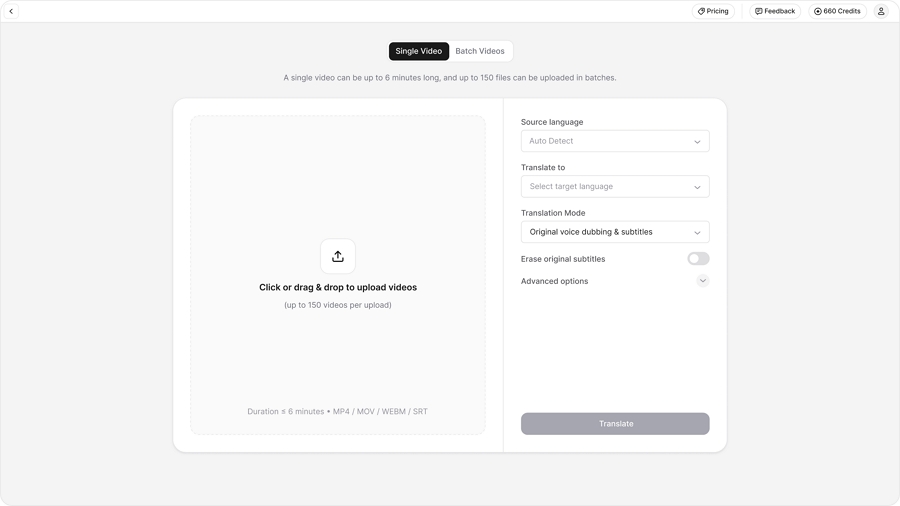
2. Wait for Vosko to translate and dub your video. Unlike native automated tools, you stay in full control. Use the timeline editor to adjust industry jargon, fix brand names, or verify speaker tags for multi-person interviews.
Vosko AI's acoustic modeling doesn't just read the translated text—it applies your original vocal timbre and emotional delivery. The final dub sounds authentically like you, not a generic synthetic narrator.
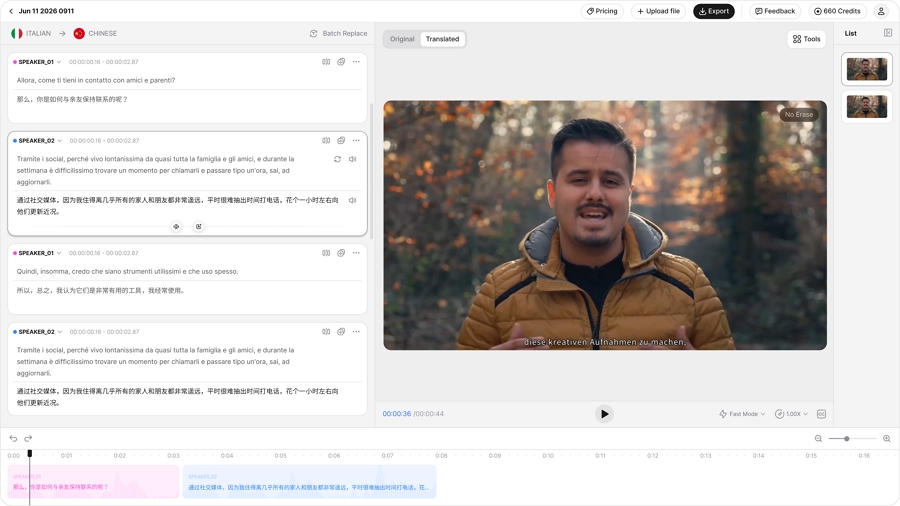
3. Download the finalized video with burned-in subtitles, or export separate audio tracks (.mp3/.wav) and subtitle files (.srt/.vtt) for upload to YouTube as multi-language audio tracks, TikTok, or your own website.
How accurate is YouTube auto dubbing?
For high-resource language pairs like English-to-Spanish, translation accuracy generally reaches 75-85%. However, creators must monitor for mistranslated industry jargon, awkward colloquialisms, and incorrect grammatical gender assignments when referring to products or brand names.
Can I edit dubbed audio in YouTube studio?
No. YouTube Studio does not currently offer an audio waveform editor to trim, re-time, or alter synthetic audio tracks once generated. To fix timing or translation errors, creators must turn off native auto-dubbing and upload a custom, pre-edited .mp3 or .wav multi-language audio file created in external software.
Native dubbing vs. third-party services: Which is better?
YouTube's feature is free but lacks script customization, voice preservation, and multi-platform export options. Third-party services such as Vosko require an investment ($1–$5 per minute) but deliver authentic voice retention, transcript editing, multi-speaker isolation, and exportable files.
Does auto dubbing affect copyright or monetization?
No. Utilizing native auto-dubbed audio tracks within YouTube does not trigger Content ID copyright claims or impact your channel's monetization status. The underlying video ownership parameters remain unchanged.
Which target languages should creators prioritize?
U.S. creators expanding globally should prioritize Spanish (LATAM and Spain), Portuguese (Brazil), German, French, and Hindi. These languages represent large active YouTube user bases with high demand for localized video content.
What are the best SEO practices for dubbed videos?
When offering multi-language audio, ensure you also upload translated Titles, Descriptions, and Subtitles (CC) inside YouTube Studio for each target language. YouTube's search algorithm indexes localized metadata, allowing native speakers to discover your content through local-language search queries.
Why are my YouTube video titles automatically changing languages?
YouTube's algorithm often translates titles and descriptions automatically based on the viewer's location and browser language settings. If you find these machine translations inaccurate or prefer to maintain your original brand messaging, you can disable YouTube auto translate video titles within your settings.
YouTube Auto Dubbing represents a positive step toward borderless video distribution, giving creators an easy way to explore non-native markets. However, its technical constraints—monotone synthetic voices, loss of vocal identity, platform lock-in, and dropped dialogue—mean it is best viewed as an initial diagnostic tool rather than a comprehensive localization strategy.
If your objective is to test international interest with minimal effort, native auto dubbing is a practical starting point. But when viewer retention, brand authority, and multi-platform flexibility matter, upgrading to professional video localization with authentic voice preservation remains the most effective path forward.