ElevenLabs built its name on voices, so its dubbing tool arrives with high expectations. We paid for the Starter plan, dubbed two English clips into German, and tried to fix the results in its editor. We ran the same clips through Vosko as a point of comparison.
Vosko publishes this review. ElevenLabs is a competitor, so we've separated what we measured from what either company says, and we point out where ElevenLabs did better.
The voices are the reason to use ElevenLabs. On a four-person interview, its German dub was as good as anything we've tested: every speaker kept their own voice, the laughter stayed in, and we found nothing to correct in the translation.
The editor is the reason to hesitate. You can rewrite a line and regenerate it, but you can't move it, split it, or give it a different voice.
Exports are MP4 only. And the credits go quickly: Starter's monthly allowance covered a little over two minutes of video.
Vosko matched ElevenLabs on the interview, translated one word ElevenLabs missed in our ad, and gave us far more control afterward, at a much lower cost per minute.
ElevenLabs is the better fit if you want a clean first pass and don't plan to edit.
Many older reviews describe Dubbing Studio as the main way to edit an ElevenLabs dub. That's no longer accurate.
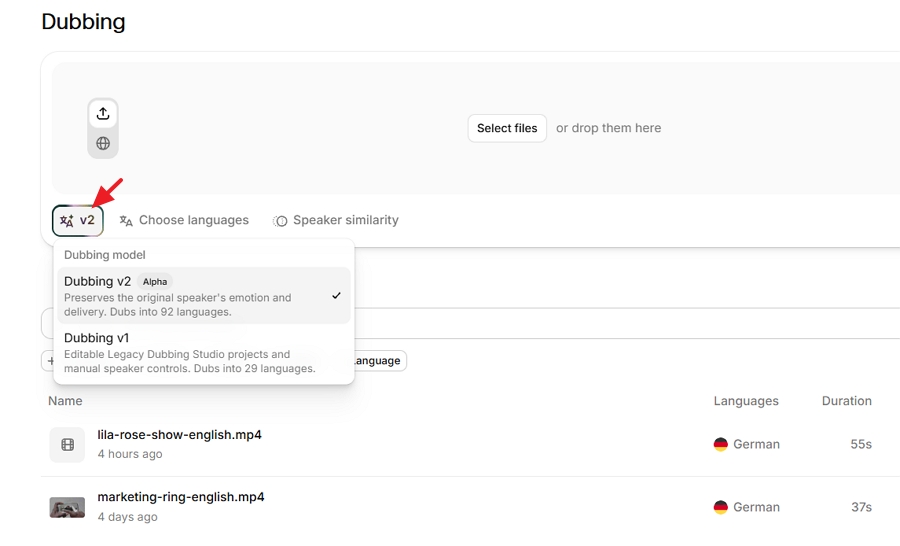
New dubs default to the v2 model. According to ElevenLabs' documentation, v2 dubs are automatic but can be edited in the app.
The older Dubbing Studio only works with the legacy v1 model. It's in maintenance mode with critical bug fixes only, and it can't open a dub that was created automatically.
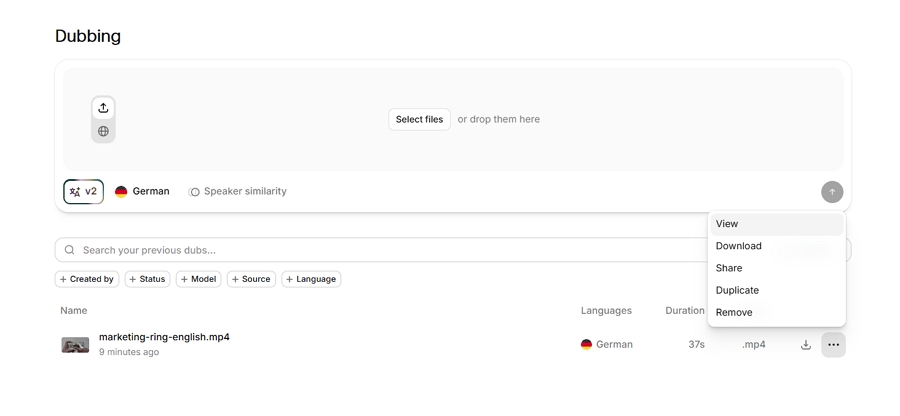
In the app, we saw only a choice between v2 and v1.
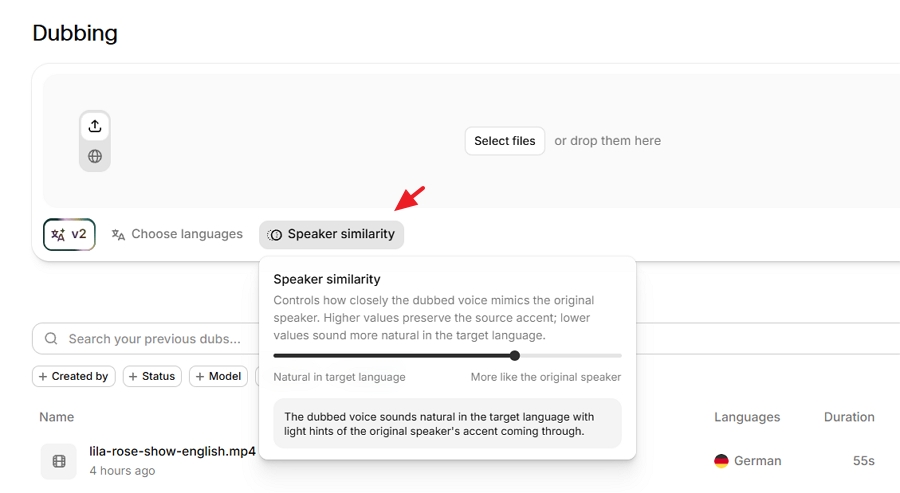
Before you start, there's one setting worth understanding: a Speaker similarity slider.
Moving it toward "More like the original speaker" keeps more of the speaker's own voice, including their accent. Moving it toward "Natural in target language" makes the voice sound more native but less like the person.
We left it at the default for both clips.
What we didn't find: options to remove background audio, turn off voice cloning, choose a resolution, or trim the clip before dubbing. ElevenLabs says lip sync isn't part of its dubbing product.
Both clips were dubbed from English into German. Our tester speaks German, so we judged the translation as well as the voices.
| Clip | Length | Speakers | ElevenLabs | Vosko |
|---|---|---|---|---|
| Product ad with background music | 0:37 | 9 | v2, Free plan, Nov 5, 2026 | Creator plan, Ultra Mode, Oct 2026 |
| Interview, no music | 0:55 | 4 (1 woman, 3 men) | v2, Starter plan, Nov 9, 2026 | Creator plan, Ultra Mode, Oct 2026 |
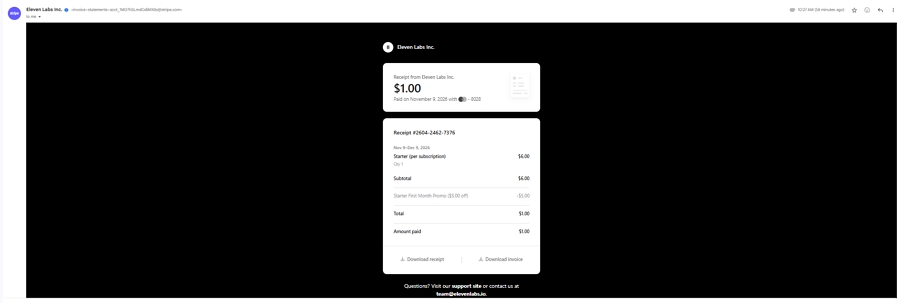
We bought ElevenLabs Starter on November 9 at a $1 first-month promotion; it's normally $6.
Both ElevenLabs dubs used automatic speaker detection and the default similarity setting. We didn't try the legacy v1 model or Dubbing Studio, other target languages, or videos longer than a minute.
The ad is the same clip we've used across our comparison series, which keeps the results comparable. The interview has no crosstalk, so neither tool was tested on overlapping speech.
This ad cuts between nine people, often after a single line, and it has tripped up most of the tools we've tested. HeyGen, Rask AI, and Maestra each gave at least one speaker the wrong voice.
ElevenLabs didn't. Its free plan doesn't show an editor, so we couldn't see how many speakers it detected. But listening through, all nine kept their own vocal character and no line landed on the wrong person.
The background music stayed under the dialogue, and no German line sounded rushed.
Two small things slipped. A speaker who says only "sorry" was left in English.
And of the two hesitation sounds in the original, ElevenLabs kept the first and dropped the second. That one is quieter in the source and may simply have been too faint to pick up.
| Nine-speaker ad | ElevenLabs (v2) | Vosko |
|---|---|---|
| Wrong voices | None | None |
| Speakers detected | Not shown on the free plan | 9 |
| "Sorry" translated | No | Yes |
| Hesitations kept | 1 of 2 | 2 of 2 |
| Background music | Kept | Kept |
| Processing time | About 3 min | About 3–5 min |
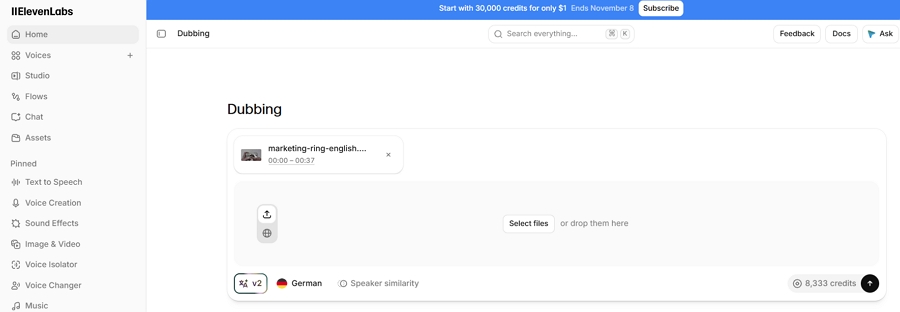
The dub used 8,333 credits, which works out to about 13,500 per minute of video. That rate matters later, when we get to cost.
We expected this clip to separate the two tools. It didn't. Both produced a German version we'd publish without changes.
ElevenLabs found all four speakers. The woman kept a female voice, the three men stayed distinct from one another, and each person sounded the same at the end as at the start.
Short reactions like "yeah" and "right" went to whoever said them. The laughter came through, and the pacing never felt hurried.
Our tester couldn't find a mistranslated or awkward line.
Vosko's result, from the same clip, matched it point for point. If we had to pick a winner on output alone, we couldn't.
The interview took about three minutes to process in each tool. On ElevenLabs, it cost 12,389 credits, which was exactly the estimate shown before we confirmed.
That's a useful habit of the interface: you always see the price before you commit.
This is where the two tools part ways.
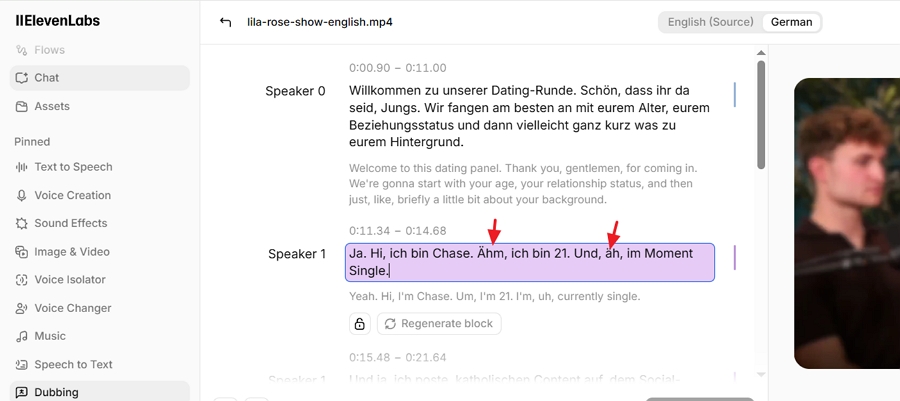
To open the ElevenLabs editor, click the dub's name or choose Edit from its menu. On the free plan, the name opens a video player instead and the menu has no Edit option, so editing effectively starts with Starter. If you're setting up your first dub, our step-by-step guide on how to translate and dub using ElevenLabs shows where each button is.
The editor is built around text. The original transcript lives in a Source view, and each translation sits in its own language tab, so you can't see a line and its translation side by side.
Edits save automatically, but the audio doesn't change until you click Regenerate all. When we did, ElevenLabs re-voiced only the segments we'd changed and didn't charge any extra credits.
We made three changes to the interview's German script, and the whole round took about a minute. That's quick, as long as wording is all you need to change.
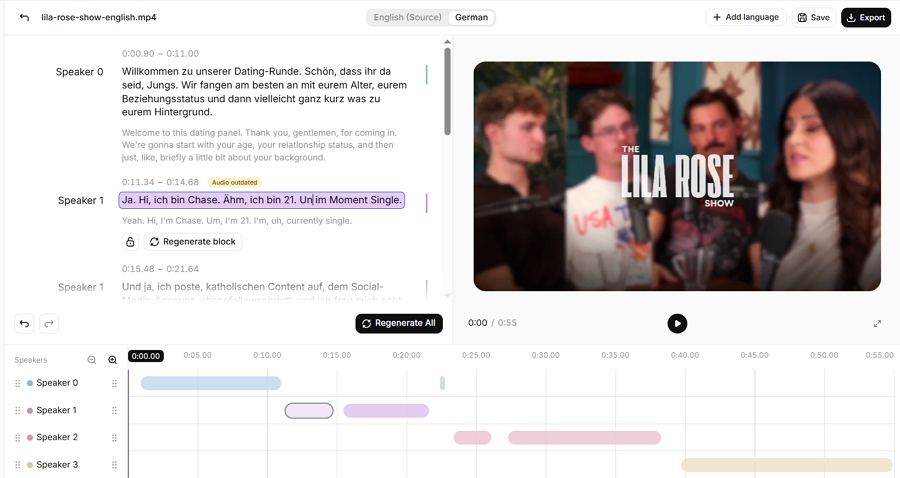
Anything beyond wording isn't there:
| Task | ElevenLabs (v2 editor) | Vosko (Ultra Mode) |
|---|---|---|
| Edit source and translated text | Yes, in separate views | Yes |
| Re-voice an edited line | Yes, at no extra cost | Yes, 20 credits per edit |
| Find and replace across the script | No | Yes |
| Adjust a line's timing | No | Yes |
| Split, merge, add, or delete segments | No | Yes |
| Change or reassign a speaker's voice | No | Yes |
| Adjust voice or background volume | No | No |
| AI retranslation | No | Not in Ultra Mode |
| Undo or version history | No | No |
In practice, this means a mistake in timing or speaker assignment can't be fixed inside ElevenLabs. Our clips didn't produce one, but the ad in our other comparisons shows how often busy videos do. Vosko's edits cost credits, but they cover the problems ElevenLabs can't touch.
ElevenLabs is easier at the start of the job. You can upload a file or paste a YouTube link, and ElevenLabs says TikTok and other online videos work too. Vosko's translation workflow takes uploaded files only.
The end of the job is where ElevenLabs gets thin. Our v2 dubs could only be downloaded as MP4. There was no separate audio track, no background stem, and no subtitle file.
ElevenLabs' legacy Dubbing Studio can export SRT captions, per-speaker WAV tracks, and AAF timeline data, but only for v1 dubs.
| ElevenLabs (v2) | Vosko | |
|---|---|---|
| Import | File upload or video link | File upload |
| File limit | 2 GB and 180 minutes | 200 minutes (Creator and above) |
| Downloads | MP4 | Video; mixed audio, vocals, or background; original and translated SRT |
| Resolution | Matched our source | Original, high, or standard |
| Watermark | Free plan only | Free plan only |
| Remove burned-in subtitles | No option found | Yes |
| Lip sync | Not offered | Not offered |
| When the dub is ready | No notification; check back |
Two smaller things came up in daily use. Your credit balance sits in the account menu at the top right rather than on the dubbing screen. And if you leave while a dub is processing, nothing tells you it's done.
The limits above come from ElevenLabs' help center and our own testing. ElevenLabs notes that output is usually 1080p and may not match the source; our clips came back at their original resolution.
ElevenLabs sells one pool of credits that every product draws from, from text to speech to music. Dubbing v2 is the most expensive thing in it. Both of our dubs worked out to about 13,500 credits per minute of video, for each target language.
| ElevenLabs plan | Monthly price | Credits | v2 dubbing that buys | Per minute |
|---|---|---|---|---|
| Starter | $6 | 30,000 | About 2 min 13 sec | About $2.70 |
| Creator | $22 | 121,000 | About 9 min | About $2.45 |
| Pro | $99 | 600,000 | About 44 min | About $2.23 |
| Vosko plan | Monthly price | Dubbing included | Per minute |
|---|---|---|---|
| Starter | $11.50 | 15 min | About $0.77 |
| Creator | $31.50 | 45 min | About $0.70 |
| Pro | $94.50 | 150 min | About $0.63 |
Prices are from the ElevenLabs and Vosko pricing pages; minutes and per-minute figures are our calculations.
Take a creator who publishes one five-minute video a week in German, about 20 minutes of dubbing a month.
On ElevenLabs, that needs the $99 Pro plan, because Creator's credits run out after about nine minutes. On Vosko, it fits in the $31.50 Creator plan with room to spare.
ElevenLabs claws some of that back on edits: re-voicing a corrected line cost us nothing, while each edit in Vosko used 20 credits.
ElevenLabs also still offers the older v1 automatic model at 3,000 credits a minute without a watermark, which would cut the cost sharply. We didn't test v1, so we can't say how its voices compare.
ElevenLabs makes the most sense for someone who dubs occasionally and wants the first result to be the final one. A short interview, a product clip, a few minutes of a course: upload it, wait three minutes, download the MP4.
If you already use ElevenLabs for voiceovers or text to speech, adding dubbing to the same account is convenient, and the ability to paste a YouTube link saves a step.
It's a harder sell for regular production. The per-minute cost climbs fast, and the editor can fix words but not timing or voices. If a dub comes back with a problem beyond wording, you'll be fixing it in another app.
Vosko suits the opposite workflow: weekly or long-form videos, busy multi-speaker footage, and anyone who needs subtitle files, separate audio tracks, or burned-in captions removed. It costs less per minute and gives you more ways to correct the output.
The trade-offs are that each edit uses credits and you have to upload files rather than paste links.
Neither tool offers lip sync. If your videos are mostly people talking to camera and mouth movement matters, look at a tool built for that.
Yes, on paid plans. In the app, you can rewrite the source or translated text and regenerate the edited lines. You can't change timing, split segments, or swap voices.
On our free account, the Edit option didn't appear. ElevenLabs says editing v2 dubs through its API is limited to Enterprise plans.
About two minutes and 13 seconds of v2 dubbing a month, based on the 13,500 credits per minute our tests used. Each target language is charged separately, so dubbing one minute into two languages uses about 27,000 credits.
Only on the free plan. ElevenLabs says paid plans don't watermark dubs, and our Starter dub had none.
Yes, by default. In both of our clips, each speaker sounded like themselves in German. The Speaker similarity slider lets you trade some of that likeness for a more native-sounding accent.
ElevenLabs Dubbing delivers the voice quality its reputation promises. On our interview, we had nothing to fix.
What it lacks is everything around the voice: an editor that can handle timing and speakers, exports beyond MP4, and pricing that works for regular production.
If you need a polished dub now and then, it's a strong choice. If dubbing is a weekly part of your work, try Vosko on the same clip and compare the output, the editor, and the bill.