Most AI dubbing tools sound fine with one speaker. The real test comes when several people talk in quick succession, and the tool has to decide who said what and which voice goes with each line.
That's where we focused this comparison. Rask AI and Vosko are both built specifically for video localization, so we ran them on two multi-speaker clips and looked closely at speaker handling, editing, and what each plan actually costs.
Vosko publishes this comparison. We've kept our test findings separate from official product information and called out where Rask did better.
Vosko handled a fast-cutting, nine-speaker ad more accurately. It identified every speaker, while Rask found three and gave one woman a male voice. On a calmer four-person interview, both tools did well.
Rask has the faster, more polished editor, and re-dubbing after edits is free. Vosko costs less per minute on comparable plans, but each edit uses credits.
If your videos have many speakers, Vosko is the safer choice. If you mostly dub one or two speakers and edit heavily, Rask's editor is a real advantage.
We tested both tools between October 18 and 25, 2026, translating English into German.
Vosko ran on the Creator plan in Ultra Mode, which it applies automatically for German. Rask ran on its free trial with voice cloning on. Lip sync requires Rask's Creator Pro plan, so we didn't test it.
The free trial limits each video to one minute and doesn't allow exports, so we judged Rask's output in its preview player. These are short clips in one language pair, so treat the results as one realistic test rather than a full evaluation of either product.
| Clip 1: 9-speaker ad | Vosko | Rask AI |
|---|---|---|
| Speakers detected | 9 | 3 |
| Wrong or mismatched voices | None | 3 noticeable errors |
| Standalone "sorry" translated | Yes | Yes |
| Hesitations ("um," "uh") kept | Yes | No |
| Rushed German lines | Occasionally | Occasionally |
| Background music kept | Yes | Yes |
| Processing time | About 5 min | 3–5 min |
The ad cuts between nine people, often after a single line each. Vosko's editor listed all nine speakers, and every line in the German version kept the right voice.
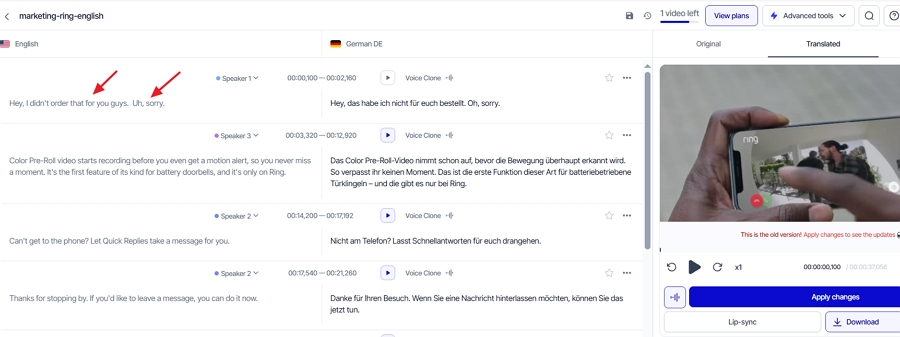
Rask's editor listed three. In the dubbed result, we heard three clear problems:
At about 0:01–0:02, two different men were merged into one segment and given the same voice.
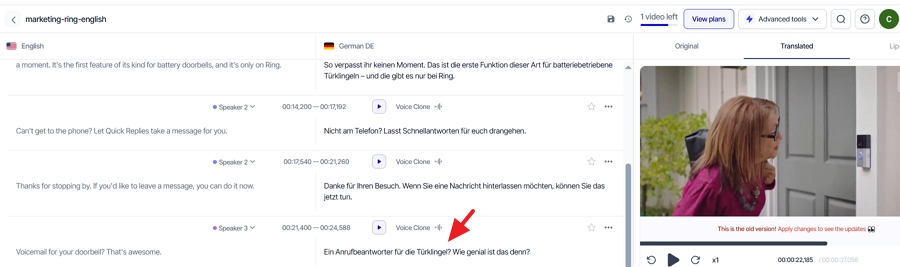
At about 0:20, a woman's line came out in a male voice.
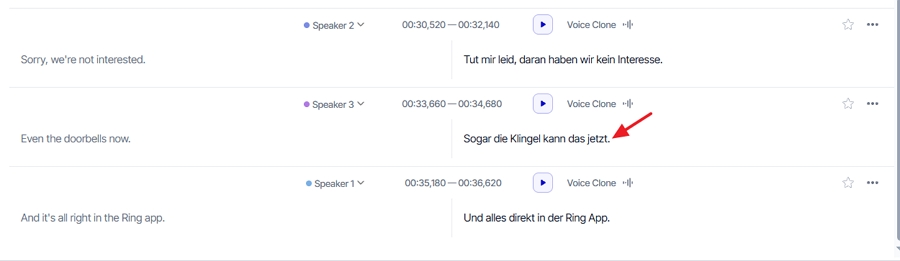
At 0:33, a man's German voice sounded noticeably different from his original voice, enough that he no longer sounded like the same person.
Two of the speakers kept a convincing clone of their original voice. For the rest, the German voices didn't resemble the originals, and we couldn't tell whether Rask had cloned them at all.
Outside of speaker handling, the results were close. Both tools translated the brand and feature names correctly and kept the background music. In both, a longer German line occasionally sounded slightly rushed, since German usually runs longer than English. Vosko kept the speakers' hesitation sounds, while Rask removed them.
We saw the same voice problem in one more clip. On a 42-second, three-speaker Thai video, Rask again dubbed a woman with a male voice.
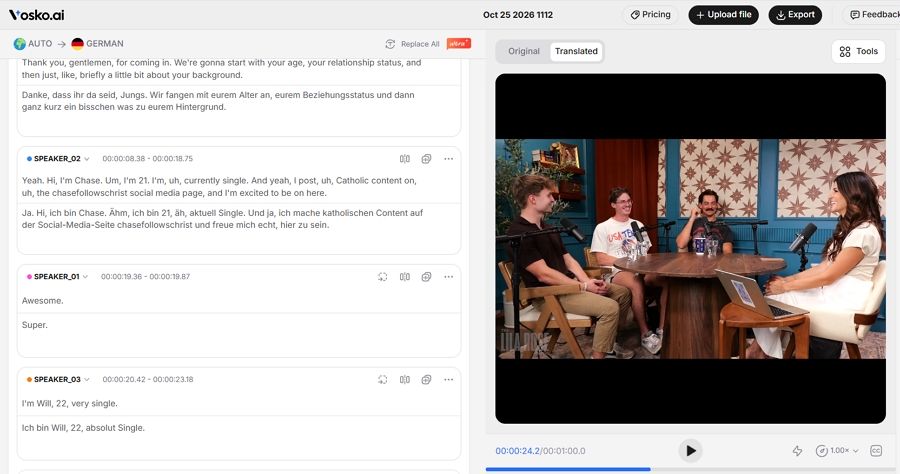
The interview was a much easier case, and Rask handled it well. Both tools found all four speakers, kept the woman's voice female, and gave the three men distinct voices that stayed consistent from start to finish. Each speaker still sounded like themselves in German.
Short reactions such as "yeah" and "right" were translated and assigned to the right person in both versions. The conversational phrasing and the speakers' lighthearted tone came through naturally, with no overlaps or awkward gaps at the handoffs.
The one difference was laughter. Vosko kept the speakers' laughter in the dubbed track. Rask's version dropped it.
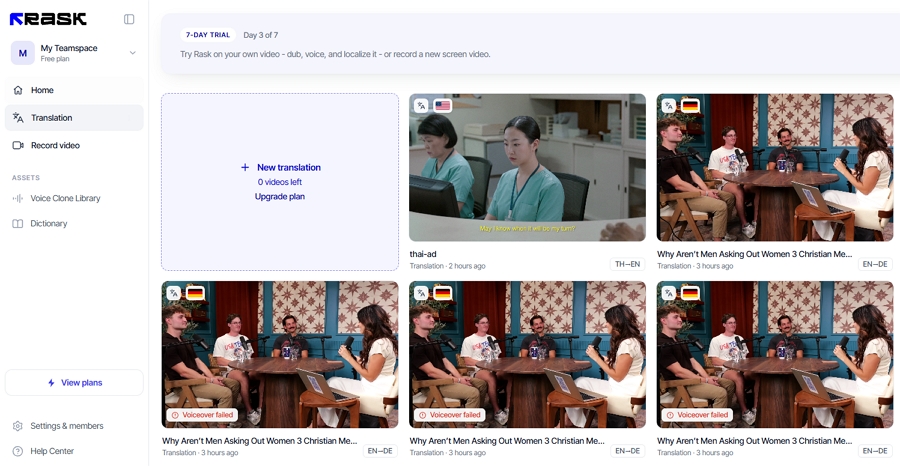
Getting the clip through Rask took some effort. Our one-minute file failed three times with a "Voiceover failed" message. Rask didn't deduct any minutes for the failures, which matches its stated policy. Trimming the clip to about 45 seconds solved the problem, so Rask's result covers the first 45 seconds while Vosko processed the full minute.
Including the failed attempts, getting a finished Rask dub took about 20 minutes. Vosko processed the full clip in about 3 minutes on the first try.
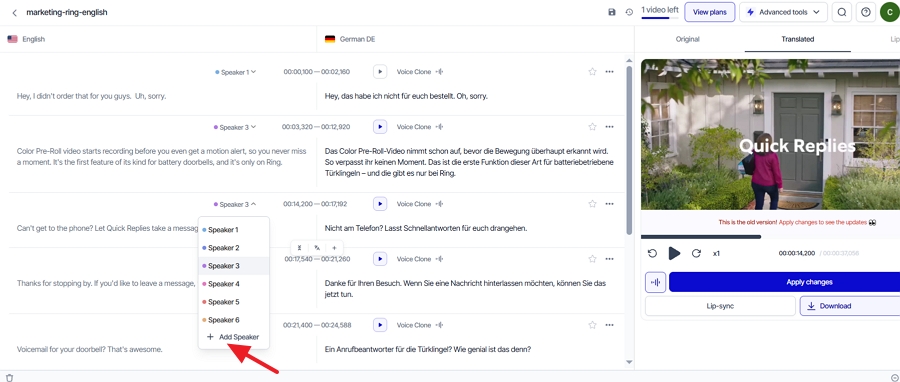
Every AI dubbing tool makes speaker mistakes sometimes, so how easily you can fix them matters as much as the first result.
In Rask, you can reassign a line to a different speaker from a dropdown. On the free trial, though, applying that change requires a paid plan, so we couldn't confirm the result. There's also an "Add speaker" option. When we tried it on the ad, Rask showed "Generation timed out. Click to retry."
The bigger obstacle is upstream. Reassigning a line only helps if Rask has already cloned the correct voice. In our ad, most speakers were never cloned, so there was no right voice to switch to.
Vosko gives you two ways to fix a wrong voice. You can reassign the line to the correct speaker, or copy a speaker's voice and paste it onto the line. Our clips didn't produce a voice error in Vosko, so we tested the voice-copy tool on a correct line instead, and it applied the copied voice as expected.
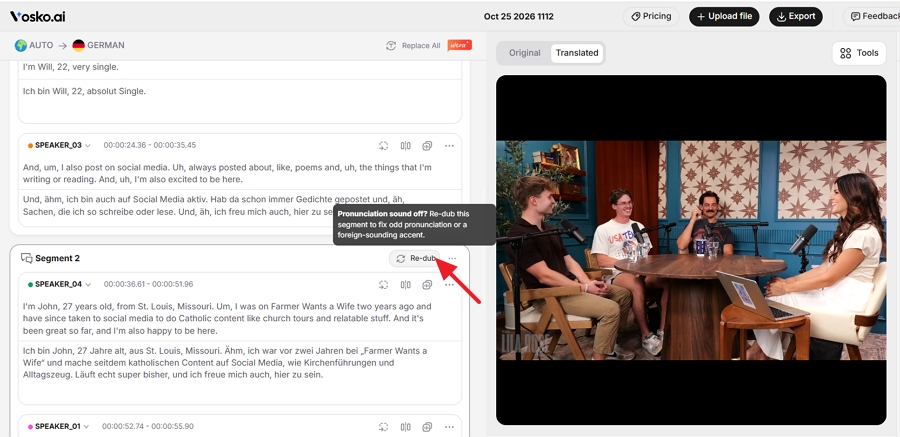
Vosko also launched a re-dub option on October 22, 2026, for regenerating a single line when the pronunciation sounds off or carries an accent. It arrived after our main tests, so we haven't evaluated it.
For routine corrections, Rask's editor was the more pleasant one to use. Among the dubbing tools we've tested so far, it was the most complete and the most responsive.
We made five wording changes in each tool. Rask saves automatically after each edit, in about five seconds, and we finished in under 30 seconds. In Vosko, each change needs a click on Save and takes about ten seconds, so the same five edits took about a minute.
| Editing task | Vosko (Ultra Mode) | Rask AI (free trial) |
|---|---|---|
| Saving an edit | Click Save, about 10 sec | Automatic, about 5 sec |
| Cost of re-dubbing an edited line | 20 credits per edit | Free |
| Edit the source text | Translation updates; you confirm it | Click Translate to update |
| Batch find and replace | Yes | Translation dictionary on Creator Pro |
| Split, merge, add, delete segments | Yes | Yes |
| Adjust timing | Step buttons | Type the time |
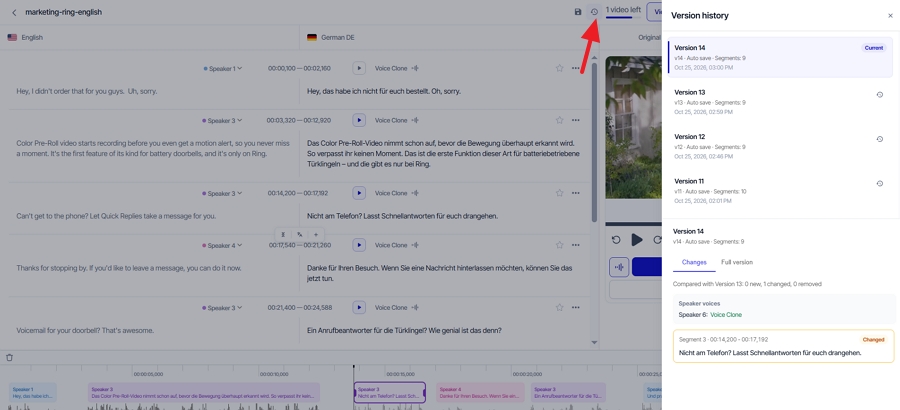
| Version history | No | Yes |
| AI retranslation | No | Not found |
The cost difference adds up if you revise a lot. Each edit in Vosko used 20 credits in our test, while Rask doesn't charge for re-dubbing segments after edits. Vosko's batch find and replace, added to Ultra Mode on October 20, is quicker for fixing one term across a whole video.
Vosko shows translated subtitles in its preview, burns them into the video, and exports both the original and translated subtitles as SRT files. Rask didn't show subtitles in preview. It can burn them in, but SRT download requires Creator Pro.
Rask accepts YouTube and Google Drive links as well as local files. Vosko's translation workflow takes local files only.
Rask's free trial includes three minutes, spread across up to three videos of one minute or less. You can't export the result, and lip sync, the translation dictionary, and SRT upload are locked.
Vosko's free plan includes 200 credits, which covered about 2 minutes and 50 seconds of dubbing in our test, across as many videos as you like. You can export with a watermark and translate into several languages at once.
Rask's prices changed recently. Its help center lists the current plans, updated October 23, 2026, while the FAQ on its pricing page still shows older, higher prices. Prices below are monthly.
| Vosko Creator | Rask Creator | Rask Creator Pro | |
|---|---|---|---|
| Price | $31.50 | $39 | $99 |
| Dubbing minutes per month | 45 | 25 | 100 |
| Approximate cost per minute | $0.70 | $1.56 | $0.99 |
| Lip sync | No | No | Yes, 3 extra minutes per minute |
| SRT subtitle download | Yes | No | Yes |
| Batch processing | Yes | No (Business) | No (Business) |
On comparable entry plans, Vosko gives you nearly twice the minutes for less money. Rask's Creator Pro narrows the gap and adds lip sync, team spaces for three people, and its translation dictionary. Multi-video batches start on Rask's Business plan at $249 a month.
Vosko's per-edit credit cost cuts into that advantage if you revise heavily, so factor in how much you usually correct. Vosko also accepts single uploads up to 200 minutes on Creator and above. Rask lists voice cloning in 32 languages, so check that your target language is covered before relying on it. Vosko pricing is on its pricing page.
Pick Vosko when:
Pick Rask AI when:
Rask offers a free trial with three minutes, split across up to three videos of one minute or less. You can preview the result, but exporting requires a paid plan.
No. Rask's help center says re-dubbing segments after edits is free, and our edits didn't use any minutes. In Vosko, each edit we made used 20 credits.
Yes. Vosko exports both the original and the translated subtitles as SRT files. On Rask, SRT download is included from the Creator Pro plan.
Rask does, on Creator Pro and above. Lip sync uses three extra minutes for every minute of video. Vosko doesn't offer lip sync; it focuses on keeping each speaker's original voice, emotion, and background audio.
Rask is a mature localization tool with an editor that's genuinely quick to work in. On a simple interview, its dub was as good as Vosko's.
The difference showed up on the harder clip. With nine speakers and fast cuts, Rask merged voices and misgendered a speaker, and its free trial gave us no practical way to fix it. Vosko kept every voice right and costs less per minute on comparable plans.
If your videos involve more than a couple of speakers, try Vosko AI on your busiest clip and listen to how each voice holds up.