If you open the Settings menu on a YouTube video and there's no Audio track option, the cause is usually simple: the video has only one audio track. YouTube shows the option only when there's something to switch to, so most of the time nothing is broken.
Sometimes the option really is missing, though. A dub may not exist for that video, a track you uploaded may not have gone through, or the track may play but not sound the way you expected. This guide goes through the causes in the order we'd check them, viewers first and creators second. We tested the main ones ourselves in November 2026, and we say where we didn't.
| You're... | Start here |
|---|---|
| Watching a video and can't find Audio track | If you're watching |
| Adding audio tracks to your own video | If you're the creator |
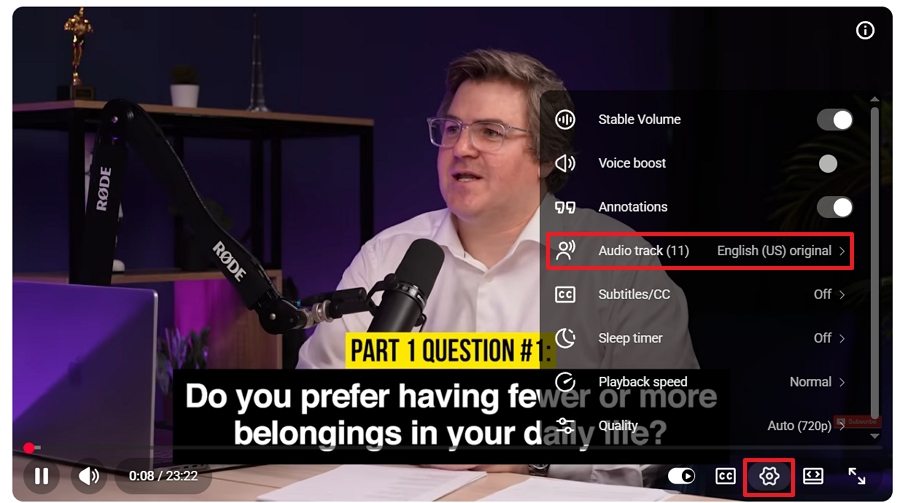
Open the Settings menu in the player. Audio track appears only when the video has more than one track. We opened a video with several tracks on a Windows browser, the iPhone app, a phone browser, an embedded player, and a Short, and the option was there each time. A single-track video had no Audio track on the first four.
If the video doesn't offer another language, no setting on your side will add one. Subtitles or auto-translated captions are the next best thing.
| Where you're watching | Where to look |
|---|---|
| Computer browser and embedded players | Settings (gear) > Audio track |
| iPhone app | Settings icon at the top right of the player > Audio track |
| Phone browser | Settings icon at the top right of the player > Audio track |
| Shorts | Three-dot menu in our test; the row of buttons under the video title in newer versions |
Shorts is the one that moves around. In June 2026, YouTube said it was putting the audio track and other controls into a row of buttons under the video title, as Phandroid reported. In our November test, a Short with several tracks still had Audio track in the three-dot menu at the top right, so check both places.
On the video with several tracks, our Windows and iPhone 16 menus listed names like English (Original) and Spanish, and a dubbed track carried an Auto-dubbed mark. The option showed up the same way in a private window, so if you suspect a browser extension, a private window is a quick check. We didn't test the Android app or a TV app.
According to YouTube's help pages, your preferred language comes from your watch history, and you can change it in your settings. If a video's original audio is already in one of your preferred languages, it plays as it is and isn't swapped for a dub.
That can look like a missing dub when the video simply started in your language. To hear another one, pick it from Audio track. The steps for preferred languages are in our guide to turning off YouTube auto dubbing. We didn't test this setting ourselves.
YouTube's auto dubbing runs after a video is uploaded. Creators can choose to review dubs before they're published, and YouTube says it may add dubs to older videos over time, per its auto dubbing page. So a video can go without a dub for a while.
YouTube says videos with auto dubs are marked "auto-dubbed" in the video description. In our test, the dubbed track also had that mark in the Audio track menu.
Some videos never get one. YouTube lists the reasons: the video is longer than 120 minutes, it has no speech or very little, its language isn't supported or can't be detected, the speech is too fast, or it has a copyright claim.
The language pair matters too. English videos can be dubbed into about twenty languages, but most other languages are dubbed into English only. A Spanish video, for example, won't get a German dub. Creators can see what's available for a video on its Languages page in Studio. Our auto dubbing review covers what else to expect from it.
YouTube says multi-language audio is available to creators with Advanced features. In YouTube Studio on a computer, check Settings > Channel > Feature eligibility.
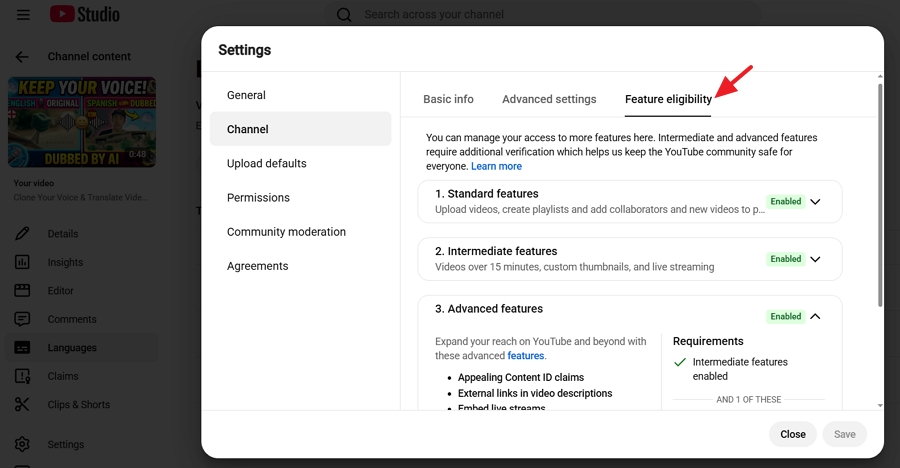
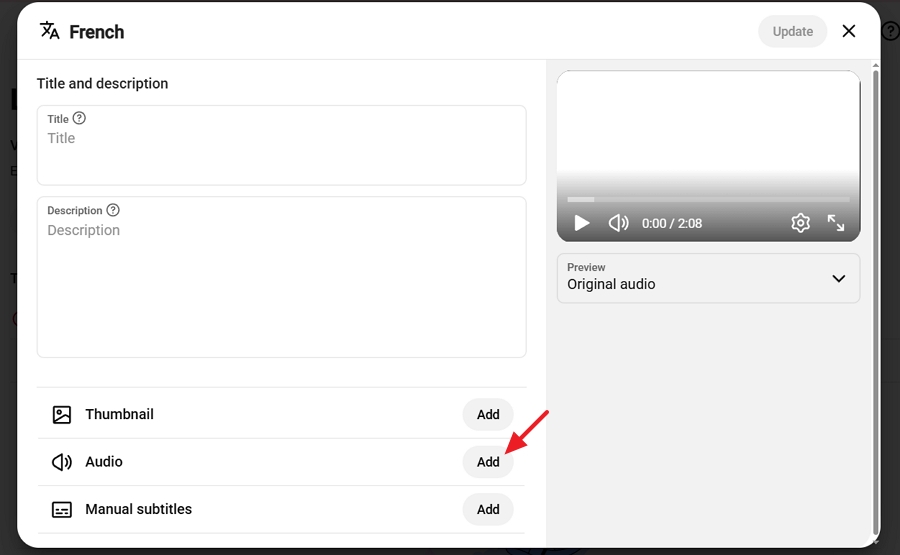
Then open a video's Languages page. If there's no Audio option next to a language, check this first. Our guide to YouTube multi-language audio has the upload steps.
Give it a few minutes first. In our test, a 48-second video with a 48-second track showed the new track in the Audio track menu within five minutes. We only tried a short file, so longer ones may take more time.
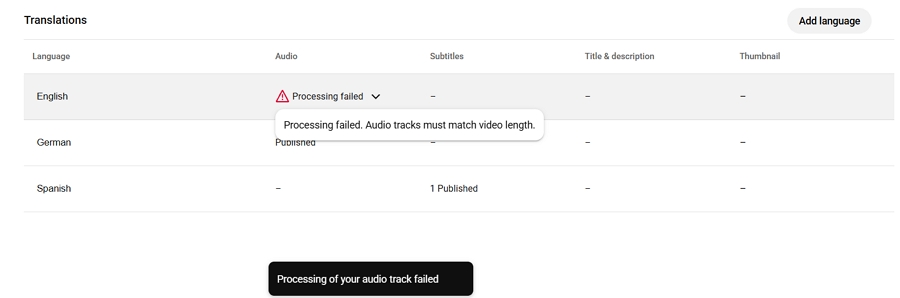
Then check the length. YouTube says the file should be roughly the same length as the video. We tried a track of clearly different length and got the message "Processing failed. Audio tracks must match video length." We didn't test how much of a gap is allowed, so export the dubbed audio to match the video as closely as you can.
Check the language you picked, too. When we added an English track to an English video, YouTube accepted it and listed two English options: English (US) Original, which stayed the default, and plain English. Nothing fails, but your menu gets confusing.
If YouTube already made an auto dub in that language, you can't add your own until you delete the auto dub. We ran into this in testing, and it matches what YouTube says.
On file types, YouTube says the file must be in a supported audio-only format. A WAV file worked for us. We also put a full MP4 video file in the audio slot, and YouTube took it and used its sound. We wouldn't rely on that. Export an audio-only file instead. We didn't try file types that might be rejected, so we can't tell you which ones fail.
One more thing to check is the background music. YouTube says it may remove a second audio track if it detects copyrighted content that differs from the original audio.
A German track with a different song under it than the English original is the kind of thing that can trigger this. Keep the background audio the same across language versions, and make sure you have the rights to it.
If viewers hear speech with no music or effects, look at which file you uploaded. A voiceover-only file has just the voice. A mixed file has the voice plus the background sound. In our test, the voiceover-only German file played with no background audio, and the mixed file played with it. If you want the music and effects to carry over, upload the mix.
| What you see | Likely cause | What to try |
|---|---|---|
| No Audio track on one video | The video has one track only | Use subtitles or auto-translated captions |
| A YouTube dub should exist but isn't there | Not live yet, held for review, or the video doesn't qualify | Check again later; creators can check the Languages page |
| A dub exists for English but not your language | Most pairs run into English only | Look for another route, such as subtitles |
| You hear the original, not the dub | The original is already in your preferred language | Choose the language in Audio track |
| No Audio option in Studio | Advanced features not on | Check Feature eligibility |
| Upload fails with a length message | Track and video lengths differ | Re-export to match the video's length |
| Two English options in the menu | Track language matches the video's | Delete the extra track if you don't want it |
| Can't add a track for a language | An auto dub already exists | Delete the auto dub first |
| Track vanished after upload | Copyrighted audio differs from the original | Keep the background audio the same |
| Track plays with no music | Voiceover-only file | Upload the mixed file |
Subtitles and auto-translated captions work on any video that has captions. If you publish videos and want a dubbed track, you have to make the audio. YouTube's own auto dubbing is one route, and our comparison covers when it's enough. The other is to dub with a tool and upload the file yourself.
Vosko AI is our product. It exports the dubbed video, a mixed audio file, and a voiceover-only file, which is how we got the two files in the tests above. Voice cloning needs the speaker's permission, and Vosko doesn't do lip sync. Our guide to translating YouTube video audio lays out the options.
Most often, the video has only one audio track. YouTube shows the option only when there's more than one to choose from.
Yes. YouTube lets creators add audio tracks to Shorts as well as regular videos. In our November 2026 test, the option was in the three-dot menu. YouTube has been changing the Shorts player, so it may sit in a row of buttons under the title instead.
In our test, a 48-second video showed its new track within five minutes. We didn't test longer videos.
YouTube says multi-language audio is available to creators with Advanced features. You can check your status under Settings > Channel > Feature eligibility in YouTube Studio.
In November 2026, we opened a video with several tracks on a Windows computer, the iPhone 16 app, a phone browser, an embedded player, and a Short. We opened a single-track video on the same devices except Shorts. On the creator side, we added tracks to a 48-second test video. We didn't test the Android app, a TV app, the preferred-language setting, longer files, file types that might be rejected, or a video file with several audio streams uploaded as a normal video.