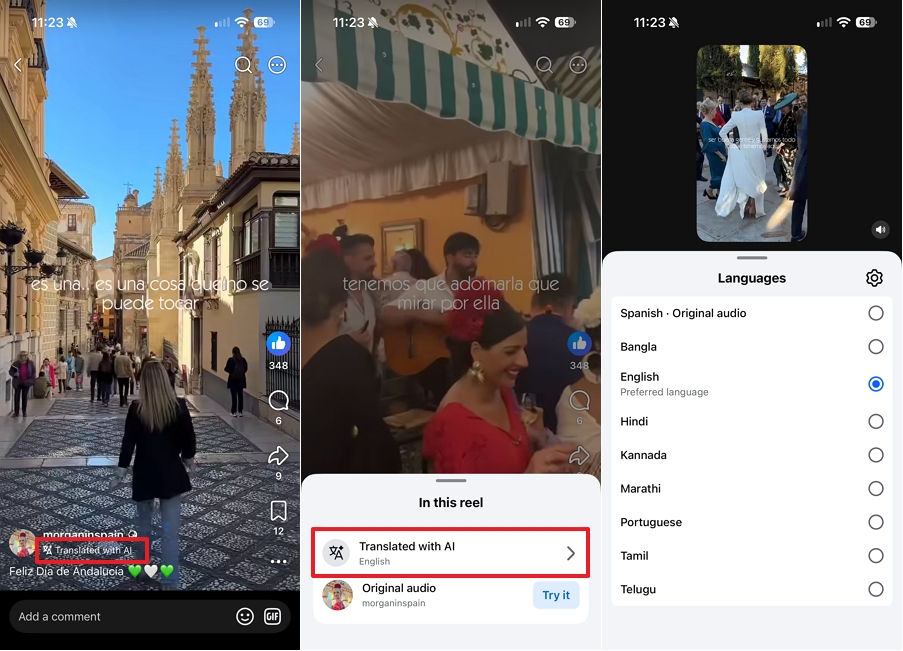
On our Facebook account, a Spanish Reel played with an English voice. A label under the account name read Translated with AI. That's what Meta AI translation looks like to a viewer. Behind it is a tool that creators switch on before posting.
This guide follows both sides. It covers what we saw on our own accounts in November 2026. It also covers what Meta says about the creator side, which we couldn't try, and where Meta's description stops.
Meta AI translation turns a creator's speech into another language. It dubs the speech in a voice that uses the creator's own sound and tone. It can also match the mouth movements to the new audio. It's free, and creators switch it on before posting.
Viewers get the dub in their preferred language, with a label and a way back to the original audio. Facebook requires 1,000 followers and Instagram a public account, where Meta AI is offered.
A Reel is dubbed this way only if its creator turned translation on. When it is, the app plays the audio that matches your language settings.
On Facebook, we set Language you'd like to have posts translated into to English and opened a Spanish Reel on an iPhone. It played with an English dub.
Tapping the label opened a panel called In this reel. Tapping Translated with AI there opened a Languages list that includes Original audio.
On Instagram, translation runs through two switches under Settings and activity > Language and translations. Translate voice and Translate text on reels were both off on our test account until we turned one on.
After that, a translated Reel showed Translate with AI under the account name. Its Languages list marked the original audio with (original). Turning Translate voice back off made that list stop loading, with a message that it couldn't load translations.
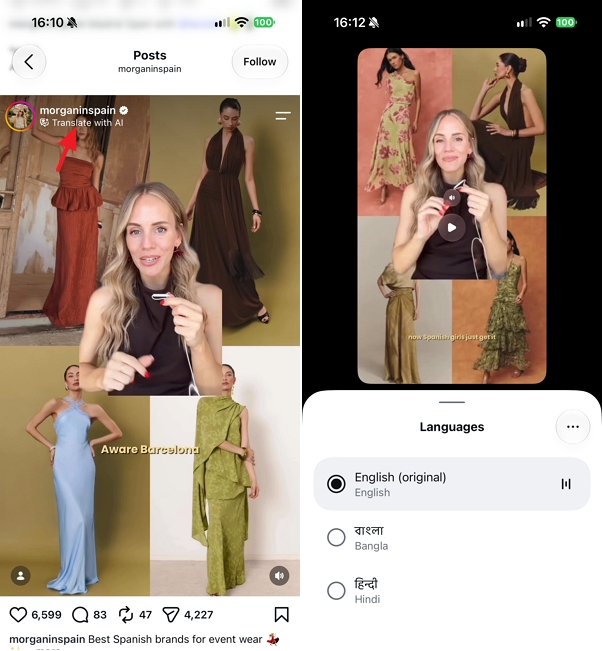
Two details differed from Meta's description. Meta's newsroom says every translated Reel carries a "Translated with Meta AI" label, while our screens showed shorter wording.
Meta's instructions also point to a Don't translate option in a Reel's three-dot menu. We didn't find it in Instagram 456.0.0.
On a computer, instagram.com showed none of these labels or switches. Its Language setting changes only the app language. A Reel that showed the label on our phone showed nothing on the web.
The full viewer steps are in our guides to translating Reels on Facebook and Instagram.
Meta's guides describe a switch on the sharing screen. It's called Translate your voice with Meta AI on Facebook. Instagram's creator blog calls it Translate voices with Meta AI. The creator picks the languages and decides whether to add lip syncing.
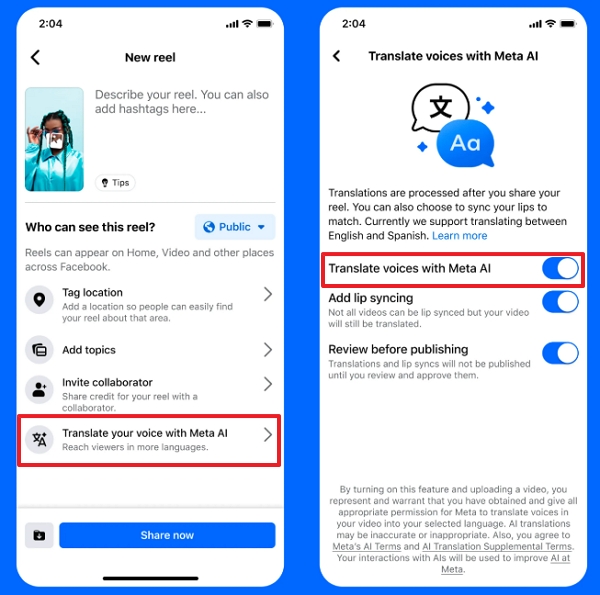
A review setting holds the translation until the creator approves it. On Facebook, that can happen from a notification or the Professional Dashboard.
Meta's creator guide adds two things. Rejecting a translation leaves the original Reel alone, and a views breakdown by language appears after posting.
We couldn't try any of this. On Facebook, Meta limits the switch to creators with 1,000 followers, and our Page has 129.
On Instagram, the switch is meant for public accounts. We didn't find it on our test account, private or public, on a phone or a computer.
Instagram's help page says the feature isn't available for everyone and doesn't work on a computer. So treat this section as Meta's description, not our result.
Meta's newsroom post and creator guides describe results, not the system. They don't name a model or explain how the voice is matched.
What they do describe is three jobs. The tool translates the speech and generates dubbed audio with the creator's sound and tone.
If the creator asks, it also matches mouth movements to the new audio. Some press coverage, such as Business Today, calls this voice cloning. Meta's own phrase is "sound and tone."
Meta's research group has published open speech-to-speech models called Seamless. One of them is built to preserve expression and tone across languages. The pages we read don't say whether Reels runs on them.
The list has grown in steps since the August 2025 launch. This table follows Meta's announcements as of November 2026.
| Announced | Languages | Platform |
|---|---|---|
| August 2025 | English and Spanish | Facebook, Instagram |
| October 2025 | Hindi and Portuguese added | Facebook, Instagram |
| January 2026 | Bengali, Tamil, Telugu, Marathi, Kannada | Facebook, Instagram (rolling out) |
| June 2026 | Arabic, Bahasa Indonesia, French, Thai, Vietnamese | Facebook ("soon") |
| July 2026 | French, German, Italian, Japanese, Korean |
Meta's newsroom lists the July additions for Instagram. In November, we opened a translated Reel on our test phone.
Its Languages list offered nine languages: Spanish, English, Hindi, Portuguese, Bengali, Tamil, Telugu, Marathi, and Kannada.
That's the list from before July's additions. It shows what that one Reel was translated into, so it doesn't prove which languages Instagram supports today.
Published totals differ too. Social Media Today reported that Instagram's head, Adam Mosseri, said 14 languages while Meta's press release said 18.
The table above gives Instagram 14, and Meta's 18 may include Facebook's additions, though neither source says so. Go by the list inside your own app.
Speaker count is the clearest limit, and it differs by platform. Facebook supports up to two speakers, as long as they don't talk over each other. Instagram's creator blog says one speaker for now.
Meta's tips for cleaner results are about the recording. Face the camera, speak clearly, keep your mouth uncovered, and keep music and background noise low.
Meta's guides describe approving or rejecting a translation, not editing its words. So listen to the preview for names, numbers, and product terms. We found no accuracy figures and no maximum video length in the pages we read.
The tool dubs speech. Instagram's creator blog lists text and caption sticker translation as coming soon. The app already has a viewer switch called Translate text on reels, which we didn't test. We also didn't find a Meta tool that translates or exports a subtitle file.
Three routes don't depend on Meta AI. They help when the switch is missing, your language isn't on the list, or you want to edit the script.
The first is your own dubbed audio. On a Facebook Page, Meta says you can upload up to 20 dubbed audio tracks per Reel. We couldn't test it, because Create reel on our Page showed only Closed captions at the sharing step. Our Facebook Reels guide lists the steps as Meta describes them.
The second is subtitles, and these did work for us. Our Page took one .srt file per language. Each file needed a name before the language and country code.
Facebook rejected a file named only with the codes and accepted ones like Captions.es_ES.srt. The steps are in our guide to translating Facebook video subtitles.
The third is a dub made in another tool and posted as a new Reel.
Disclosure: Vosko AI is our product.
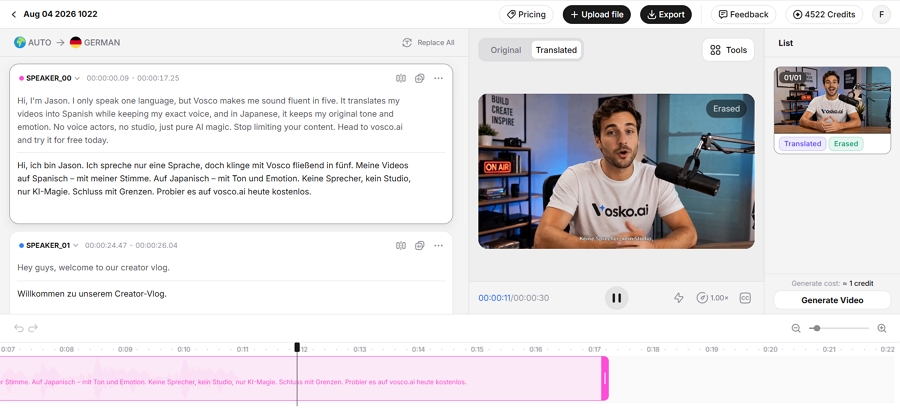
Vosko AI Dubbing works on recorded video and dubs it into 94 target languages. It replaces only the dialogue, so the music and effects stay. You can edit the translated script, then export a dubbed video, mixed audio, or translated subtitles as .SRT.
Vosko clones a voice only with the speaker's permission. It doesn't change mouth movements, so a close-up face won't be lip-synced. If lip sync matters most, Meta AI is the better fit.
No. The tool sits on the creator's side of the sharing screen. A viewer only hears a translation if the creator turned one on. To dub another creator's Reel and repost it, get their permission first.
No. See translation turns a caption or comment into text after you tap it. Meta AI translation dubs a Reel's speech. The Meta AI chatbot is a separate feature that this guide doesn't cover.
On Instagram, turn off Translate voice in Language and translations, and Translate text on reels for on-screen text. For a single Reel on either platform, pick the original audio from the Languages list. The taps are in our guides to turning off auto translate on Instagram and Facebook.
Meta AI translation dubs a creator's spoken Reel into another language, with lip sync, and it costs nothing where Meta offers it. What a viewer hears depends on their language settings and, on Instagram, on the Translate voice switch. Creator access depends on the account, and our test accounts didn't show the switch.
Three limits matter most. It translates speech, not subtitle files. Facebook allows up to two speakers and Instagram one, for now. Meta's guides describe no way to edit the dub's wording. If one of these blocks your Reel, the routes above still get it to viewers in their language.