Search for "Perso AI vs HeyGen" and most of what you'll find is written by Perso itself. Those pages make a strong case, but several details are out of date, including Perso's language count and HeyGen's prices.
We wanted an outside look. So we dubbed the same nine-speaker English ad into German with both tools, tested lip sync on a separate interview clip, and checked both companies' current pricing pages in late October and early November 2026.
Disclosure: Vosko, which makes a competing dubbing tool, publishes this comparison. Vosko isn't part of the head-to-head; we list it as an alternative near the end.
Perso AI (now called Perso Dubbing) is the more focused dubbing tool. It's cheaper to start, includes a script editor and custom glossary from its $6.99 plan, and handled pacing well in our test. Its weak spots were a missed translation, a clunky editing flow, and short per-video limits on lower plans.
HeyGen is an avatar platform whose translator covers more languages and is usually cheaper per minute. It translated our ad more completely and offers far more languages, but you can't edit a translation at all until its Pro plan.
For short clips you'll want to tweak, Perso is the easier fit. For high volume, many languages, or lip sync on a budget, HeyGen is the safer bet.
| Perso AI (Perso Dubbing) | HeyGen | |
|---|---|---|
| Built for | Dubbing existing video | AI avatars, with a video translator |
| Dubbing languages | 12 free; 82 on Starter and Creator; 116 on PRO | 30+ free; 175+ languages and dialects on paid plans |
| Lip sync | Uses the same credits at 3× the dubbing rate: up to 2 / 13 / 60 min on Starter / Creator / PRO, in 82 languages | Every plan; costs 6 or 10 credits per minute instead of 4 |
| Script editing | From Starter ($6.99) | From Pro (from $49), before generation only |
| Glossary | From Starter | Brand glossary on paid plans |
| Max length per video | 3 / 15 / 30 / 60 min by plan | 30 min on Creator and Pro; 60 min on Business |
| Dubbing engines | Linnet 4 by default; more models on PRO | Speed; Precision on paid plans |
| Exports | MP4, SRT, XLSX script, WAV tracks per speaker and for music | MP4, SRT |
| Max resolution | 1080p; 4K on PRO | 1080p on Creator; 4K on Pro |
| Entry paid plan | Starter, $6.99/month for 7 min | Creator, $29/month for 600 credits |
The main test was a 37-second English product ad with nine speakers, quick cuts, and background music, dubbed into German. Our tester speaks German, so we could judge the wording as well as the voices.
The settings weren't identical, and we note where that affects a result. We didn't test Perso's Nightingale or Finch models, HeyGen's Precision engine, or HeyGen's proofreading, all of which need higher plans.
One short clip can't predict every result, so read this as one careful data point rather than a final ruling. We used the same ad in our Rask AI vs HeyGen comparison, if you want to see how a third tool handled it.
| Nine-speaker ad, English to German | Perso AI | HeyGen |
|---|---|---|
| Speakers listed in the editor | 5 | No editor on the free plan |
| Lines dubbed in the wrong voice | None we could hear | 1 speaker |
| Standalone "sorry" | Left in English | Translated |
| Hesitations ("um," "uh") | Removed | Kept |
| Rushed German lines | None | None, with Dynamic Duration on |
| Original voices, emotion, background music | Kept | Kept |
| Processing time | About 3 min, with lip sync | About 2 min, without lip sync |
Both tools kept the speakers' recognizable voices, their emotional tone, and the background music under the dialogue. Neither sounded robotic.
The difference was in who got which voice. HeyGen made one clear mistake: at about 0:20, a woman's line came out in a male voice, and her two lines were dubbed with two different voices.
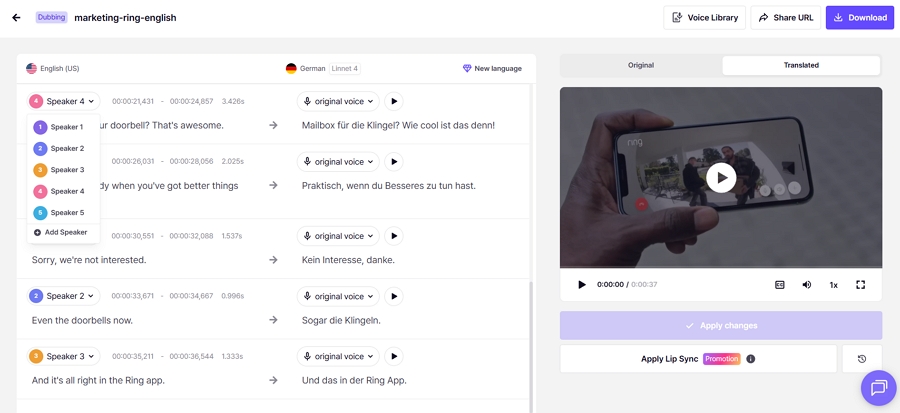
We didn't hear a wrong voice in Perso's version. Its editor grouped the nine people into five speaker labels, though, which is worth checking on longer multi-speaker videos where a merged label is more likely to be heard.
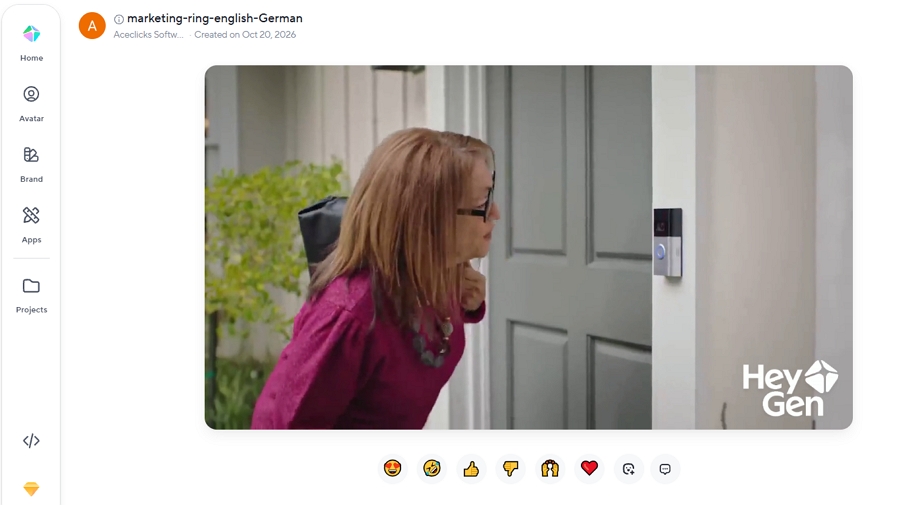
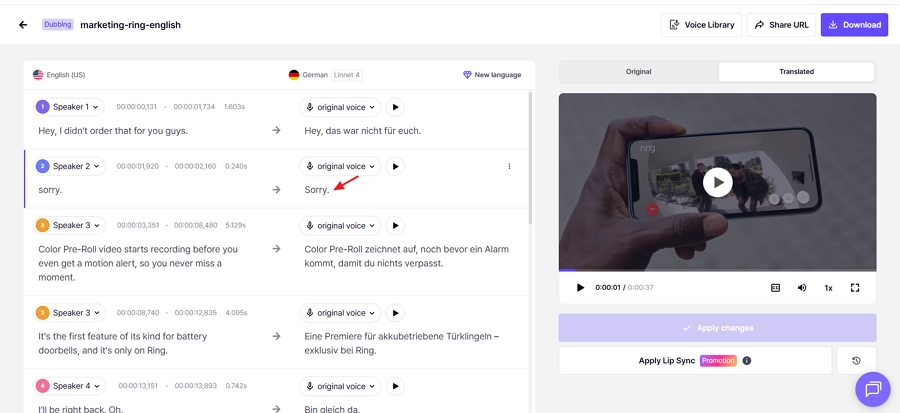
HeyGen translated the ad more completely. One speaker says a single word, "sorry," and Perso left it in English while HeyGen translated it. In a German ad, a lone English word stands out. We fixed it by hand in Perso's editor.
The two also treated hesitations differently. HeyGen kept the speakers' "um" and "uh"; Perso removed them. Perso's version sounded cleaner, and HeyGen's stayed closer to the original performance. Which is better depends on whether you're dubbing polished marketing or natural conversation.
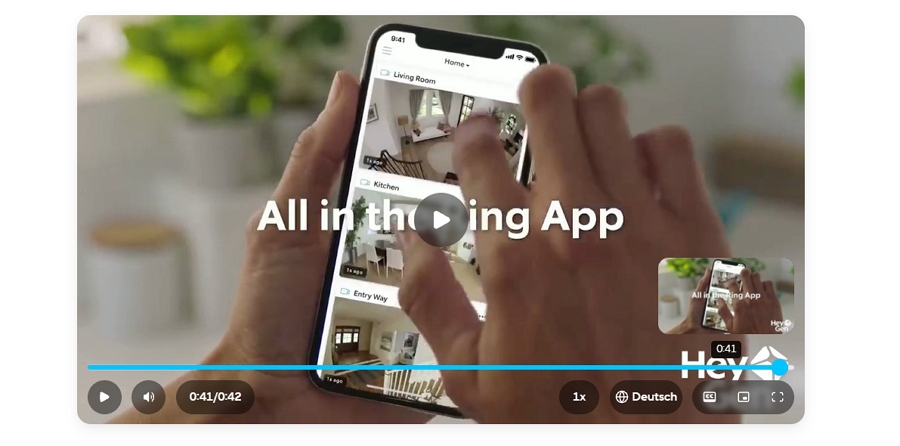
German usually runs longer than English, and both tools handled it well. No line in either version sounded rushed. HeyGen got there partly by stretching the video from 37 to 42 seconds with Dynamic Duration. If your ad has to fit a fixed slot, keep that in mind or turn the setting off.
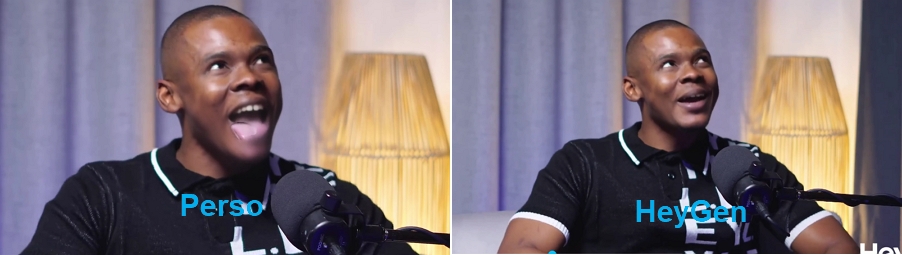
Both companies make strong lip-sync claims, and Perso's own comparison pages say its lip sync beats HeyGen's. To check, we ran the same one-minute, two-person interview through both: HeyGen with its Speed engine, and Perso with its Linnet 4 model and lip dubbing on.
Both results were smooth overall. The speakers' mouths followed the German audio and held up when they turned their heads. HeyGen's version had a few seconds where the mouth area looked blurred.
The most revealing moment came when one speaker sticks his tongue out for a few seconds. The two tools handled it in opposite ways:
In short, HeyGen leaned toward a clean picture, and Perso leaned toward faithfulness, with artifacts. Neither was flawless, so check expressive moments such as laughing, tongue movements, or hands near the face before publishing either.
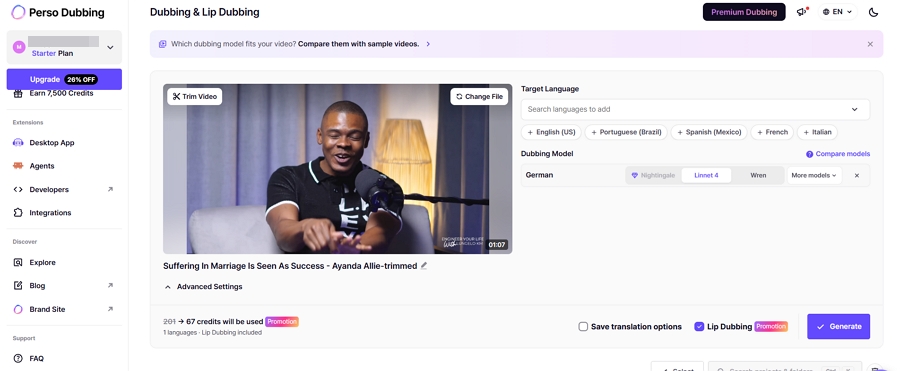
Lip sync also costs differently. HeyGen includes it on every plan, including free, and on paid plans it uses 6 credits per minute with Speed or 10 with Precision, instead of 4. Perso's lip sync starts on Starter and uses the same credits as regular dubbing at three times the rate.
Our 67-second clip would normally have cost 201 credits; a promotion running at the time of our test brought it down to 67. At the standard rate, Perso's plans cover about 2, 13, or 60 minutes of lip sync on Starter, Creator, and PRO, in 82 languages.
This is Perso's clearest advantage, and it's mostly about price. Perso includes script editing from its $6.99 Starter plan. HeyGen's editing starts on Pro, which its help center lists from $49 a month. Some comparisons put HeyGen Pro at $99, which doesn't match HeyGen's current documentation.
| Editing task | Perso AI (Starter and above) | HeyGen Free and Creator | HeyGen Pro and above |
|---|---|---|---|
| Edit source and translated text | Yes | No | Translated text, before generating |
| Adjust timing | Type exact start and end times | No | Yes |
| Add or delete segments | Yes | No | Not confirmed |
| Merge segments | No | No | Not confirmed |
| Glossary | Custom glossary | No | Brand glossary |
| When you can edit | After the dub is generated | Not at all | Before the final video is generated |
Perso's editor did what we needed. We corrected the untranslated "sorry," and the timing fields let us set start and end times to the millisecond. The workflow was the rough part: saving the edit sent us back to the dashboard, and we had to find the project in the task list again. That's fine once, but tedious across many corrections.
The Starter plan also showed a voice-cloning option we couldn't select, though the dub still used the speakers' original voices by default. We didn't test the glossary.
On HeyGen's Free and Creator plans, nothing can be changed once the translation is generated. That's why the voice error in our ad would have stuck. From Pro up, HeyGen's Edit & Review step lets you proofread the translation before the final video is made; HeyGen says it supports search and replace, timing changes, and voice swaps. We couldn't test it.
Perso sells credits that convert to dubbing minutes, and lip sync uses the same credits at three times the rate. HeyGen sells credits shared across all its features, and translation uses 4 credits per minute, or 6 to 10 with lip sync.
| Plan | Monthly price | Dubbing included | Lip sync | Max per video |
|---|---|---|---|---|
| Perso Starter | $6.99 ($3.49 first month) | 7 min | 2 min | 3 min |
| Perso Creator | $29 | 40 min | 13 min | 15 min |
| Perso PRO | $99 | 180 min (Linnet 4) | 60 min | 30 min |
| HeyGen Creator | $29 | 150 min, or 100 with Speed lip sync | Included in credits | 30 min |
| HeyGen Pro | From $49 | 250 min, or 166 with Speed lip sync | Included in credits | 30 min |
| HeyGen Business | $149 | 375 min, or 250 with Speed lip sync | Included in credits | 60 min |
Perso's PRO plan also offers a Finch model that stretches the same credits to 900 minutes, which is where Perso's advertised $0.11 per minute comes from. Its Nightingale model uses credits four times faster than Linnet 4. Extra Perso credits cost $1.50 per minute.
| Your workload | Perso AI | HeyGen |
|---|---|---|
| Four 5-minute videos, no lip sync, light edits | Creator, $29 (Starter's 3-minute limit rules it out) | Creator, $29, but no editing; Pro from $49 to edit |
| Four 5-minute videos with lip sync | PRO, $99 (Creator's credits cover only about 13 minutes of lip sync) | Creator, $29 |
| 150 minutes of dubbing, no lip sync | PRO, $99 | Creator, $29 |
These are our own estimates based on each plan's allowances. For light, editable work, the two cost about the same. As volume or lip sync increases, HeyGen becomes much cheaper, unless Perso's Finch model meets your quality bar.
HeyGen's credits also pay for its avatar videos and other tools, so if you use those, translation shares the same budget.
HeyGen's free plan is the more useful trial. Perso's is closer to a demo.
| Free plan, in our test | Perso AI | HeyGen |
|---|---|---|
| How much you can dub | One video; only the first 30 seconds were translated | Up to 3 videos a month, 1 minute each |
| Export | No | Yes, with a watermark |
| Script editor | No | No |
| Lip sync | No | Yes |
One Perso quirk is worth knowing. When we uploaded a second video on the free plan, the progress bar sat at 0% with no message. After several tries, we realized the free plan allows only one generation, as Perso's pricing page states. A notice would have saved us from assuming the upload had failed.
HeyGen's own pages disagree on the free plan's video length: its help center says one minute, while its translator FAQ mentions three. Our account allowed one-minute videos.
Perso is quick to start: sign up, upload, pick languages, and wait for an email. You can paste a video link instead of uploading, and trim the video during upload so you only dub the part you need. Both worked well. Two things slowed us down: the editor sends you back to the dashboard after each save, and the credit balance is buried, with no history of what each project used.
HeyGen accepts local files, YouTube and Google Drive links, and earlier uploads. You can translate into up to 10 languages at once and group them into a collection with an embeddable, language-switching player. Its avatar tools live in separate sections and didn't get in the way, though returning to the translation dashboard took two steps.
Neither tool showed translated subtitles in its preview player. Both export SRT files. Perso also exports the script as a spreadsheet and separate audio tracks for each speaker and the music, which is useful if you finish videos in an editor.
| If you're dubbing… | Better pick | Why |
|---|---|---|
| Short social clips you want to polish | Perso AI | Editing and glossary from $6.99; trim on upload |
| Talking-head videos where lip sync matters | HeyGen | Cleaner lip sync in our test and far cheaper per minute; Perso kept the original expression more faithfully |
| Lots of minutes each month | HeyGen | Far more minutes per dollar, unless Perso's Finch model is good enough |
| Rare languages or regional dialects | HeyGen | 175+ languages and dialects versus Perso's 116 on PRO |
| Videos you'll finish in an editing app | Perso AI | Separate speaker and music tracks, plus a spreadsheet of the script |
| One video into many languages for a website or LMS | HeyGen | Up to 10 languages per job and a multilingual player |
| Brand names and product terms | Perso AI on a budget; HeyGen Pro otherwise | Perso's glossary starts on Starter; HeyGen's proofreading starts on Pro |
If you also make avatar videos, HeyGen covers both jobs on one plan. If you only dub existing footage, Perso keeps you from paying for avatar features you won't use.
Vosko publishes this article, so read this section with that in mind. It's a fit for a narrower set of jobs than either tool above.
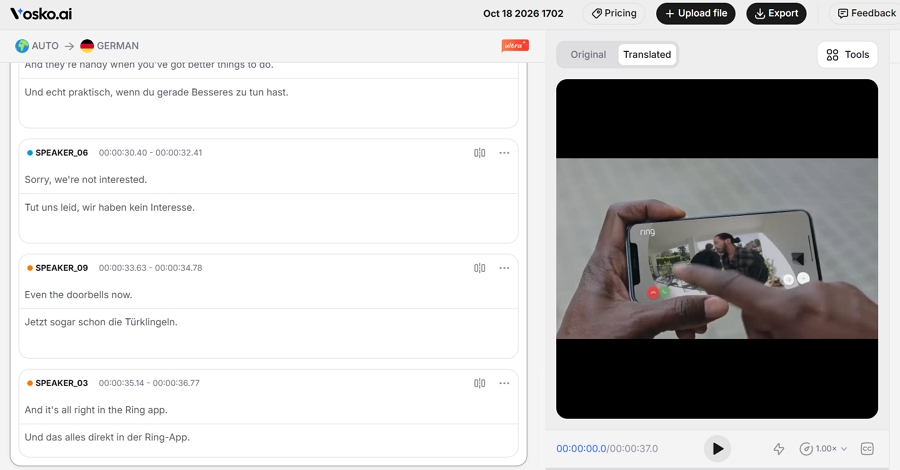
Where it could suit you better: on the same nine-speaker ad, Vosko kept all nine speakers apart with no wrong voices, translated the "sorry" that Perso missed, and kept the hesitations. It takes single videos up to 200 minutes on its Creator plan and above, longer than either Perso's or HeyGen's mid-tier limits, and it can remove subtitles already burned into a video before adding new ones.
Where it's weaker: Vosko has no lip sync, so it's the wrong choice for on-camera presenters. Every edit uses credits, it supports 94 dubbing languages, and it accepts only uploaded files, not links. Its Creator plan costs $31.50 a month for 45 minutes, about $0.70 per minute, close to Perso Creator and well above HeyGen.
Our direct comparisons with Perso AI and HeyGen go into more detail.
Yes. Perso AI now markets its dubbing product as Perso Dubbing. It's developed by ESTsoft, a South Korean software company.
Perso is cheaper to start, at $6.99 a month, or $3.49 for the first month. HeyGen is cheaper per minute once you dub more than a few short videos: its $29 Creator plan covers up to 150 minutes without lip sync, versus 40 minutes on Perso's $29 Creator plan.
Only from the Pro plan up, and only before the final video is generated. On HeyGen's Free and Creator plans, a finished translation can't be changed. Perso includes a script editor from its Starter plan.
It depends on the plan: 12 on the free plan, 82 on Starter and Creator, and 116 on PRO. Lip sync covers 82 languages. Some older pages, including Perso's own, still say 33+.
Perso AI is a sensible choice for creators and small teams who dub short clips and want to correct them without paying for a premium tier. In our test, it held the pacing well and kept the speakers' voices intact, though it missed a word and its editing workflow needs polish.
HeyGen is the stronger pick at scale and for on-camera content. It translated our ad more completely, produced cleaner lip sync on our interview, and costs far less per minute. Just budget for Pro if you need to fix translations before they go out.
Whichever you lean toward, run your own clip through both free plans first. Our results came from one ad, and your footage will show you more than any comparison can.