HeyGen and Rask AI show up on nearly every shortlist for translating existing videos, but they come from different directions. HeyGen is an AI avatar platform with a powerful video translator built in. Rask AI is a dedicated localization tool built around dubbing, voice cloning, and editing translated scripts.
We ran both on the same multi-speaker ad, tried each on a real interview clip, then checked each company's current documentation for pricing and plan limits. Most comparisons we found online quote prices that have since changed, so every price here was checked in late October 2026.
Disclosure: This comparison is published by Vosko, which makes a competing dubbing tool. Vosko isn't part of the head-to-head. We mention it briefly at the end as a third option.
HeyGen is the better choice for on-camera video where lip sync matters, and it's much cheaper per translated minute. The trade-off is control: on its Free and Creator plans, you can't edit a translation before or after it's generated.
Rask AI is the better choice when you expect to review and correct translations. Its editor was fast and complete in our test, and re-dubbing a corrected line is free. It costs more per minute, and lip sync starts on a $99 plan.
Neither tool handled our fastest multi-speaker clip perfectly. Both gave at least one woman a male voice.
| HeyGen | Rask AI | |
|---|---|---|
| What it is | AI avatar platform with a video translator | Dedicated video localization tool |
| Dubbing languages | 175+ languages and dialects | 135+ |
| Voice cloning | Yes | Yes, in 32 languages |
| Lip sync | All plans, including free | Creator Pro ($99/month) and above |
| Edit the translation | Proofread before generating, Pro and above | Line-by-line editor on all plans |
| Re-dub after an edit | Not available on Free or Creator | Free on paid plans |
| Entry paid plan | Creator, $29/month | Creator, $39/month |
| Cost per minute, entry plan, no lip sync | About $0.19 | About $1.56 |
| Max length per video | 30 min (Creator, Pro); 60 min (Business) | Not published |
| Languages per job | Up to 10 | Multiple on Business |
| Free plan | Up to 3 videos a month, exports with watermark | 3 minutes total, no export |
We tested both tools on their free plans in October 2026, translating English into German. Our tester speaks German, which let us judge the translations as well as the voices.
| HeyGen | Rask AI | |
|---|---|---|
| Shared clip | 37-second ad, 9 speakers, background music | Same clip |
| Settings on the shared clip | Audio-only dubbing (no lip sync), Dynamic Duration on | Voice cloning on, no lip sync |
| Second clip | 1-minute interview, 2 speakers, lip sync on (Speed engine) | 45-second cut of an interview, 4 speakers (1 woman, 3 men) |
| Test dates | October 20 | October 22–25 |
The shared ad is a deliberately hard clip: nine people, often one line each, with quick cuts. It's the best direct comparison we have.
The second clips were different videos, so we report them separately rather than comparing them line by line. Because both tools were on free plans, we couldn't test HeyGen's Precision engine or proofreading, or Rask's lip sync and translation dictionary. Where we describe those, we rely on each company's documentation.
| Nine-speaker ad | HeyGen | Rask AI |
|---|---|---|
| Speakers detected | Not visible on the free plan | 3 |
| Noticeable voice errors | 1 | 3 |
| Standalone "sorry" translated into German | Yes | Yes |
| Hesitations ("um," "uh") | Kept | Removed |
| Rushed German lines | None | Occasionally |
| Background music | Kept | Kept |
| Processing time | About 2 min | 3–5 min |
HeyGen got more of the voices right. Most of the ad played smoothly, but at about 0:20, a woman's line came out in a male voice. She speaks twice, and her two lines got two different voices. HeyGen's free plan has no editor, so we couldn't see how many speakers it detected.
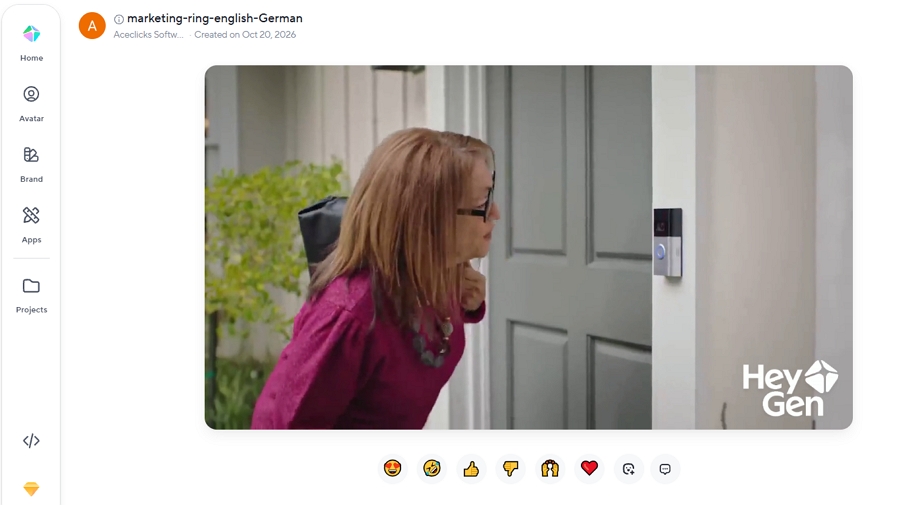
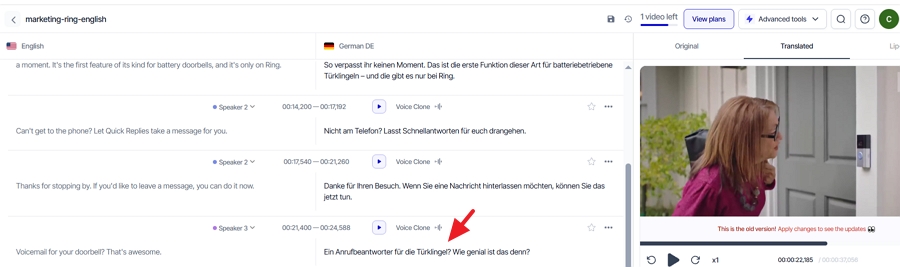
Rask's editor showed three speakers for nine people, and we heard three problems. At the very start, two different men were merged into one segment with one voice. At 0:20, the same woman got a male voice, as she did in HeyGen. At 0:33, a man's German voice sounded so unlike his original that he no longer seemed like the same person. Only two speakers kept a convincing clone of their own voice.
Pacing favored HeyGen, partly because of a setting. With Dynamic Duration on, HeyGen stretched the 37-second ad to 42 seconds so longer German lines didn't have to be rushed, and we couldn't spot where the time was added. Rask kept the original length, and a longer line occasionally sounded hurried. If your video must fit a fixed slot, such as a 30-second ad, turn Dynamic Duration off.

On calmer footage, both tools did well.
HeyGen's two-person interview kept both speakers' voices and tone, and the conversation sounded natural in German.
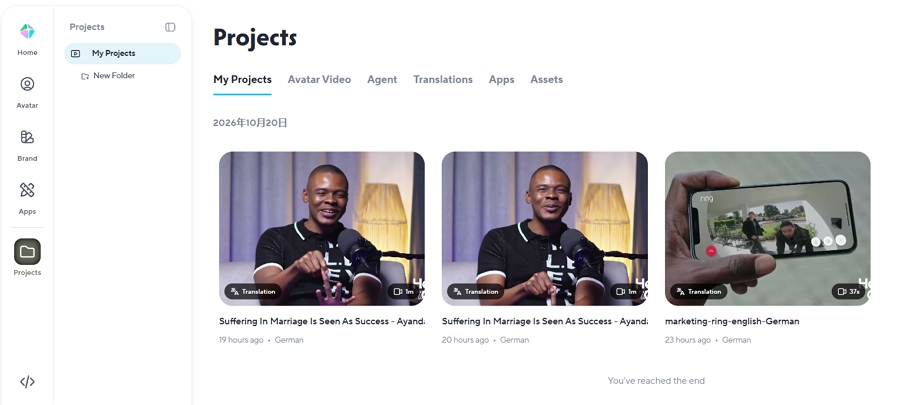
Rask's four-person interview was a stronger test, and Rask passed it. It found all four speakers, kept the woman's voice female, and gave the three men distinct, consistent voices. Short reactions such as "yeah" and "right" went to the right person. The one loss was laughter, which Rask dropped.
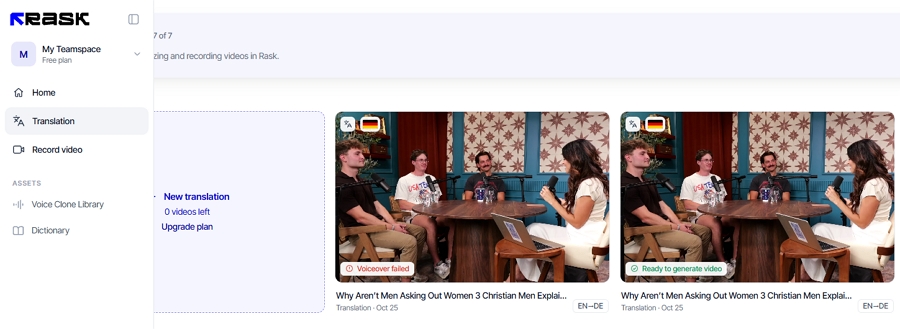
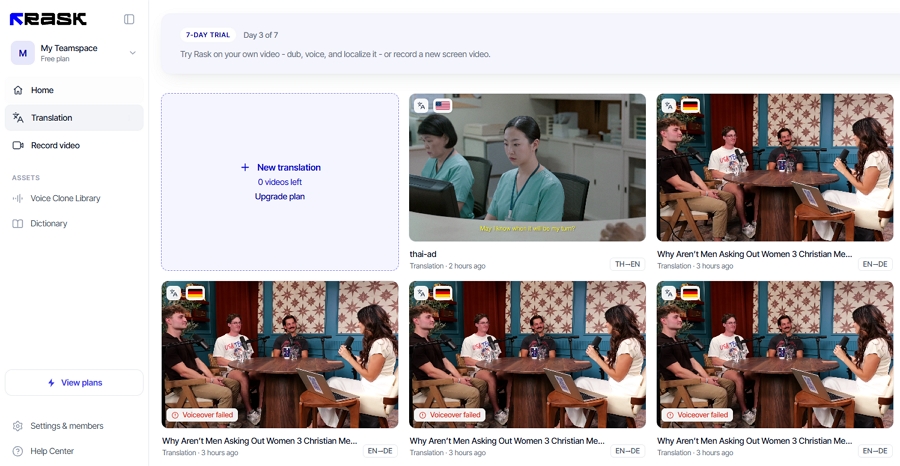
Getting that clip through Rask took some patience. The full one-minute file failed three times with a "Voiceover failed" message, without using any of our minutes. Trimming it to 45 seconds worked.
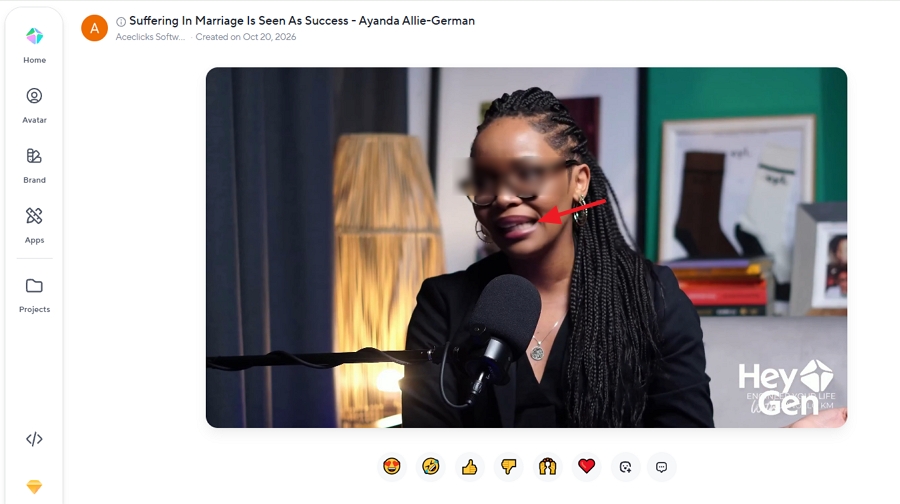
Lip sync is HeyGen's signature feature, and it's available on every plan, including the free one. On our interview clip, using the Speed engine, the speakers' mouths matched the German audio and held up through head turns. For a few seconds, the mouth area looked blurred, so it's worth checking close-ups before you publish.
HeyGen's paid plans add a Precision engine, which HeyGen says handles harder footage such as side angles and faces partly covered by hands or microphones. On paid plans, lip sync also costs more: HeyGen charges 4 credits per minute without lip sync, 6 with Speed, and 10 with Precision.
Rask offers multi-speaker lip sync from its Creator Pro plan at $99 a month. Each minute of lip sync uses three extra minutes on top of the dubbing minute, according to Rask's help center. It isn't available on the free trial, so we couldn't test it. Independent reviewers who have tried both, such as NemoVideo, generally rate HeyGen's lip sync as smoother.
If your videos are mostly voiceovers, screen recordings, or fast-cutting footage where faces are small, lip sync matters far less, and this section shouldn't decide your choice.
This is the biggest practical difference between the two, and it depends heavily on your plan.
HeyGen is built to translate and deliver. On the Free and Creator plans, there's no script editor at all: once a translation is generated, you can't change a word, a timestamp, or a voice. After generation, HeyGen offers extras such as watermark removal, upscaling, and AI clipping, but not script changes.
From the Pro plan up, HeyGen adds an Edit & Review step before the final video is generated. HeyGen says it shows the source and translation side by side and supports search and replace, timing changes, and voice swaps. Its brand glossary can force specific translations, protect terms, and set pronunciations. We couldn't test these on the free plan.
Rask gives every user a line-by-line editor, including on the free trial. We made five wording changes on the shared ad. Rask saved each one automatically in about five seconds and re-dubbed only the edited line, and we finished all five in under 30 seconds. Rask keeps a version history, and its help center says re-dubbing segments after edits doesn't use extra minutes.
| Editing task | HeyGen Free and Creator | HeyGen Pro and above | Rask AI (all plans) |
|---|---|---|---|
| Edit translated text | No | Yes, before generating | Yes, anytime |
| Edit source text | No | Not confirmed | Yes, then click Translate |
| Adjust timing | No | Yes | Yes, type the time |
| Split, merge, add, delete segments | No | Not confirmed | Yes |
| Change a line's voice or speaker | No | Yes (voice swap) | Yes; applying needs a paid plan |
| Glossary | Not on Free | Brand glossary | Translation dictionary, Creator Pro |
| Version history | No | Not confirmed | Yes |
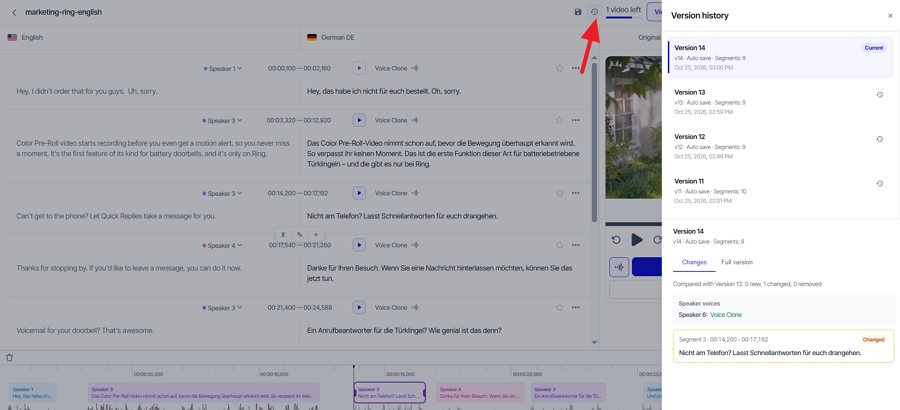
Rask's editor has limits too. When we tried to fix the ad's speaker errors, reassigning a line to another speaker required a paid plan, and adding a new speaker returned "Generation timed out." Reassigning also only helps if Rask has already cloned the correct voice, and in our ad most speakers weren't cloned.
HeyGen covers more ground: 175+ languages and dialects on paid plans, and 30+ on the free plan. You can translate one video into up to 10 languages at once, and group the results into a collection with an embeddable player that switches languages, which is handy for a website or LMS.
Rask dubs into 135+ languages, but voice cloning works in 32 of them. In the rest, you'll hear a stock voice rather than the original speaker. If keeping the speaker's voice matters, check that your target language is on Rask's cloning list. Translating into several languages, or several videos, in one batch starts on Rask's Business plan.
Both tools generate translated subtitles and can burn them into the video. Neither showed subtitles in its preview player during our test. HeyGen let us export an SRT file on the free plan. Rask includes SRT upload and download from Creator Pro.
Both accept local files, YouTube links, and Google Drive links. HeyGen also lets you reuse earlier uploads.
Rask's interface is focused on localization, so everything is a click or two away. HeyGen's translator sits inside a much larger avatar platform. The avatar tools didn't get in the way, but returning to the translation dashboard from a project took two steps.
The two price very differently. HeyGen sells monthly credits shared across all its features, and translation uses 4, 6, or 10 credits per minute depending on lip sync. Rask sells dubbing minutes, and lip sync uses three extra minutes per minute.
| Plan | Monthly price | Includes | Max per video | Notable features |
|---|---|---|---|---|
| HeyGen Creator | $29 | 600 credits | 30 min | Lip sync, 1080p |
| HeyGen Pro | From $49 | 1,000 credits | 30 min | Proofreading, 4K |
| HeyGen Business | $149 | 1,500 credits | 60 min | Proofreading |
| Rask Creator | $39 | 25 min | Not published | Voice cloning, editor |
| Rask Creator Pro | $99 | 100 min | Not published | Lip sync, SRT, translation dictionary |
| Rask Business | $249 | 250 min | Not published | Multi-video and multi-language batches |
Rask lowered its prices in October 2026. Several comparisons still ranking for this topic, including HeyGen's own, quote Rask's older plans, so check the date on any pricing you read.
| Scenario | HeyGen | Rask AI |
|---|---|---|
| No lip sync, cheapest plan | About $1.93 (40 of 600 Creator credits) | About $15.60 (10 of 25 Creator minutes) |
| Lip sync | About $2.90 with Speed, $4.83 with Precision (Creator) | About $39.60 (40 of 100 Creator Pro minutes) |
| Editable before final output | About $2.94 with Speed lip sync (Pro, from $49) | About $15.60 without lip sync (Creator) |
These figures are each project's share of the monthly plan, our own calculation. On price alone, HeyGen wins clearly. Two details narrow the gap a little: HeyGen's credits also pay for its avatar and other features, and Rask doesn't charge again when you re-dub lines after editing.
The free plans test different things. HeyGen's lets you judge the output; Rask's lets you judge the editor.
| HeyGen Free | Rask AI free trial | |
|---|---|---|
| Allowance in our test | Up to 3 videos a month, 1 minute each | 3 minutes total, 1 minute per video |
| Export | Yes, with a watermark | No, preview only |
| Lip sync | Yes | No |
| Script editor | No | Yes |
| Languages | 30+ | Full list |
HeyGen's documentation isn't consistent about the free plan. Its help center says the free plan includes one to three videos depending on region, each up to one minute, while the FAQ on its translator page mentions videos up to three minutes. Our free account allowed one-minute videos.
On Rask, a failed dub doesn't use your minutes, which helped when our interview clip failed three times.
Choose HeyGen if:
Choose Rask AI if:
Be careful with both if your videos cut quickly between many speakers. On our nine-speaker ad, each tool gave at least one speaker the wrong voice, and neither free plan offered a practical way to fix it. Check a busy clip before committing to either.
If neither tool fits, Vosko AI video translator, which publishes this article, is worth a look for one specific need: dubbing multi-speaker video in each person's own voice. Weigh our view of our own product accordingly.
On the same nine-speaker ad, Vosko identified all nine speakers and kept each voice correct. It also accepts single videos up to 200 minutes, processes up to 150 short videos in a batch, and can remove subtitles already burned into the picture.
It has clear trade-offs. Vosko has no lip sync, so HeyGen is the better choice for on-camera presenters. Each edit uses credits, unlike Rask's free re-dubs. It dubs into 94 languages, fewer than either tool here, and accepts local files only. Its Creator plan costs $31.50 a month for 45 minutes, about $0.70 per minute, which sits between HeyGen and Rask.
We've compared it directly with HeyGen and Rask AI if you'd like the details.
It depends on what's on screen. For a creator talking to camera, HeyGen's lip sync makes the translated version look more natural. For narrated tutorials, screen recordings, or podcasts, lip sync matters less, and Rask's editor makes it easier to fix terminology. Both accept YouTube links.
Yes, from the Creator Pro plan at $99 a month, and each minute of lip sync uses three extra minutes. We couldn't test it on the free trial. HeyGen includes lip sync on every plan, including the free one.
No. HeyGen's script proofreading starts on the Pro plan, and it happens before the final video is generated. On Free and Creator, the translation can't be changed once it's done.
HeyGen, with 175+ languages and dialects on paid plans. Rask dubs into 135+ languages, with voice cloning in 32.
HeyGen is the stronger all-rounder for on-camera video: better lip sync, more languages, smoother pacing on our ad, and a much lower price per minute. Its weak point is control on the cheaper plans.
Rask is the better tool for people who edit. Its editor was the fastest we used, re-dubs after edits are free, and it handled a four-person interview cleanly. It costs more, and its lip sync sits behind a $99 plan.
On busy, many-speaker clips, test before you commit. Both made speaker mistakes on our hardest video.