VMEG and Vosko are built for the same job: take a finished video, clone the voices, and hand back a dubbed version. That makes it a closer match than avatar platforms or voice labs, and the differences come down to details you only see by running real footage through both.
So we did. We paid for VMEG's $1.50 three-day trial, dubbed a crowded ad and a four-person interview from English into German, edited the results, and tried its lip sync on a two-person clip.
Disclosure: Vosko publishes this review. VMEG came out ahead in several of our tests, and we say so where it did.
Do you need lip sync? If your videos show people talking to camera, VMEG is the only one of the two that offers it. Vosko doesn't.
How much will you fix after the first pass? VMEG let us rewrite, retime, split, and re-voice lines without spending a single credit. Vosko charges 10 to 20 credits per edit, depending on the model, though it got more of the busy ad right the first time.
What do you need to hand off? If you finish videos in an editing app, Vosko exports separate voice and background tracks and lets you burn subtitles in. VMEG gives you the mixed audio, the video, and subtitle files.
On price, VMEG's lower monthly tiers cost less per minute than Vosko's Ultra Mode, the model we tested. At the top tiers the two are level, and Vosko's newer Flash model is slightly cheaper per minute across its plans.
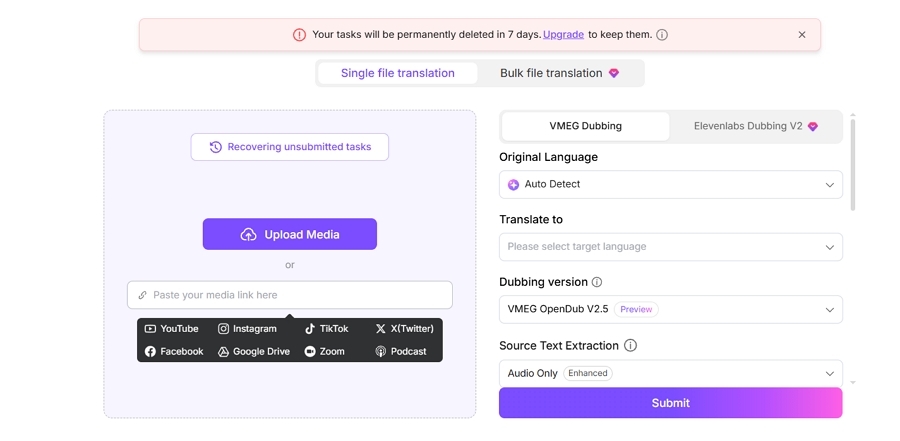
VMEG accepts more kinds of input. Besides local files, it takes links from YouTube, TikTok, Instagram, X, Facebook, Google Drive, Zoom, and podcasts. Vosko's translation workflow takes uploaded files only.
The language lists differ too. VMEG advertises 170+ languages; the dubbing menu in our account listed 145 locales, which come to about 85 languages once regional variants are merged. Vosko dubs into 94 languages.
Both tools cloned the original speakers by default, and VMEG confirmed German as a cloning language. VMEG also has a library of stock AI voices you can swap in later.
One setting stood out on VMEG's upload screen: a Remove Subtitles toggle for burned-in captions, priced at 30 credits a minute on its pricing page. Vosko offers the same kind of removal. We didn't test VMEG's version this time.
VMEG's FAQ puts the upload limit at two hours and recommends staying under one, while its long-video dubbing page says it handles two-hour videos "and longer content."
Our uploader didn't show a limit, and we didn't test long files. Vosko accepts videos up to 200 minutes on Creator and above. For batches, VMEG says up to 20 videos at once, and Vosko takes up to 150 videos of six minutes or less on paid plans.
Our benchmark is a 37-second product ad with nine speakers and music underneath. It has caught out most tools in our Perso AI alternatives test, usually by handing one person's line to the wrong voice.
VMEG didn't make that mistake. Every voice it produced belonged to the right person, the music stayed in, and the speakers' emotion and tone carried over into German. No line sounded rushed.
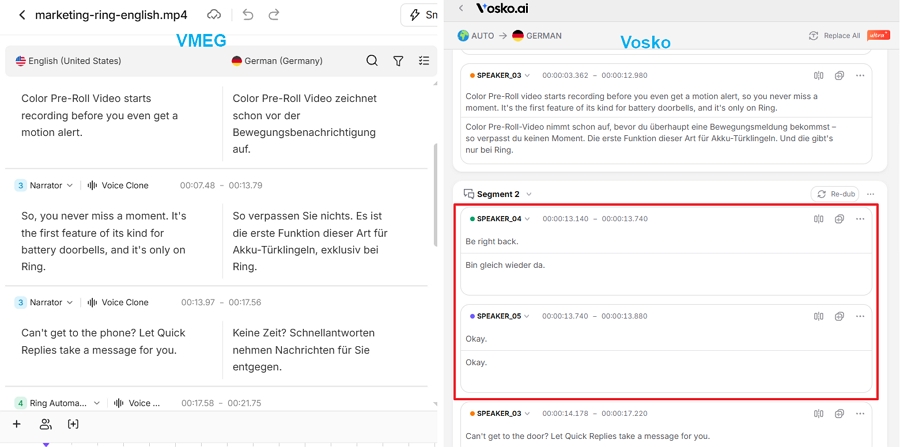
The misses were in what it didn't catch. Its editor listed six speakers for the ad's nine people. Two quick lines around 0:13, "Be right back" and "Okay," weren't picked up at all, and those moments came out silent in the German version. A quiet "hmm" at 0:24 was dropped, so one of the ad's two hesitations survived. A speaker who only says "sorry" was left in English.
Vosko caught all nine speakers, both hesitations, and the "sorry."
| Nine-speaker ad | VMEG | Vosko |
|---|---|---|
| Speakers in the editor | 6 | 9 |
| Short lines left silent | 2 | 0 |
| Lines given the wrong voice | None | None |
| "Sorry" translated | No | Yes |
| Hesitations kept | 1 of 2 | 2 of 2 |
| Background music | Kept | Kept |
| Processing time | About 5 min | About 3–5 min |
| Credits used | 60 | 70 (includes subtitles) |
The interview has one woman and three men, plenty of "yeah" and "right," and some laughter. Here the two tools were level.
VMEG found all four speakers and kept the three men distinct. Short reactions went to the people who said them, the laughter stayed, and the pacing was relaxed. The woman kept a female voice throughout, and our tester found no translation errors. It took about five minutes and 60 credits, against roughly three minutes for Vosko.
VMEG bills anything under a minute as a full minute, so this 55-second clip cost the same as the 37-second ad. Vosko charged a full minute for both clips too, but it bills videos of 30 seconds or less as half a minute.
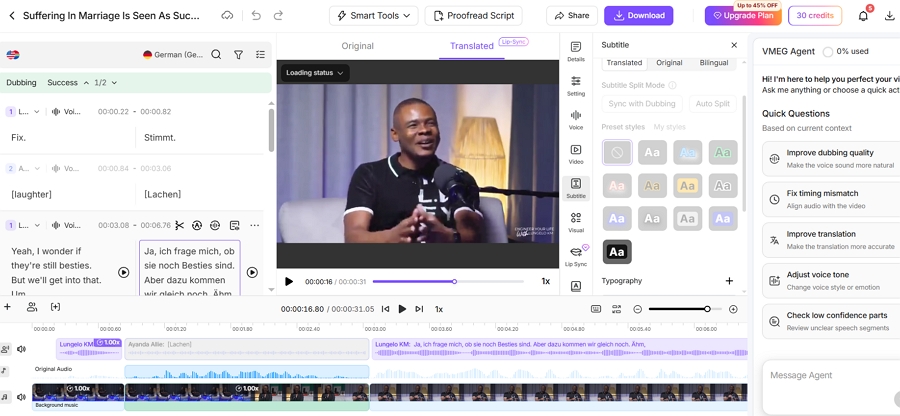
This is where VMEG impressed us most. We made five edits to VMEG's interview dub: replace a word across the script, give a line to another speaker, push a start time back half a second, split a line, and re-voice the result. Then we compared that with what Vosko's editor offers.
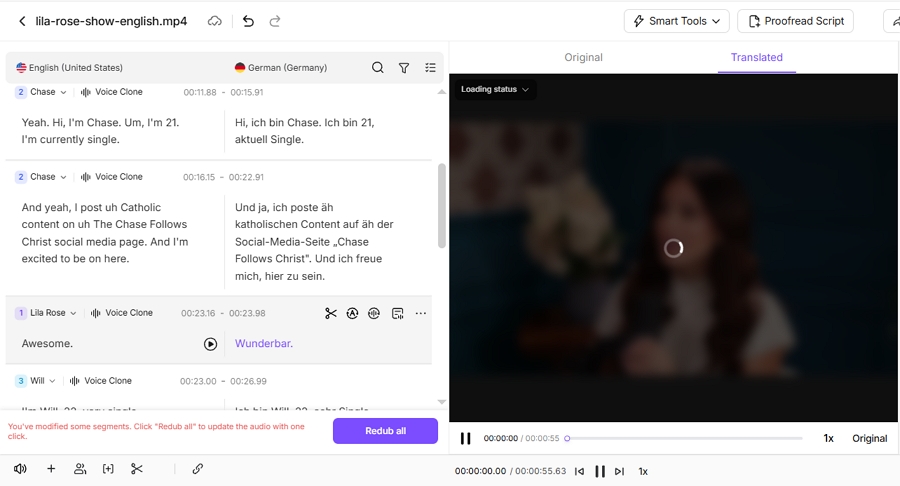
VMEG handled all five. Find and Replace sits in the editor, the speaker can be switched from the start of each line, times can be typed in directly, and a scissors button splits a segment. Re-dub sentence regenerates only the lines you changed.
None of it cost credits. We checked the balance after several rounds, and it never moved. The whole pass took about five minutes.
The layout helps. Source and translation sit side by side, edits save automatically, and a confirm button keeps a re-dub from firing by accident. VMEG also offers AI retranslation, and an AI agent panel on the right of the editor suggests prompts such as "Fix timing mismatch," "Adjust voice tone," and "Check low confidence parts." You can also swap in a stock voice from its library.
| Edit | VMEG | Vosko (Ultra Mode) |
|---|---|---|
| Find and replace | Yes | Yes |
| Reassign a speaker | Yes | Yes, or copy another speaker's voice |
| Adjust timing | Yes | Yes |
| Split a line | Yes | Yes |
| Re-voice edited lines | Yes, changed lines only | Yes |
| AI retranslation | Yes | Not in Ultra Mode |
| Cost per edit | None in our test | 20 credits (Flash: 10) |
| Undo or version history | No | Undo or save after each edit |
Vosko can do nearly the same set of fixes, but each one draws on your minutes. In Ultra Mode an edit costs 20 credits, roughly 17 seconds of dubbing; on Vosko's Flash model it costs 10. German is one of Vosko's Ultra Mode languages, which also rules out AI retranslation.
Vosko does have one safeguard VMEG lacks: after each edit, it asks you to save or undo the change. In VMEG, a bad replace-all stays until you fix it by hand.
Vosko has no lip sync, so this section is VMEG's alone. We ran it on a 30-second cut of the two-person interview from our Perso AI vs HeyGen comparison, including the moment where one man sticks his tongue out.
The mouths matched the German well, but the area around them was slightly soft. When the tongue came out, VMEG erased it, as HeyGen did on the same footage. Shortly before that, a line spoken by someone off camera was synced onto the mouth of the person on screen, who wasn't talking.
We scored it 3.5 out of 5. In our earlier tests on the full interview, HeyGen earned 4.5 and Perso AI 4. The clip lengths differ, so read those scores as context rather than a strict ranking. Even so, VMEG's lip sync looked usable rather than best in class.
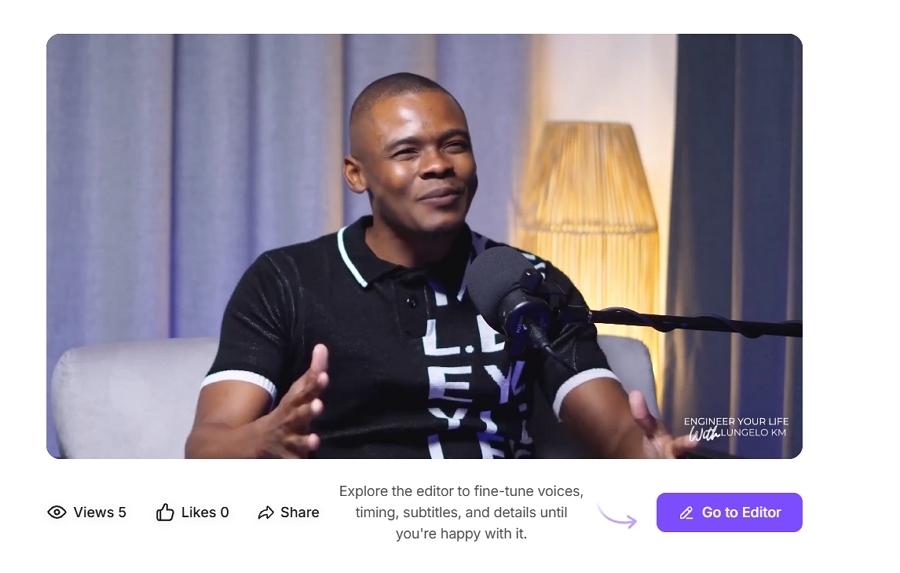
The cost was 150 credits for 30 seconds: 60 for the translation, which is billed as a full minute, plus 90 for lip sync. VMEG's own pages give three different add-on rates, 30, 60, and 90 credits a minute. Only 90 matched our bill.
Lip sync itself took about five minutes. The translation before it took around fifteen.
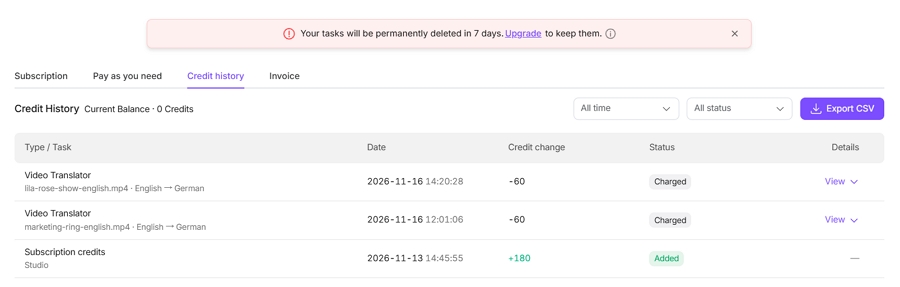
One billing problem came up along the way. Our first attempt stopped with a message that the job needed 90 credits and we had 60. When we went back to the dashboard, those 60 credits were gone, and the deduction didn't appear in the usage history. They still hadn't been returned when we finished testing, so we bought another trial to complete the test.
VMEG's subtitle options are more detailed than we expected. It exports two kinds of SRT, one split for reading and one split by spoken line, for both the original and the translation.
Audio is thinner. You get the dubbed mix as an M4A, plus a ZIP with each sentence as its own clip, but no separate voice or background track. Vosko exports the mix, the voices alone, or the background alone, which matters if you rebalance music or replace a voice in an editing app.
| Export | VMEG | Vosko |
|---|---|---|
| Video | MP4 | MP4 |
| Subtitles | Reading and spoken-line SRT, original and translated | Original and translated SRT |
| Audio | Mixed M4A; per-sentence clips (ZIP) | Mixed, voices only, or background only |
| Burn subtitles into the video | No option found | Yes |
| Resolution choice | None | Original, high, or standard |
| Watermark on paid plans | No | No |
| Alert when the job finishes | None we saw |
The missing alert is a small thing until a job runs long. With lip sync, ours took around 20 minutes, and we had to keep checking back.
VMEG and Vosko both charge by the minute of source video and round partial minutes up. Short clips are the exception: Vosko bills a video of 30 seconds or less as half a minute, or 35 credits in Ultra Mode, while VMEG charged our 30-second clip a full 60. Watch the edge: a clip VMEG's player showed as 1:00 was quoted at 120 credits, the price of two minutes. VMEG uses 60 credits a minute for dubbing. Vosko uses 70 in Ultra Mode and 50 on its Flash model, both including subtitles.
VMEG was running a holiday sale when we checked on November 16, 2026, with up to 45% off annual plans. Vosko had no sale running, only its usual annual discount of up to 20%. To keep the comparison even, the table uses monthly prices.
| Monthly plan | Price | Dubbing included | Per minute |
|---|---|---|---|
| VMEG Starter | $20 | 36 min (2,160 credits) | About $0.56 |
| VMEG Creator | $70 | 129 min (7,780 credits) | About $0.54 |
| VMEG Business | $180 | 346 min (20,770 credits) | About $0.52 |
| Vosko Starter, Ultra Mode (tested) | $11.50 | 15 min (1,050 credits) | About $0.77 |
| Vosko Starter, Flash | $11.50 | 21 min | About $0.55 |
| Vosko Creator, Ultra Mode (tested) | $31.50 | 45 min (3,150 credits) | About $0.70 |
| Vosko Creator, Flash | $31.50 | 63 min | About $0.50 |
| Vosko Pro, Ultra Mode (tested) | $94.50 | 150 min (10,500 credits) | About $0.63 |
| Vosko Pro, Flash | $94.50 | 210 min | About $0.45 |
| Vosko Studio, Ultra Mode (tested) | $154.50 | 300 min (21,000 credits) | About $0.52 |
| Vosko Studio, Flash | $154.50 | 420 min | About $0.37 |
Prices are from the VMEG and Vosko pricing pages; per-minute figures are our math. During the sale, VMEG's annual Starter plan was $96 a year for 12,960 credits, or about $0.44 a minute. Vosko's annual Creator plan is $300 a year, or about $0.39 a minute with Flash.
Vosko launched Flash on November 12, 2026, after our Vosko tests were done. Like Ultra Mode, it clones the original voices and supports German, and its 50 credits a minute include subtitles. We haven't tested its output, so the quality results in this review apply to Ultra Mode only, and the Flash costs here use its published rates of 50 credits a minute and 10 credits per edit.
Say you publish four five-minute videos a month in German, and you fix about ten lines in total.
For audio-only dubbing at this volume, VMEG's $20 Starter plan is the safest fit, though Vosko's Flash model comes close on Starter. Once lip sync is on, VMEG costs $70, more than twice Vosko's Creator plan, but Vosko can't do lip sync at all.
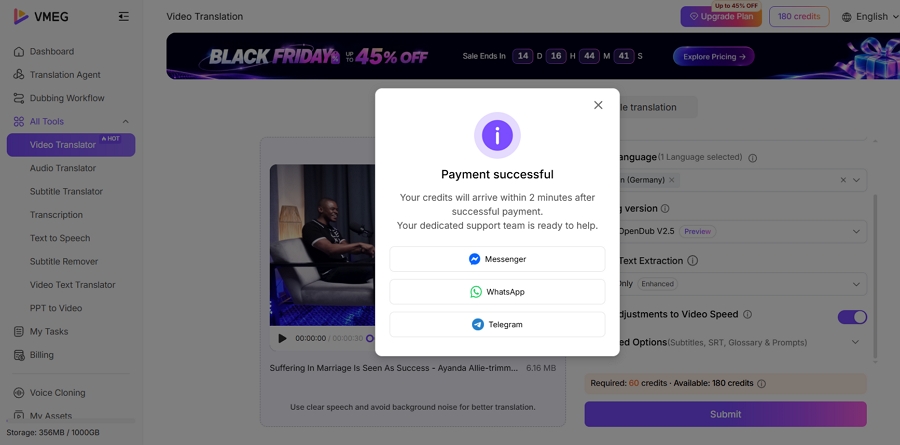
VMEG's FAQ mentions free trial credits, but our new account had none. The way in was a three-day trial for $1.50 with 180 credits, enough for three minutes of dubbing. Unless you cancel, it renews as the $96 annual Starter plan. Vosko's free credits covered about 2 minutes and 50 seconds of dubbing, with a watermark.
| Clip | Length | Speakers | VMEG | Vosko |
|---|---|---|---|---|
| Product ad with music | 0:37 | 9 | 3-day trial, Nov 16, 2026 | Creator, Ultra Mode, Oct 2026 |
| Interview | 0:55 | 4 (1 woman, 3 men) | 3-day trial, Nov 16, 2026 | Creator, Ultra Mode, Oct 2026 |
| Lip sync interview | 0:30 cut | 2 | 3-day trial, Nov 16, 2026 | Not offered |
Both dubs went from English into German, which our tester speaks, so we judged the translation along with the voices. We kept the default settings and didn't tell either tool how many people were speaking.
We bought VMEG's $1.50 three-day trial on November 13 and a second one on November 16, after the billing problem described above. We didn't test VMEG's burned-in subtitle removal, other target languages, or videos longer than a minute.
Vosko was tested in Ultra Mode in October and VMEG in November, so each result reflects the version available at the time. Vosko's Flash model came out after our tests.
One person judged all the results. With other languages, longer footage, or busier audio, either tool may do better or worse than it did here.
Yes, by default. In both of our dubs, VMEG cloned each speaker, including into German. You can also switch a speaker to one of its stock AI voices.
Not really. VMEG's FAQ mentions free trial credits, but our new account had none. The cheapest way to try it is the $1.50 three-day trial, which renews as an annual plan unless you cancel.
Yes. You can change the text, retime or split lines, switch speakers, retranslate, and re-voice only what you changed. None of our edits used credits. There's no undo.
In our nine-person ad, neither tool gave anyone the wrong voice. Vosko listed all nine speakers and kept both hesitations and a one-word line; VMEG listed six, left two quick lines silent, and dropped one hesitation and the "sorry."
| Your videos | Better fit | Why |
|---|---|---|
| Videos where lip sync matters | VMEG | It has lip sync; Vosko doesn't |
| Regular uploads you correct by hand | VMEG | Edits were free and the editor is fuller |
| Short audio-only dubs on a budget | VMEG | Cheapest plan that fits a light month; Vosko Flash is close per minute |
| Busy ads with many quick speakers | Vosko | Caught every speaker and small sound |
| Projects finished in an editing app | Vosko | Separate voice and background tracks, burned-in subtitles |
| Webinars or courses over two hours | Vosko | Vosko lists 200 minutes per video, VMEG two hours; based on published limits, not tested |
VMEG is the stronger all-rounder of the two, and for many creators it will be the better buy. Vosko earns its place on crowded footage and on projects that need clean stems at the end. If that's your work, try Vosko on your busiest clip and compare the two side by side.