For viewers wanting an instant fix, go to your TikTok app settings, select Language, choose English as your translation language, and enable Always Show Translations. This automatically converts supported foreign captions and descriptions into English.
For creators looking to reach the lucrative English speaking market, relying on TikTok's native text translation is a poor strategy. You should use a dedicated AI dubbing platform like Vosko to generate perfectly synced English voiceovers and hardcoded subtitles before uploading your video.
When you encounter foreign content on your feed, TikTok provides native translation tools designed for quick context. However, you must understand exactly what the platform translates and where its limitations lie.
TikTok natively translates descriptions and auto generated captions. The platform currently supports automatic translation in 52 languages, including English, Spanish, French, German, Portuguese, Japanese, Korean, Arabic, Hindi, and Chinese.
Before relying on this feature, you should be aware of a few technical realities. First, the automated English translation only appears if the original creator allowed TikTok to generate auto captions during their upload process. If they disabled this option, or if the foreign text is permanently burned into the video pixels by a third party editor, the native translation will fail.
Furthermore, TikTok's automatic language detection frequently misinterprets mixed languages, heavy regional slang, or niche dialects. The built in subtitle translation is excellent for getting a quick idea of what a video is about, but it is not reliable enough to serve as a high quality subtitle track.
Here is how to set up automatic English translations across your mobile and desktop devices.
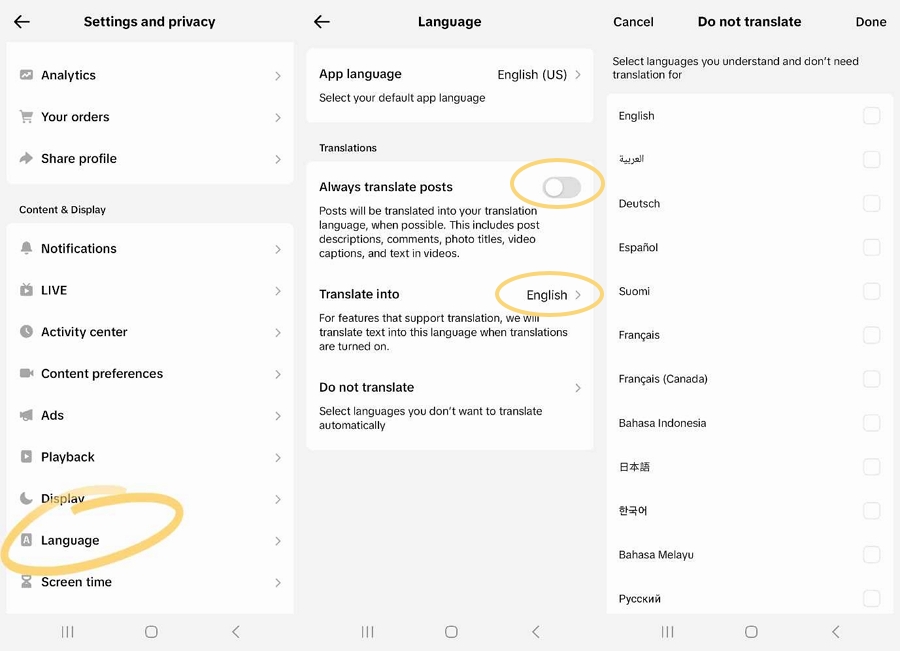
1. Go to your profile section on TikTok and click on the menu button in the top right corner.
2. Select Settings and Privacy.
3. Under the Content and Activity section, select Language.
4. Under the Translate into menu, choose English as your target translation language.
5. Toggle on Always translate posts. This ensures descriptions and captions will always translate, except for specific languages you choose to exclude.
The web version of TikTok handles translation settings differently, applying them directly within the video player interface.
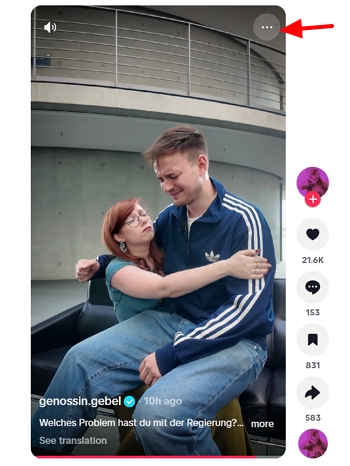
1. On the video you are watching, click the three dot menu icon in the top right corner of the video player to open the settings panel.
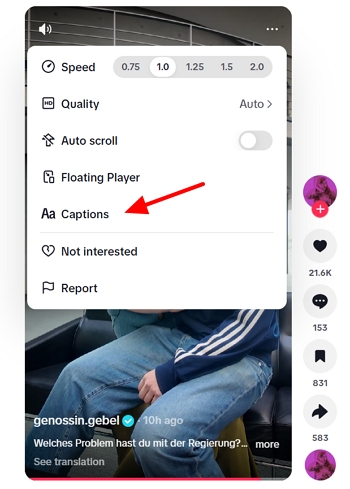
2. Select Captions.
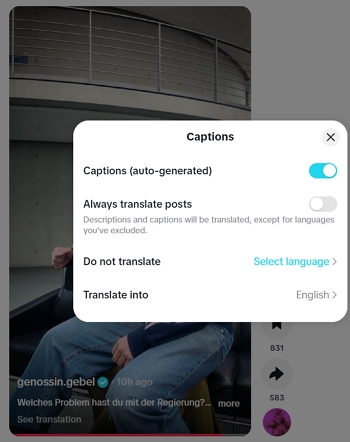
3. Toggle on Captions (auto-generated).
4. Toggle on Always translate posts. This ensures descriptions and captions will always translate, except for specific languages you choose to exclude.
5. Under the Do not translate menu, you can select specific languages that you want to keep in their original format.
6. Under the Translate into menu, select English to force the platform to convert foreign descriptions and captions into English text.
You should now see English subtitles on the TikTok video.
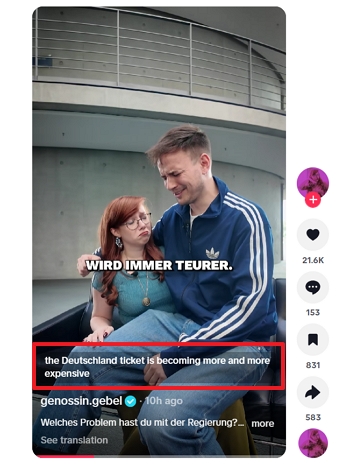
As a content creator or brand, relying on viewers to manually toggle translation settings is a flawed growth strategy. The English speaking market commands the highest CPMs (Cost Per Mille) and purchasing power on the platform.
The United States alone holds the largest TikTok audience globally, with over 136 million active users. When combined with audiences in the United Kingdom, Canada, and Australia, this represents a massive, highly lucrative demographic.
While TikTok has a global user base, viewer behavior is highly sensitive to friction. Captions are non-negotiable for accessibility and retention. Videos with accurate captions average 12% higher retention than those without, and the gap widens for educational or information-dense content.
However, this retention benefit disappears when audiences are forced to read poorly synced or inaccurate machine generated text. If a subtitle track lags behind the audio or mistranslates cultural nuances, users will simply swipe to the next video because the cognitive load is too high.
To maximize global ROI and algorithmic reach, you must localize your content before hitting publish. By providing hardcoded English subtitles or a seamless English voice dub, you remove all friction for the viewer.
This increases watch time, boosts engagement rates, and signals to the algorithm that your content is viable for the English speaking For You Page.
Translating subtitles is a good start, but audio dubbing is the ultimate standard for video localization. Viewers connect with emotion, tone, and pacing. For creators who want to fully localize their content, Vosko provides an advanced AI localization engine designed specifically to handle complex video audio.
Unlike basic text translators, Vosko video translator supports translation across 99 languages while utilizing advanced voice cloning technology. This means the English translation will sound exactly like your original voice, preserving your natural emotion and delivery.
Furthermore, the software uses speaker diarization to accurately identify and translate multiple speakers in the same video, all while keeping your original background music and sound effects completely intact.
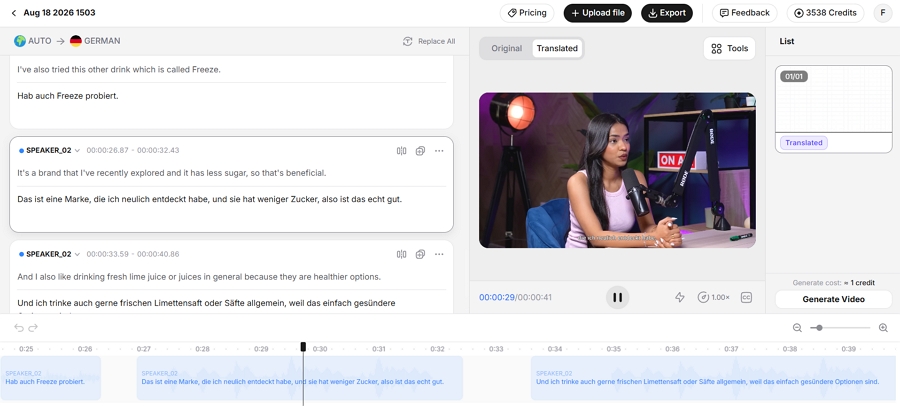
Vosko also supports syncing the translated video subtitles and allows full manual editing of the translated text blocks.
It is important to note that Vosko is a premium, professional grade platform. Its pricing model typically operates on tiered subscriptions or usage based credits depending on your video processing volume.
While casual creators might find the cost prohibitive for one off videos, professional creators and global brands will find that it offers a massive return on investment by effectively replacing expensive human translation agencies and voice actors.
Steps to translate TikTok videos with Vosko:
1. Log into your Vosko workspace and upload your original TikTok video file.
2. Select your source language and set the target output language to English.
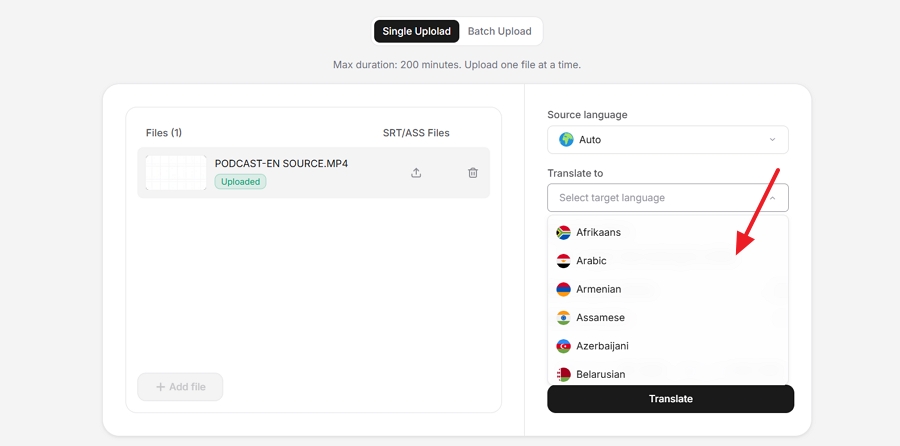
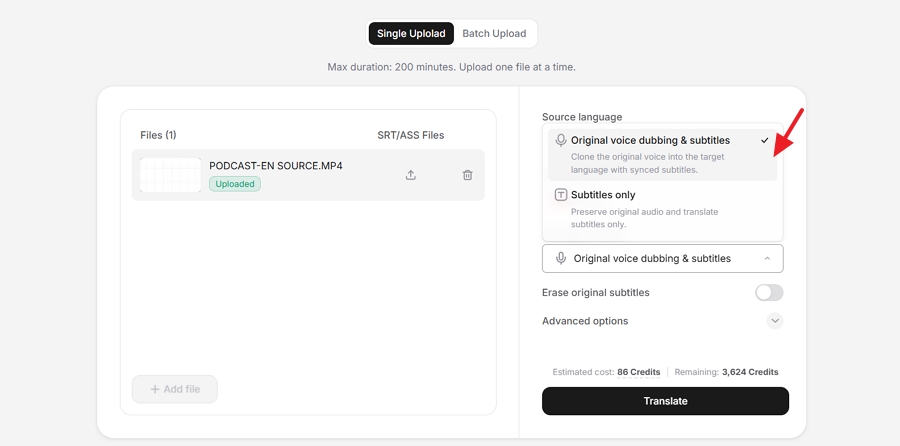
3. Choose the Original Voice Dubbing and Subtitles mode. This instructs the AI to clone your vocal tone and isolate the background audio track.
4. Click translate and allow the engine to process the translation.
5. Open the built in editor to review the translation results. Vosko allows you to manually edit the translated English text segments to fix any brand specific terminology. The AI audio will automatically adjust to match your text edits.
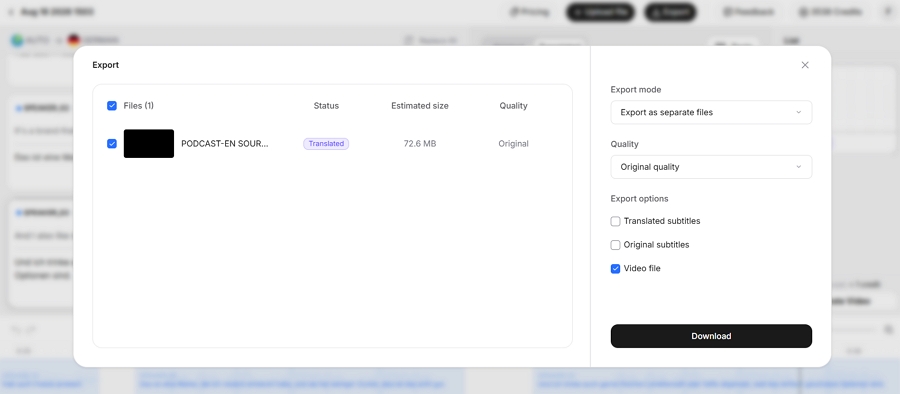
6. Render the final file and export a fully localized video, complete with your cloned English voiceover, original background music, and synced English subtitles ready for TikTok.
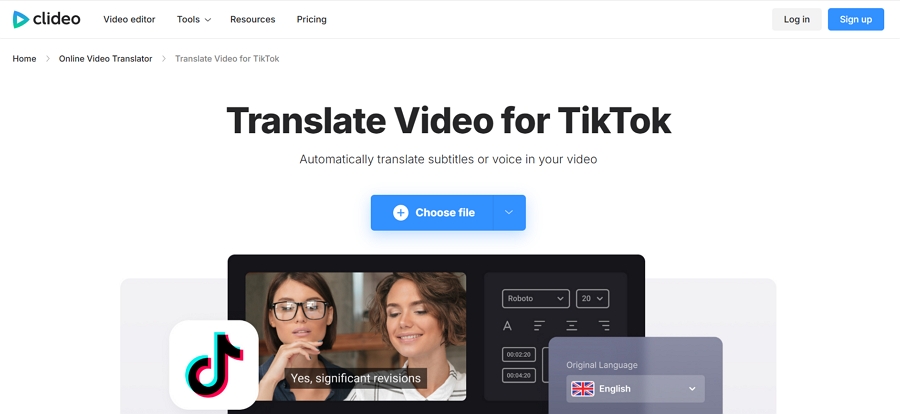
If you prefer a browser based editor and need basic text and audio translation, Clideo is a popular alternative. Clideo offers a suite of online video editing tools, including an auto translation feature for both subtitles and voiceovers.
However, its audio translation capabilities are rudimentary compared to Vosko. Clideo does not support voice cloning. Instead of preserving your natural tone and emotion, it forces you to manually select a generic system voice.
Furthermore, it lacks speaker diarization. If your TikTok video features multiple people, Clideo will apply one single voice track to every speaker—often resulting in jarring errors, such as assigning a default male voice to a female speaker.
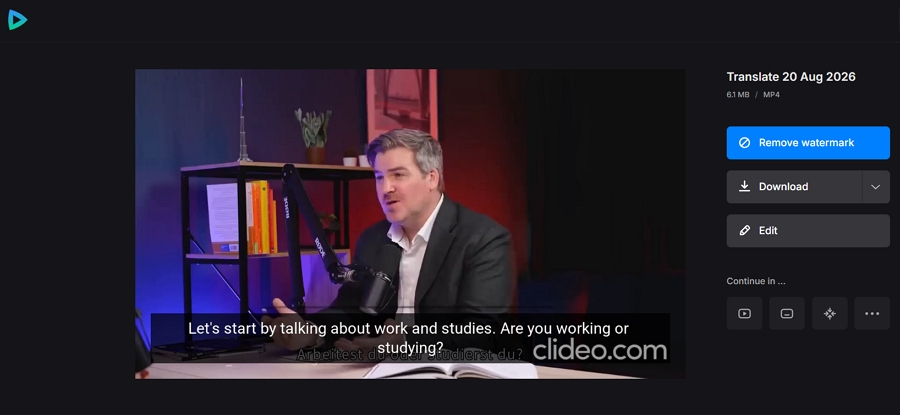
Additionally, Clideo operates on a freemium pricing model with strict limitations on its free tier. If you use the free version, your exported video will carry a prominent Clideo watermark, and you will face file upload size limits.
To remove the watermark and export in premium quality, you are required to upgrade to a paid Clideo Pro subscription.
Steps to translate TikTok videos with Clideo
1. Open your browser, navigate to the Clideo tiktok translation tool, and upload your video file.
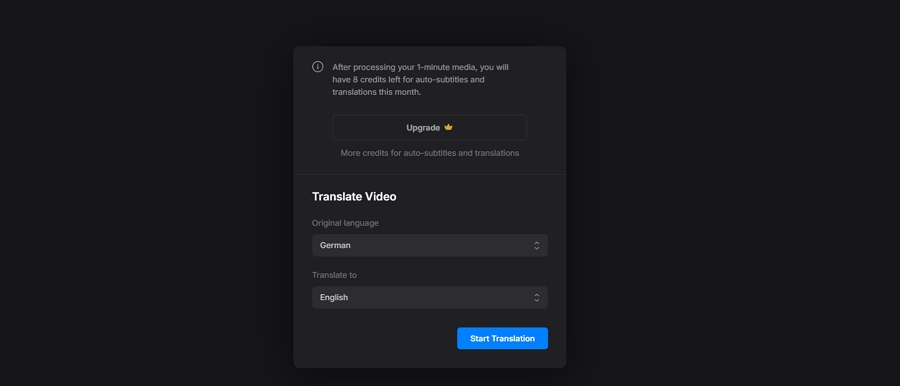
2. Choose English as your target language to translate the text blocks. And click Start translation and allow Clideo to process the translation.
3. Use the built in visual timeline editor to adjust the text timing and change the translations.
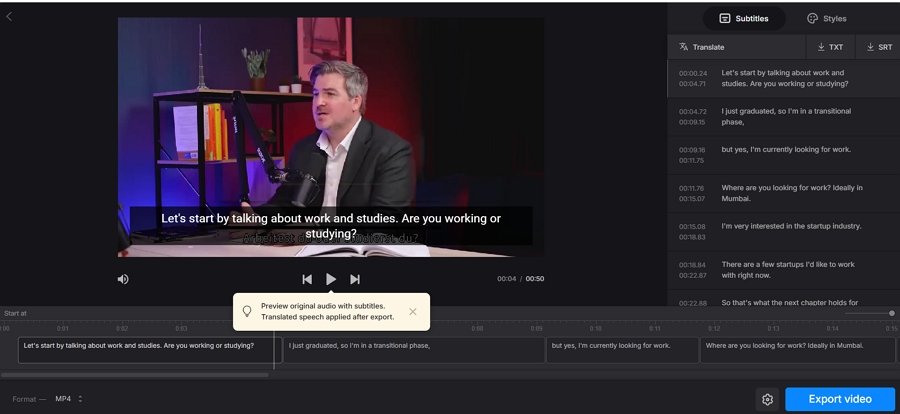
4. If you want to translate the audio, click the Settings icon and enable the Change speech option and manually pick one of Clideo's default system voices to read the translated text.
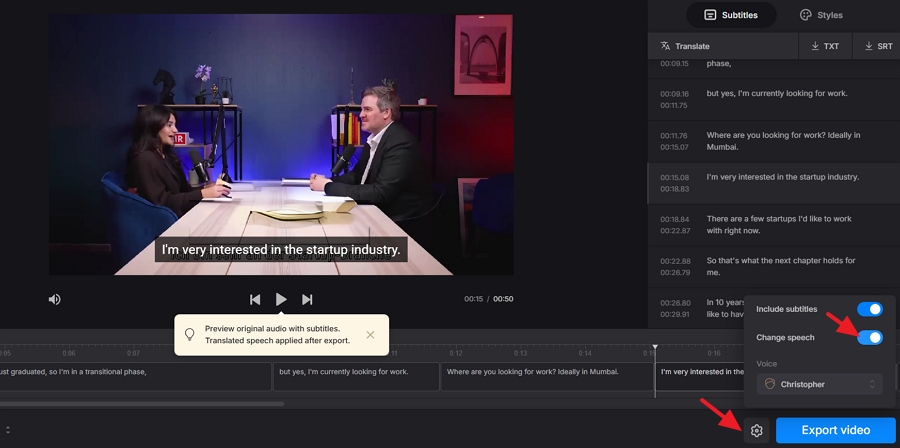
5. Click the Export video button to export the fully rendered video with the English text permanently burned into the footage and the new system voice track applied.
Can TikTok automatically translate video audio into English?
No. TikTok only provides native translation for text elements like video descriptions and soft captions. If you want to translate the actual spoken audio of a video into English, you must use a third party AI dubbing tool like Vosko.
Why is my TikTok not translating captions to English?
If your TikTok is not translating captions, check your Language settings to ensure Always Show Translations is enabled and English is selected as your target language. Additionally, native translation will not work if the creator disabled auto captions during upload, or if the foreign text is hardcoded directly into the video pixels.
How accurate is TikTok native subtitle translation?
TikTok's native translation is functional for casual viewing across its 52 supported languages, but it lacks professional accuracy. It frequently mistranslates heavy regional slang, mixed languages, and fast paced dialogue, making it unsuitable for brand localization.
What is the difference between translating subtitles and voice dubbing on TikTok?
Translating subtitles converts spoken foreign words into on screen text while keeping the original foreign audio. Voice dubbing replaces the original foreign audio track with an English audio track, allowing viewers to listen in English without relying on on screen text.
Does translating TikTok subtitles improve video reach in English speaking countries?
Yes. Providing accurate English subtitles or voice dubbing increases video watch time and completion rates among English speaking audiences. Higher engagement signals to the TikTok algorithm that your video is suitable for wider distribution on the English For You Page.
Breaking into the global TikTok algorithm requires more than just enabling a toggle in your account settings. For viewers, TikTok's native text translation offers a quick and easy way to understand foreign descriptions and captions across 52 supported languages.
However, for creators aiming to capture the massive 136 million strong US audience and other English speaking markets, relying on basic auto captions is a massive risk.
By utilizing advanced localization platforms like Vosko to generate cloned voice dubs, or tools like Clideo for text-only translations, you guarantee a frictionless viewing experience that drives retention, engagement, and global growth.