Creating video content in only one language limits your audience growth. Traditional video dubbing required hiring voice actors, renting sound studios, and spending weeks in audio post production.
Today, creators and global brands use AI video dubbing to translate their content instantly while maintaining the exact vocal tone and emotion of the original speaker. This guide breaks down the exact steps to dub a video using AI effortlessly.
Video content is estimated to account for more than 82% of global IP traffic, making video the dominant format for online communication. Yet creators and companies that publish content in only one language often limit their ability to reach international audiences.
Traditional dubbing requires voice actors, recording studios, and lengthy production cycles. Depending on the project scope, costs can range from tens to hundreds of dollars per finished minute, creating a significant barrier for many creators and businesses.
Recent industry data shows a dramatic shift toward AI-powered video localization:
As a result, AI video dubbing has evolved from an emerging technology into a core growth strategy for creators, SaaS companies, online educators, and global marketing teams.
AI video dubbing is an automated pipeline that replaces the spoken dialogue in a video with translated audio. Unlike simple text to speech generators, modern dubbing platforms run multiple specialized neural networks simultaneously.
Your entire localization workflow depends on selecting a platform that supports your required export formats and preserves natural audio quality. When evaluating platforms, prioritize tools that offer true voice cloning over generic stock AI voices.
Here's a comparison of popular AI dubbing tools:
| Tool | Key Dubbing Features | Preserves Original Voice | Supported Export Formats | Starting Price |
|---|---|---|---|---|
| Vosko | Voice cloning, 99+ languages, automatic stem isolation, time warping, subtitle translation, proofreading editor | Yes (Default) | MP4, MP3, WAV, SRT, ASS | Free trial available; paid plans from $28.83/month |
| ElevenLabs | Multilingual voice synthesis, custom voice cloning, high emotional fidelity | Yes | MP3, WAV | Free trial available; paid plans from $6/month |
| Rask AI | Video translation, voice cloning, lip sync features, film dubbing | Yes | MP4, SRT, TXT | Free trial available; paid plans from $60/month |
| Vozo | Voice cloning, 160+ languages, lip sync, subtitle translation, proofreading editor | Yes | MP4, MP3, WAV, SRT, VTT | Free trial available; paid plans from $29/month |
| VEED | AI dubbing in 50+ languages, auto subtitles, text to speech avatars | No (Stock voices) | MP4, MP3, SRT | Free plan available; paid plans from $20/month |
| Maestra | Voice cloning, 125+ languages, lip sync, subtitle translation, proofreading editor | No (Stock voices) | MP4, MP3, SRT, VTT, SCC, STL and more | Free trial available; paid plans from $39/month |
| Kapwing | Multilingual subtitles, basic text to speech, video translation | No (Stock voices) | MP4, MP3, SRT | Free plan available; paid plans from $16/month |
| Dubverse | Multilingual dubbing, text to speech, speaker identification | Partial | MP4, SRT | Free trial; paid plans from $18 for 50 credits |
For this guide, we'll use Vosko AI Dubbing software to walk through the video dubbing process step by step. Follow the screenshots below to learn how to upload your media, choose target languages, generate AI dubbing, and export your finished video.
Once you have selected your platform, start by importing your media file into the workspace. Most advanced tools allow you to upload standard video formats like MP4 and MOV.
You can also upload dedicated audio files if you are strictly dubbing a podcast or voiceover track. Ensure your source file has clear audio without heavy background noise to maximize transcription accuracy.
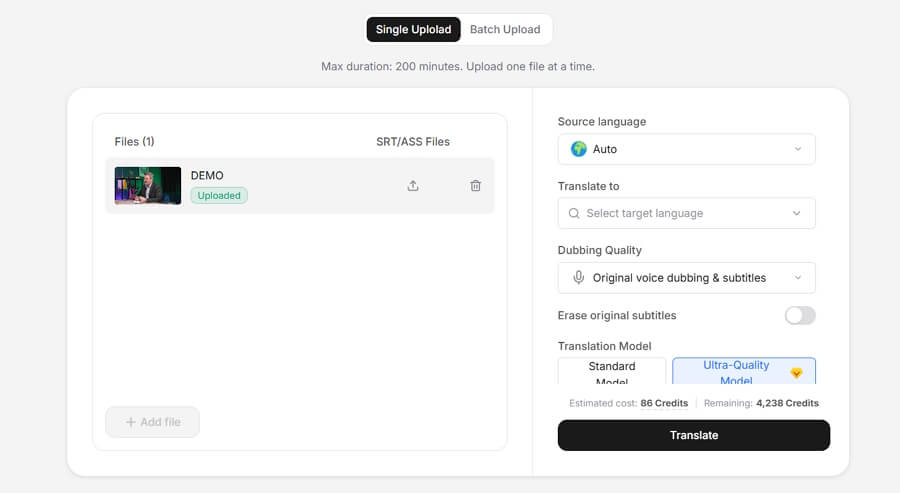
Choose your source language and pick your target destination language from the platform dropdown menu. Click Translate to Proceed.
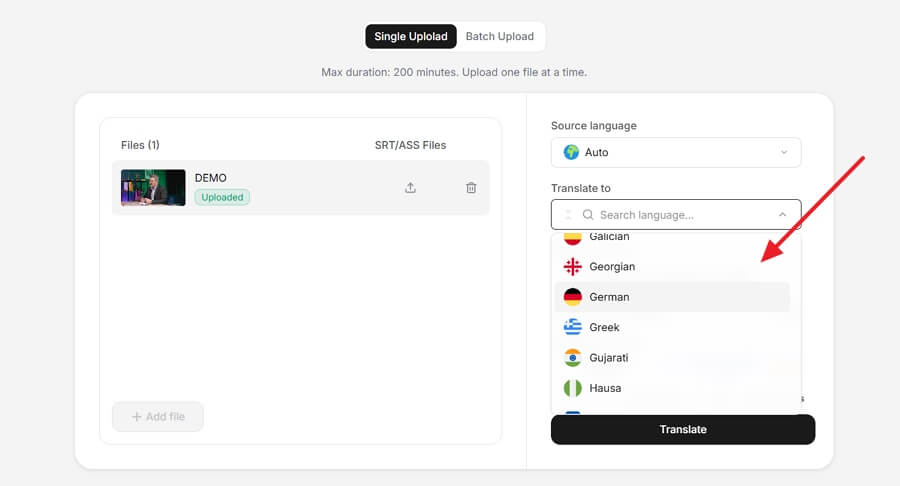
Standard platforms often force you to use stock synthetic voices. These sound generic and destroy your personal brand identity. For professional results, always use platforms like Vosko AI Video Dubbing that default to voice cloning. This ensures your translated video retains your exact vocal timbre, pitch, and emotional delivery.
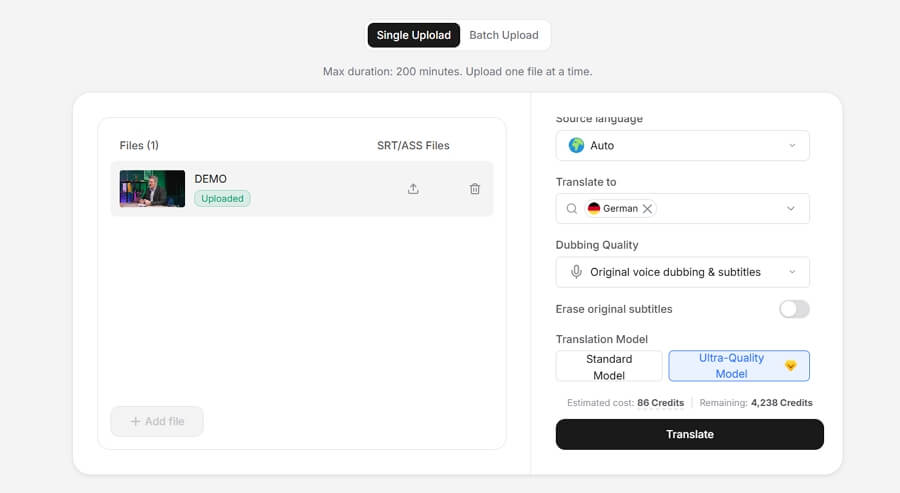
After selecting your target language and voice preferences, allow the AI engine a few moments to process the media file.
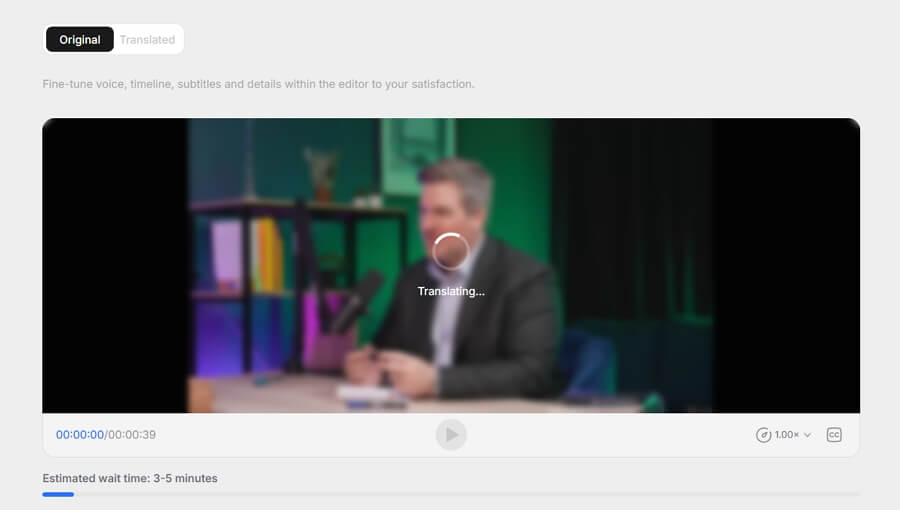
Once the initial translation and dubbing complete, simply click the Play button in your dashboard. This allows you to immediately preview the dubbed video and evaluate how natural the translated audio sounds against the original visuals.
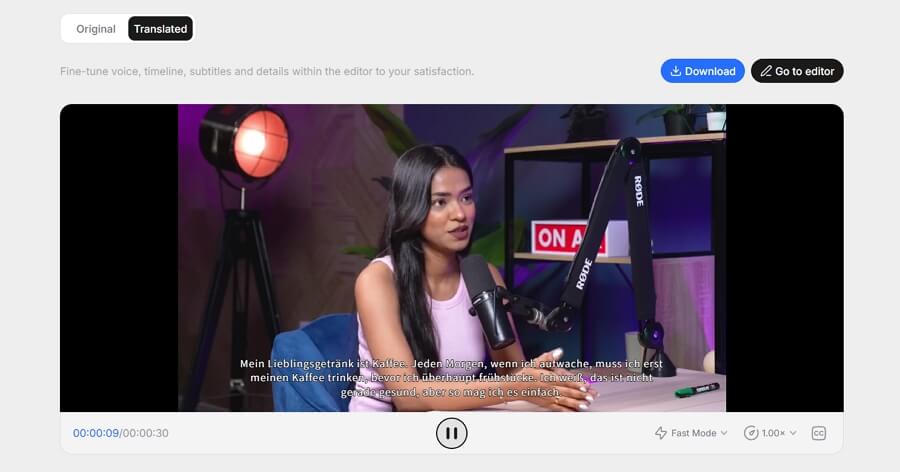
If you notice any inaccuracies during your initial preview, click the Go to editor button to open the interactive text workspace. The system automatically transcribes the spoken dialogue into editable text segments.
Fix any minor translation errors and apply strict translation rules for proper nouns, brand names, or technical jargon. This ensures complete cultural accuracy before you finalize the audio.
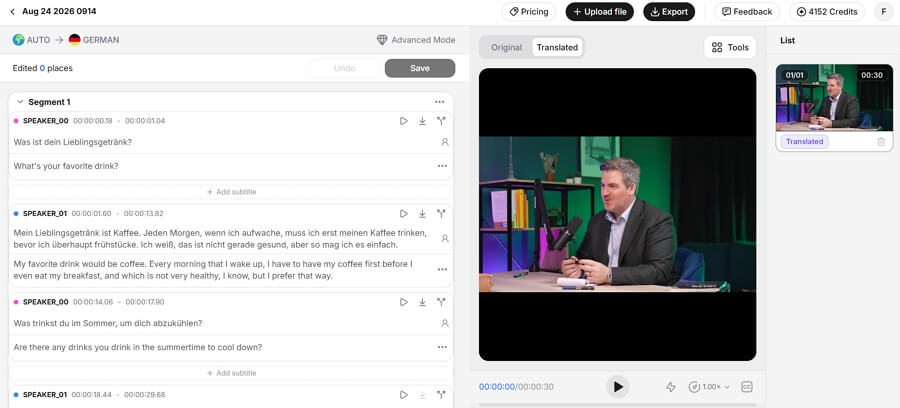
Workflow complexity varies drastically across different software tools. Many legacy video editors require you to manually toggle background stem isolation, adjust timeline audio levels, or hand align translated text to specific video frames.
Advanced platforms eliminate this friction. Tools like Vosko feature a fully automated pipeline. You do not need to manually configure complicated audio tracks. The engine automatically isolates background noise, applies dynamic time warping to fix syllable density issues, and matches translated audio pacing without any tedious manual tweaking.
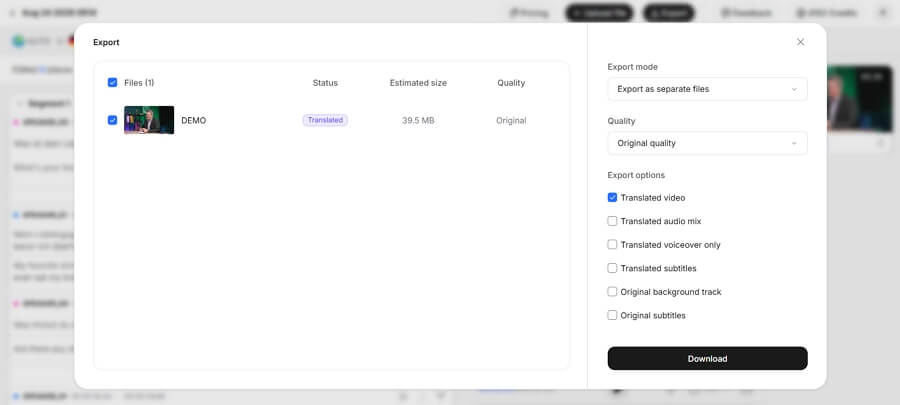
How you export depends entirely on your publishing strategy. You can download a completed MP4 file with the new audio baked in.
However, if you are uploading to major platforms, flexibility is critical. The YouTube multi language audio feature requires creators to upload separate audio files rather than re uploading a completely new video.
You must export isolated MP3 or WAV audio tracks to attach them directly inside YouTube Studio. Additionally, you can export standalone SRT files for viewers who prefer reading standard closed captions.
What are the best AI dubbing tools for US video creators right now?
Top tools include Vosko for voice cloning and automated time warping, ElevenLabs for emotional vocal fidelity, and Descript for text based audio editing.
How do I clone my own voice for AI video dubbing without losing its natural tone?
Choose a platform that uses zero shot acoustic cloning. The software analyzes your pitch contour and emotional inflections from your original audio to reproduce those exact vocal characteristics in the target language.
Which languages and English dialects do mainstream AI dubbing tools support?
Mainstream tools support over 99 global languages. This includes major regional dialects such as US English, UK English, Australian English, Mexican Spanish, and Brazilian Portuguese.
Can AI dubbing automatically detect multiple speakers and keep each voice distinct?
Yes. Advanced dubbing platforms including Vosko use speaker diarization to separate multiple voices in conversational videos. They assign a unique cloned voice to each individual speaker throughout the project.
When should I use AI dubbing instead of subtitles for YouTube localization?
Use AI dubbing when targeting mobile audiences or markets where video consumption happens on small screens. Dubbed audio creates significantly higher engagement rates and longer watch times compared to standard text subtitles.
Language is no longer a barrier to international growth. The tools required to translate video content accurately and authentically are now accessible, affordable, and incredibly fast.
A streamlined AI dubbing workflow preserves your unique brand voice and unlocks massive new demographics worldwide. Stop leaving international revenue on the table. Start localizing your content today.