Global enterprises face a quiet performance bottleneck: delivering consistent training across EMEA, APAC, and the Americas. Language barriers often undermine the effectiveness of corporate training, making it harder for employees to fully understand, engage with, and retain important information.
While they may grasp the general concepts, critical safety procedures, compliance requirements, and operational details can be easily overlooked, resulting in inconsistent learning outcomes across regions.
In the past, solving this meant booking studios for expensive human voice-overs or relying on clunky machine subtitles. Today, AI video localization allows you to scale global training without re-recording a single frame.
This guide covers the exact end-to-end workflow to localize your internal training videos efficiently, balance cultural nuances, maintain data compliance, and deploy localized content at true scale.
Before building your workflow, you must decide how to adapt the audio layer. Relying solely on subtitles creates high cognitive load—employees suffer from screen fatigue when forced to read fast-moving text while trying to absorb complex software demonstrations.
Here is how the three primary video localization strategies compare for enterprise scaling:
| Localization Strategy | Turnaround Time (Per Course) | Cost Structure | Audio Quality & Consistency | Learning Retention Rate |
|---|---|---|---|---|
| Manual Subtitling | 1–3 Days | Low | N/A (Original audio only) | Moderate (High cognitive load) |
| Traditional Studio Dubbing | 3–6 Weeks | Very High (Studio + Actor fees) | Variable (Different actors alter brand tone) | High |
| AI Dubbing | Minutes to Hours | Predictable SaaS Credit Model | Studio Quality (Preserves original voice) | High (Native viewing experience) |
For high-stakes training—such as safety compliance, leadership development, and HR onboarding—full AI dubbing is the superior choice to maximize ROI and learning retention.
The biggest mistake Learning & Development teams make is trying to localize their entire library at once. An unmaintained ten-language video library is far worse than a properly maintained two-language one.
Start by running a strict localization triage. Prioritize content where misunderstanding causes direct business harm:
Localization cost and speed are mostly determined before you even start translating. In the past, prepping a video meant hours of technical busywork—manually splitting audio tracks, exporting textless masters, and re-editing your footage to accommodate the 20 to 30 percent text expansion common in languages like German or Spanish.
You do not have to do that anymore. Modern AI solutions like Vosko video translator handle the technical prep automatically. The platform separates your background music, intelligently erases hardcoded subtitles, and utilizes Dynamic Time Stretching to seamlessly adjust the pacing of translated audio to fit your original visuals without altering the speaker's pitch.
Since the software handles the technical heavy lifting, your only job before uploading is to get your assets organized. When you process videos in bulk, version control gets messy fast. Apply a simple, consistent naming rule to your final video files (e.g., Compliance_Module1_V1.mp4) to keep your multi-language library organized.
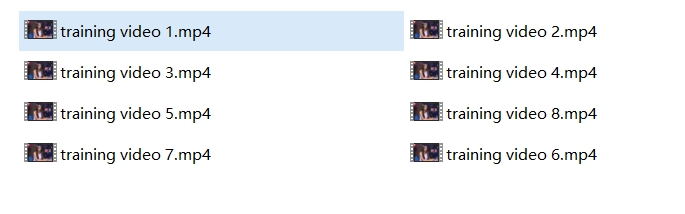
Once your files are organized, do not hit "translate" just yet. Translating a standard script is not the same as translating workplace training. Without guidance, an automatic translator might turn your proprietary software feature into a phrase your local team has never heard.
When you process videos at scale, a single terminology mistake multiplies quickly. To prevent this, build an account-wide glossary before you begin. Your glossary must include:
Processing one video into one language sequentially is not scalable for a corporate library. You need a workflow built for concurrent batch processing.
Technical Standard: Enterprise-grade tools leverage Speaker Diarization—an AI technology that automatically identifies and separates different speakers in a single audio track (e.g., an interview between a CEO and a host). This ensures the correct voice profile is applied to the correct person in the target language.
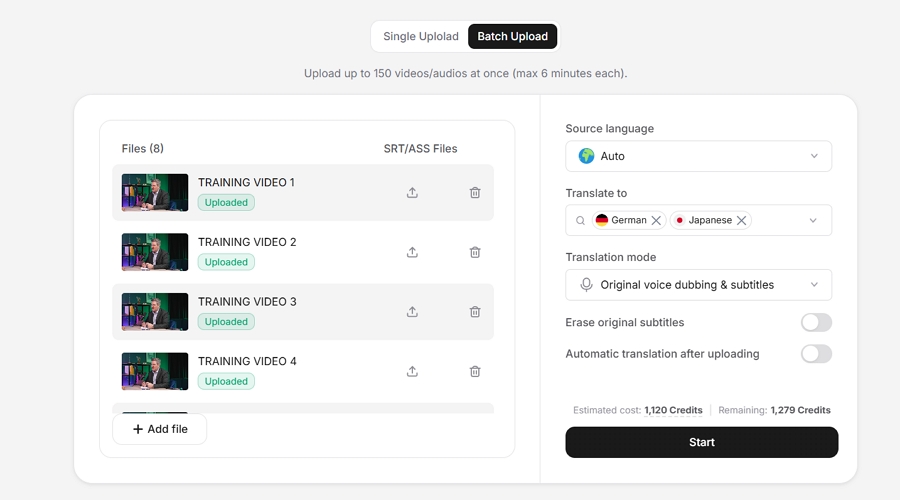
For instance, purpose-built localization platforms like Vosko AI are engineered around these exact technical standards. Instead of manual audio engineering, Vosko allows L&D teams to batch upload up to 150 training videos (under six minutes each) simultaneously. From a single source video, the system can generate localized versions into up to eight target languages at the exact same time.
By intelligently separating the vocal track, Vosko leaves your original background music untouched. It then applies authentic voice preservation, maintaining the original instructor's exact emotional delivery and pacing across all languages, delivering a natural, studio-quality finish without the studio price tag.
Putting this into practice is surprisingly simple. Here is how you start the localization process:
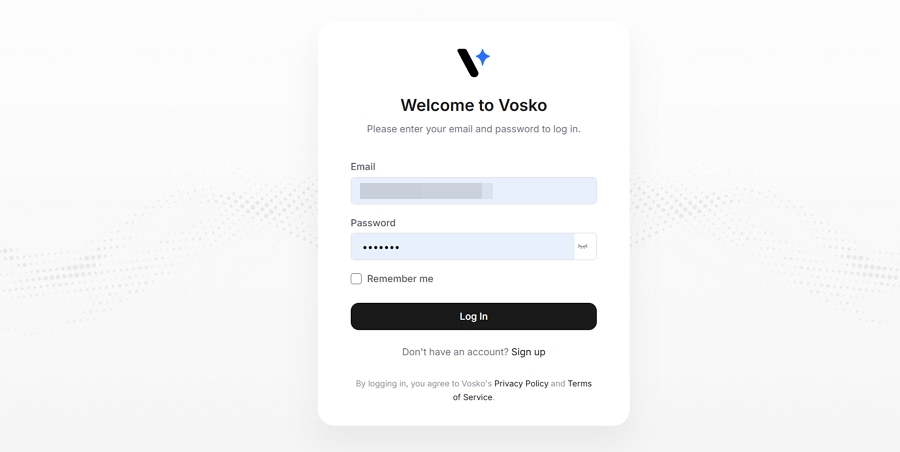
1. Create a free Vosko AI account to access the main dashboard. Vosko automatically provisions 200 free credits upon sign-up, allowing you to run a risk-free test on a short video before committing.
2. Drag and drop your training videos into Vosko. Select your target languages and click Start to let Vosko AI instantly translate your training videos.
AI translation quality varies by language group. European languages (Spanish, French, German) usually only require a light polish. However, languages like Japanese, Korean, or Arabic require heavy human review due to strict rules regarding honorifics and sentence flow.
The biggest QA mistake is handing the review solely to a linguist. Linguists catch grammar errors; the actual employees doing the job catch the terminology errors.
To solve this friction, platforms like Vosko provide a built-in inline script editor. Your regional Subject Matter Experts — such as a warehouse manager in Munich or a support lead in Tokyo—can review the script in real-time. Here is how you finalize the process in Vosko AI:
3. Listen to the localized video in real-time using the video player.
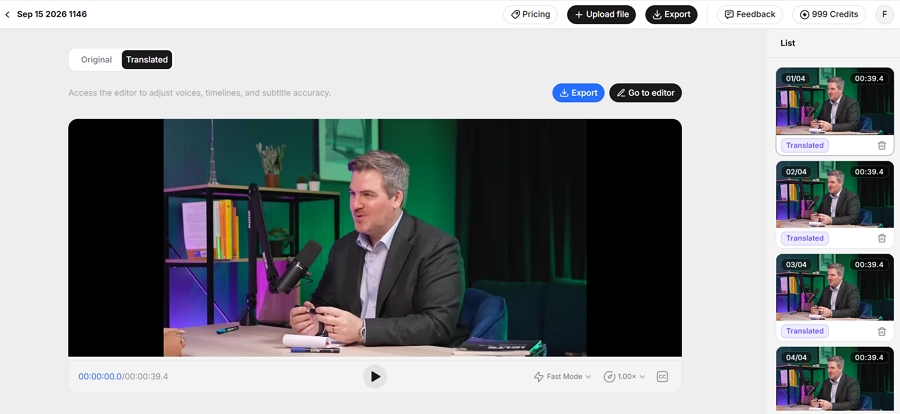
4. If a localized term feels unnatural for their specific workplace, your SME can simply adjust the text in the editor by clicking Go to editor button and regenerate that specific audio segment instantly, skipping the need to re-record the entire video.
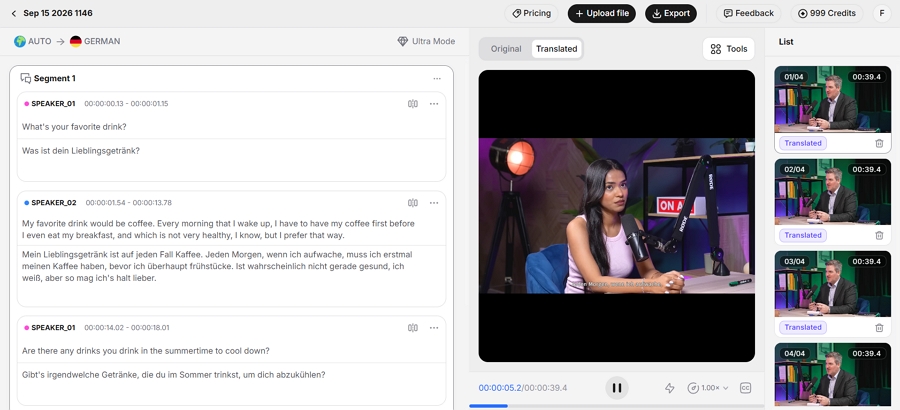
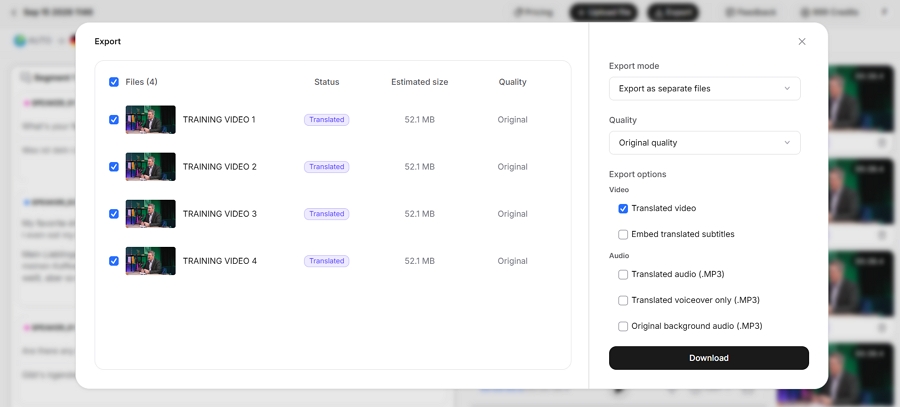
5. Once approved, hit export. You can download fully dubbed MP4 videos, standalone audio tracks, or ADA-compliant ASS subtitles ready for direct upload to your LMS.
Before you distribute the localized training videos to your global team, you must clear two final hurdles: legal compliance and system integration.
First, corporate training often contains highly confidential proprietary data. When using AI voice technology, your vendor must meet strict enterprise privacy standards and upcoming regulations, such as the 2026 EU AI Act, which requires clear transparency for AI-generated content.
Once your compliance is verified, you need to prep your finalized assets for your Learning Management System (LMS), such as Docebo or SAP Litmos. Here is your pre-launch checklist:
You no longer have to choose between speed, budget, and learning quality. By upgrading to a modern localization workflow, you can translate entire training libraries at once, keep your background audio intact, and ensure your instructors sound just as authoritative in German or Japanese as they do in English.
Stop letting language barriers slow down your workforce readiness. Build your terminology glossary, empower your regional SMEs with Vosko's inline editor, and deliver native-quality training your global team actually wants to watch.
Ready to see it in action? Sign up today to claim your 200 free credits and localize your first training module in minutes.
What is the best workflow for localizing training videos at scale?
Start by triaging your content for legal and safety priorities. Prepare textless video masters and build a pronunciation-aware glossary. Use a high-volume AI dubbing platform to batch process the videos, preserve the original instructor tone, and finalize the context using an in-country SME via an inline script editor.
Should I use subtitles only or full AI dubbing for employee training?
Use subtitles for fast, low-budget technical updates. However, for critical compliance and onboarding training, we strongly recommend full AI dubbing. Listening to localized audio reduces cognitive load and significantly improves learning retention compared to reading text.
How does AI handle the text expansion issue in languages like German or Spanish?
Languages can expand by up to 30 percent when translated from English. Advanced platforms like Vosko utilize smart subtitle synchronization to dynamically adjust the pacing of the translated audio and text, ensuring it fits the original video naturally without requiring you to manually re-edit the visual footage.
How do I review localized training videos for accuracy before publishing?
Do not rely exclusively on linguists. Have native-speaking Subject Matter Experts (SMEs) review the context using an inline script editor before rendering the final audio. This allows the people actually doing the job to fix legal terminology, product names, and cultural nuances instantly.
How does AI preserve the original video quality during translation?
Premium platforms like Vosko intelligently separate the vocal track from the audio mix. This allows the AI to translate and dub the spoken words while leaving the original background music and sound effects completely untouched, delivering a natural, studio-quality finish.